14
5.2 Spin Process Screen
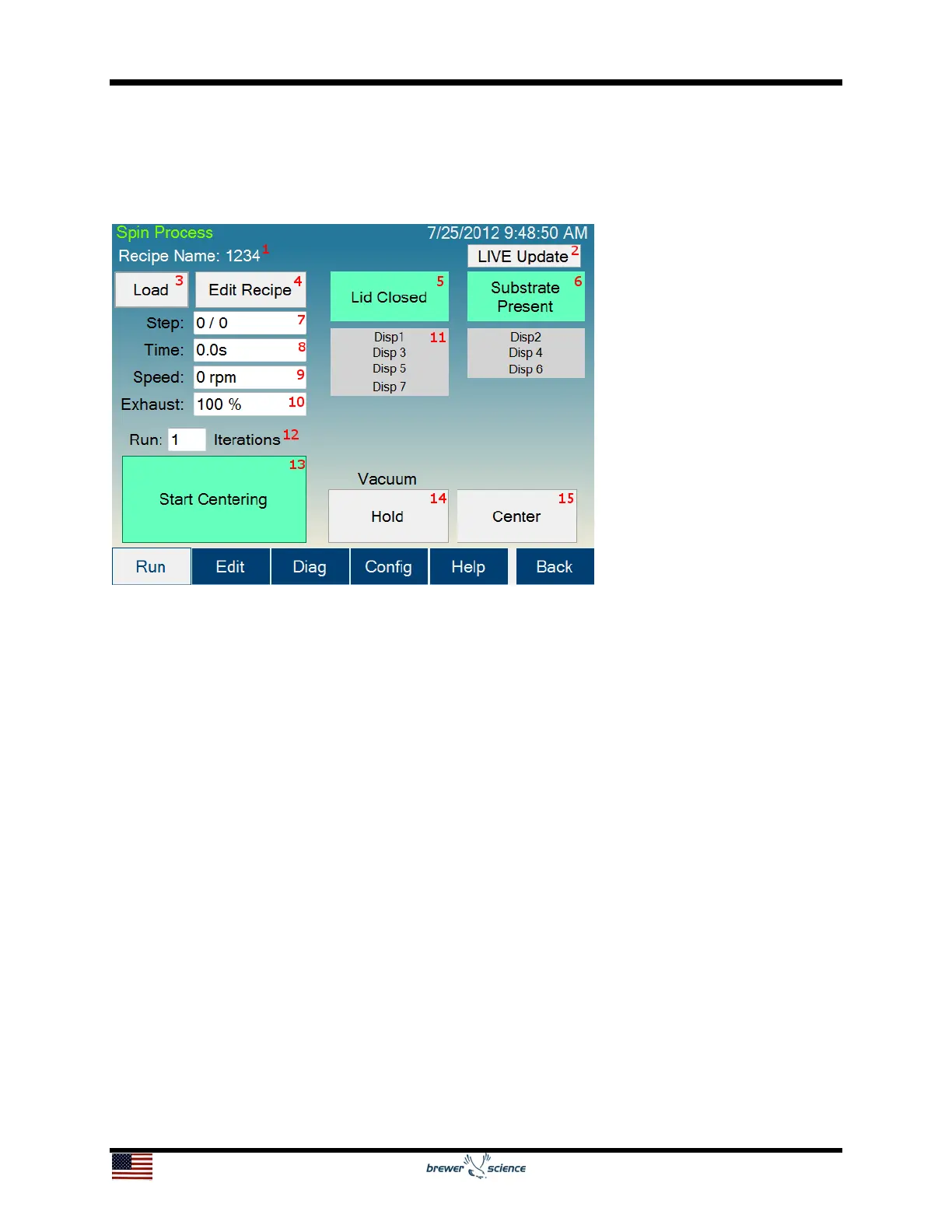
The Spin Process screen is used to run and monitor spin-coating processes using the
Cee
®
200X tool’s software.
The controls and indicators found on the Spin Process screen are listed below:
1. Recipe Name: The name of the currently loaded recipe.
2. LIVE Update button: Allows the user to update the process that is currently
running. This button is activated only during a running process. More information on
LIVE Update is available in the LIVE Update section, section 5.7. LIVE Update is not
available on all models.
3. Load button: Navigates to the recipe selection screen (section 5.2.1) to select the
process settings.
4. Edit Recipe button: Navigates to the Spin Process editor if a recipe is loaded. If a
recipe is not loaded, it will navigate to the recipe selection screen (section 5.2.1).
5. Lid Closed indicator: Shows the current state of the Lid Closed sensor.
6. Substrate Present indicator: Shows the state of the Spin Chuck Vacuum sensor.
7. Step indicator: Shows the current step of the process.
8. Time indicator: Shows the time remaining on the current process step.
9. Speed indicator: Shows the current speed of the spindle.


 To Next Page