27
5.4.1 Spin Diagnostics Screen
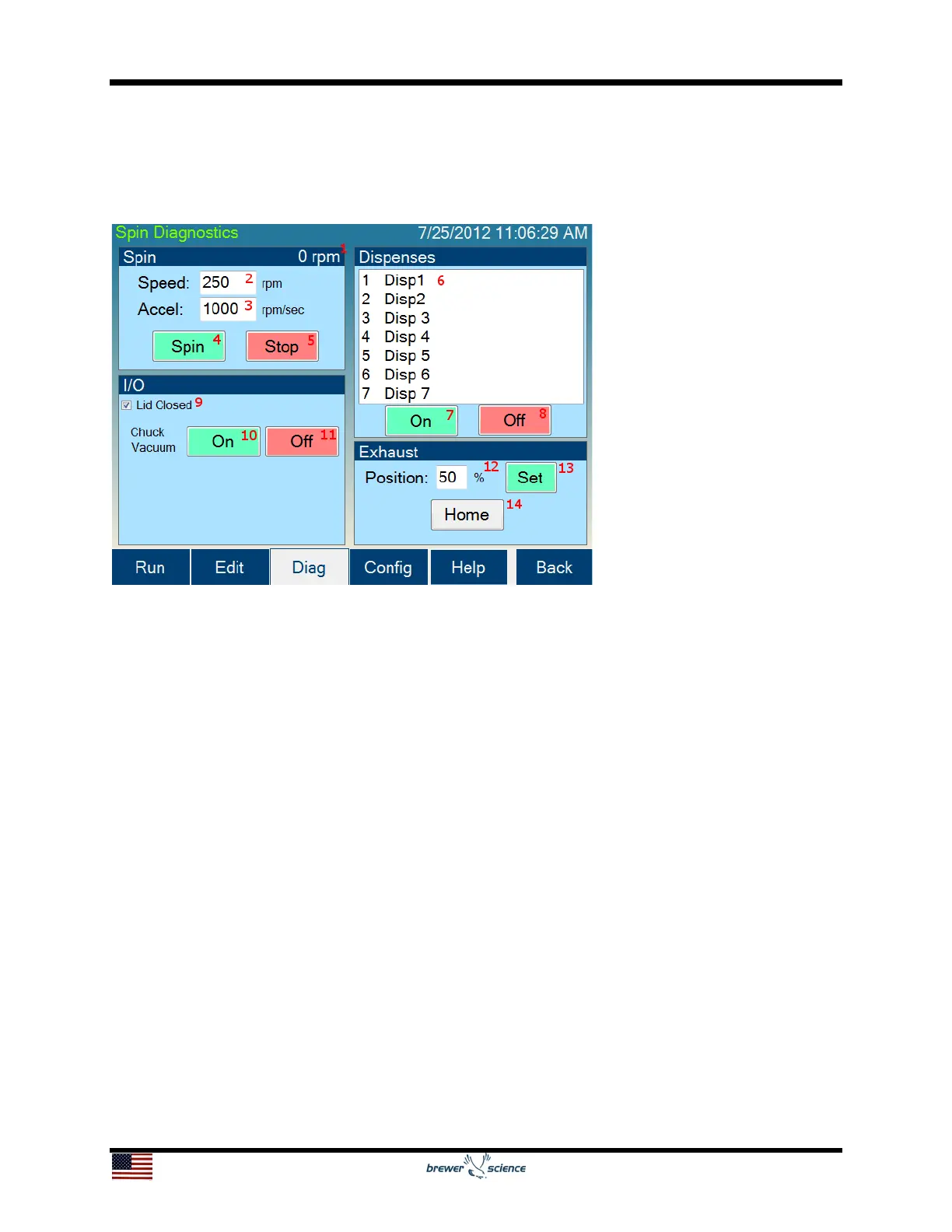
The Spin Diagnostics screen allows manual operation of most of the hardware on the
Cee
®
200X tool.
The controls and indicators found on the Spin Diagnostics screen are listed below:
1. Spin speed (velocity) display: Displays the current spin chuck speed (velocity).
2. Speed box: By pressing in this box, a numeric pad will appear to allow entry of the
desired spin speed.
3. Accel box: By pressing in this box, a numeric pad will appear to allow entry of the
desired ramp acceleration.
4. Spin button: Starts the spindle spinning using the entered velocity and acceleration.
5. Stop button: Stops the spindle.
6. Dispense selector: Pressing the desired dispense name will select and highlight it.
7. Dispense On button: Turns on the selected dispense.
8. Dispense Off button: Turns off the selected dispense.
9. Lid Closed check box: Displays the status of the lid closed sensor.
10. Chuck Vacuum On button: Turns on vacuum at the spin chuck.
11. Chuck Vacuum Off button: Turns off vacuum at the spin chuck.


 To Next Page