26
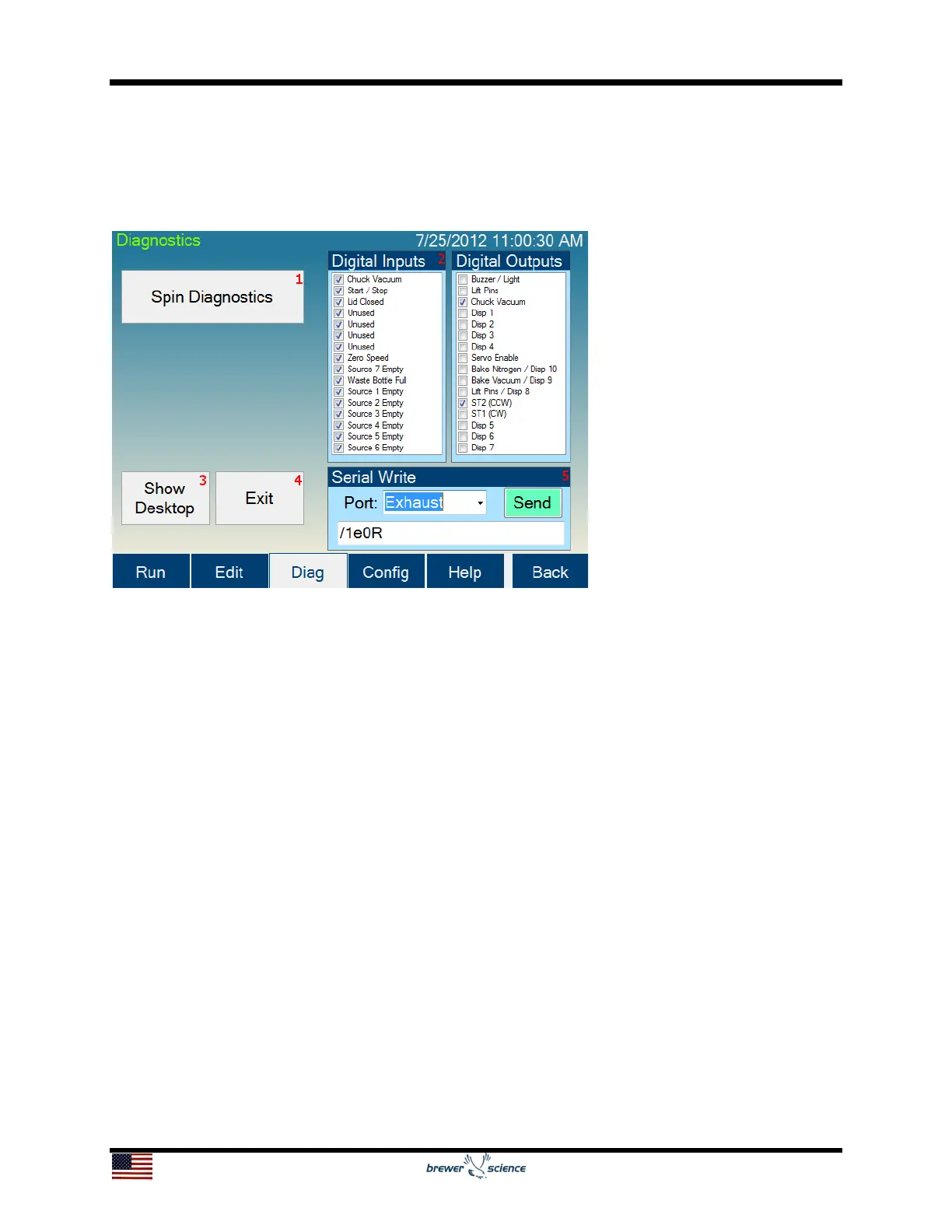
5.4 Diagnostics Screen
The Diagnostics screen allows manual operation of most of the hardware on the
Cee
®
200X tool.
The controls and indicators found on the Diagnostics screen are listed below:
1. Spin Diagnostics button: Navigates to the Spin Diagnostics screen.
2. Digital Inputs, Digital Outputs: Panels showing the current state for all of the
digital inputs/outputs (I/O) for the entire system.
3. Show Desktop button: Minimizes the Cee
®
200X tool control software, which
allows display of the Windows
®
desktop.
4. Exit button: Exits the Cee
®
200X tool software.
5. Serial Write section: Allows for hardware writes to the serial ports of the Cee
®
200X tool control system. This box is intended for use by Brewer Science
personnel only.


 To Next Page