29
5.5 User Configuration Screen
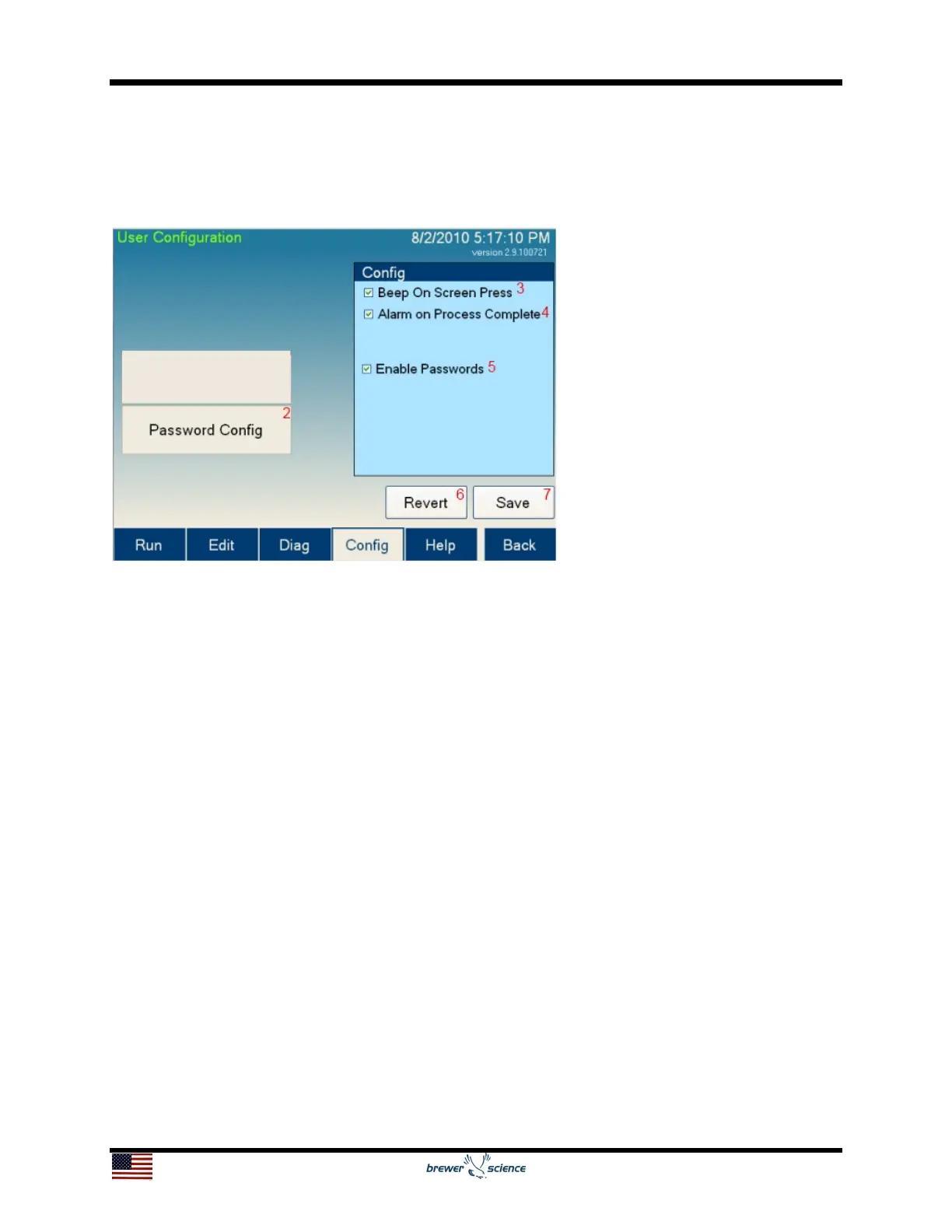
The User Configuration screen allows the user to set parameters for the Cee
®
200X tool
operation. Not all parameters are available to all user levels.
The controls and indicators found on the User Configuration screen are listed below:
1. Spin Configuration button: Navigates to the Spin Configuration Screen.
2. Password Configuration button: Navigates to the
Password Configuration Screen.
3. Beep On Screen Press: If this setting is checked, the screen will sound a slight
beep whenever a control is pressed. This feature is designed to give feedback while
using the Cee
®
200X tool.
4. Alarm on Process Complete: If this setting is checked, the tool will sound an alarm
when a process is completed.
5. Enable Passwords: If this setting is checked, the tool will require a password to
start. Using passwords also allows different users of different levels to access limited
portions of the Cee
®
200X tool’s software. If passwords are not enabled, the Cee
®
200X tool automatically logs in as a Super User. For information on logging in to the
Cee
®
200X tool’s software, see the Run screen.
6. Revert button: If changes made to the settings on this screen are not desired,
pressing this button will revert back to saved settings.
7. Save button: Saves all parameters on the screen.


 To Next Page