3-7
Presets:
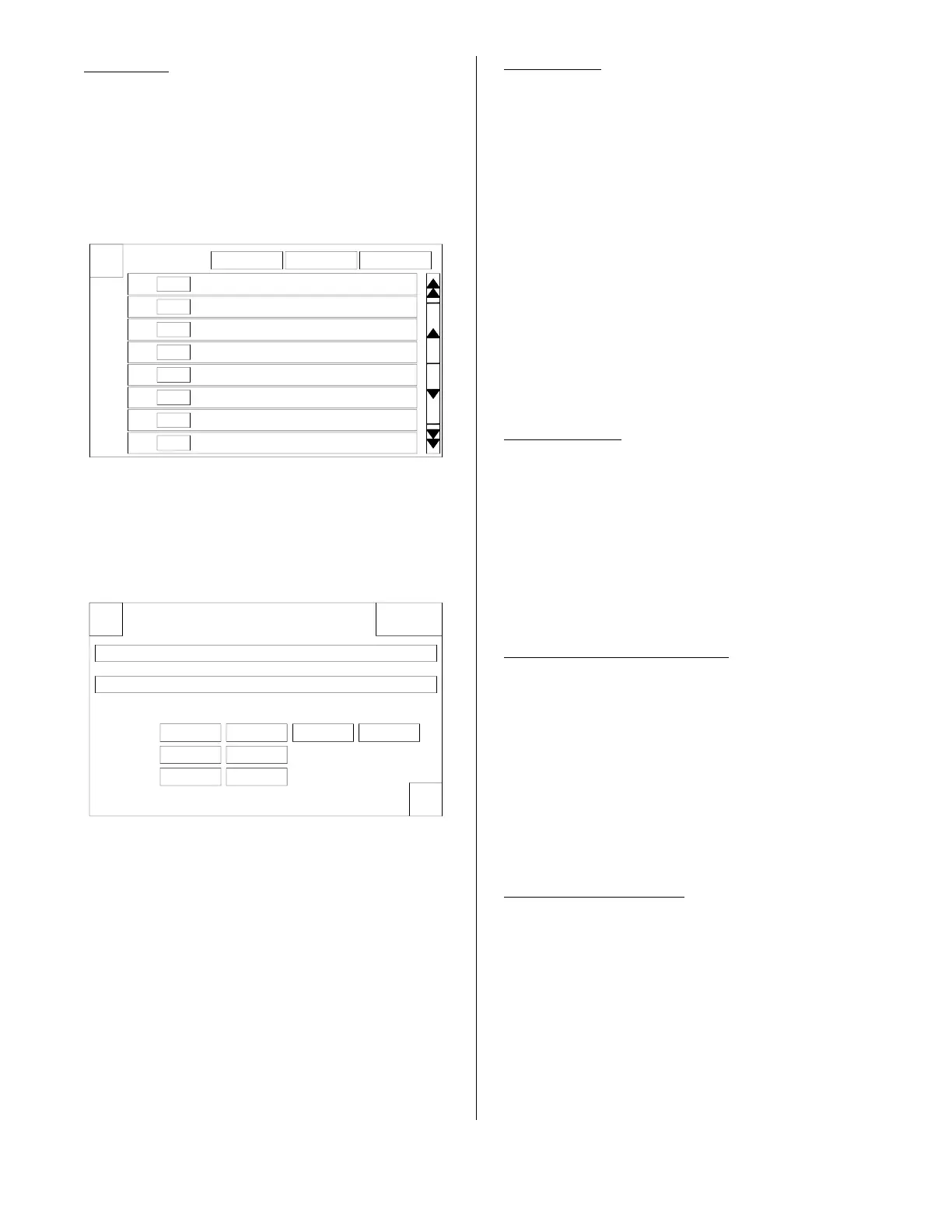
Pressing this option opens a list of products
with a picture of the product and the cook
time and cook temperature pre-loaded.
This is where the product preset is either
shown or not shown as a preset on the
Cook Tab.
By default all products will be shown. To
turn any product off, press the item once
and the Edit/Create Preset display will
appear.
Here you can edit the name of the product,
change its position on the list, set the cook
time and temperature, set Auto Comp to be
on or off during the cooking cycle and
whether or not this item should be active as
a preset on the Cook Tab.
Creating a new product or deleting a prod-
uct on the list will be described later.
Name Edit:
To edit the name of the current product
press the Edit / Enter Preset Name bar and
a typewriter keyboard will appear. The
curser will be at the end of the name. To
change the name press the BACK button
and the cursor will delete the name one let-
ter each time the BACK button is pressed.
Delete the letters until you get to the place
where you want to start making the change.
To get the numbers and symbols to come
up press the Symbol key.
When you have completed entering the
changed name press the ENTER key.
Position Edit:
To change the position of this item on the
menu list, press the Edit / Enter Preset
Number bar and a number pad will appear.
Enter the number of the position you want
this item to appear then press the ENTER
key. The product will be inserted at the
position you have selected and all items
after it will be renumbered.
Time & Temperature Edit:
There are 3 stages shown. Most of the
cooking will be done on stage 1. To edit this
feature press the button and a number pad
will appear. Enter the desired cooking tem-
perature or time and press the ENTER but-
ton. If a number is entered and the ENTER
button is not pressed within 30 seconds the
number pad will disappear and no changes
will be made.
Auto Comp On / Off:
This button toggles Auto Comp on or off.
X
Select Preset or Add New Load Menu Export Menu
# 1
# 2
# 3
# 4
# 5
# 6
# 7
# 8
Chicken 8pc Mixed FRESH
Chicken Popcorn Cajun IQF
Chicken Popcorn Regular IQF
Chicken Tenders Home Style IQF
Chicken Tenders Regular IQF
Burrito Bean'n Beef IQF
Burrito Breakfast IQF
Burrito Pizza IQF
X
OK
DeleteEdit / Create Preset
Edit / Enter Preset Name: Chicken Popcorn Cajun IQF
Edit / Enter Preset Number: 02
Stage Temperature Time Comp On / Off Active
360F1 05:00 On Yes
000F2 00:00
3 00:00000F
broaster.com Manual #17270 10/13 Rev 12/14



 To Next Page