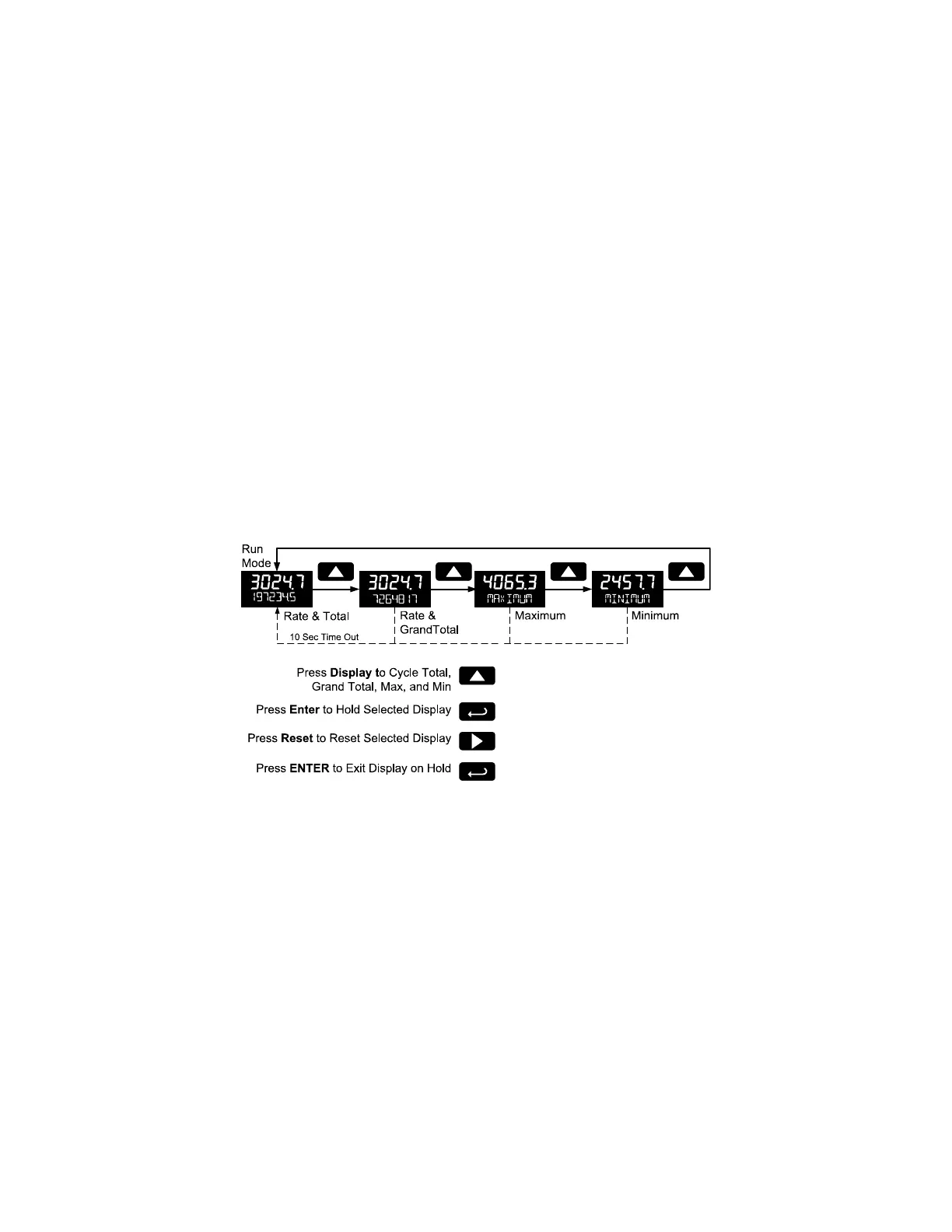
Grand Total Reading (GrTOTAL)
The grand total is a separate total that is not reset when the total is reset. This allows the complete total
to be tracked by the grand total, while individual batch, or daily totals are reset regularly.
To display the grand total, press the Up/Display button. The display will read GRTOTAL, and the GT
symbol will appear indicating the grand total is being displayed on the bottom display. After 10 seconds,
the bottom display will return to showing total. To lock the grand total on the display, press Enter.
Pressing Menu at any time will return to normal run mode.
Note: If the Display menu has been setup to display the grand total on the bottom display, pressing the
Up/Display button will display the maximum and minimum readings followed by the total.
Max/Min Readings (MAXIMUM, MINIMUM)
The maximum and minimum (peak & valley) readings reached by the rate are stored in the meter since
the last reset or power-up. The meter shows MAXIMUM or MINIMUM to differentiate between run mode
and max/min display.
To display the maximum and minimum readings use Up/Display button to cycle the bottom display.
Maximum and minimum are displayed after the grand total.
Press the Enter button to remain in Max/Min display mode. If Enter is not pressed, the Max/Min display
readings will time out after ten seconds. The meter will return to display the actual reading. Pressing
Menu at any time will return to normal run mode.
Resetting the Total (RESET TOTAL?)
If manual Total Reset is enabled in the Program menu, the total may be reset by pressing the Reset
button and using the Enter button to confirm the reset.
Additionally if programmed for manual reset, the total may be reset using a normally open pushbutton
connected across the terminals RST and COM.
Note: The total is cleared immediately when Enter button is pressed. Totalization will then continue, even
if the Enter button or external reset button continues to be held down/triggered.
Resetting the Grand Total (RESET GrTOT?)
If manual Grand Total Reset is enabled in the Program menu, the grand total may be reset using the
Reset button.
To reset the grand total, display the grand total by pressing the Up/Display button. While grand total is
being displayed, press the Reset button. Confirm the reset with the Enter button.



 To Next Page