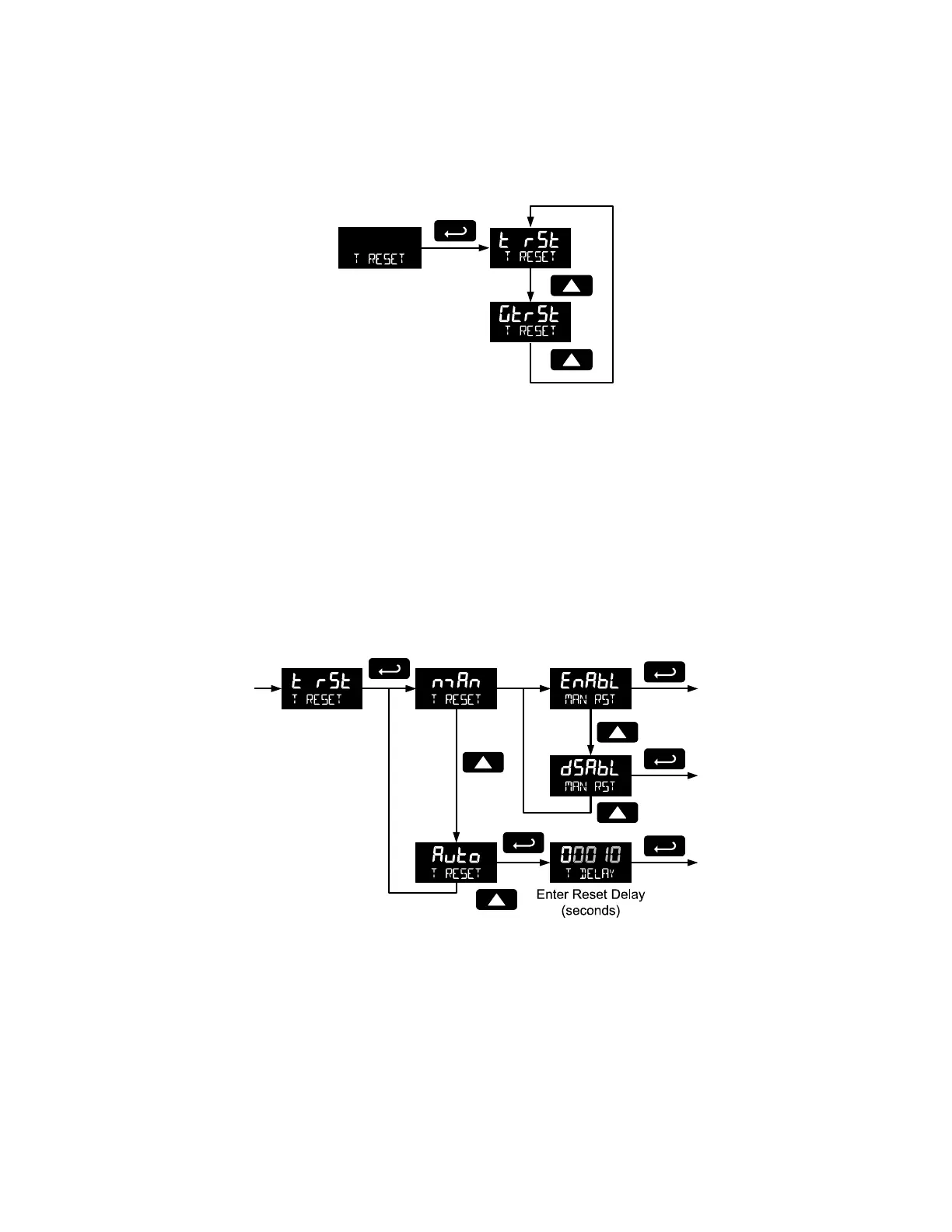
Total Reset (T Reset)
This menu is used to select the ways the total and grand total may be reset.
Manual or Automatic Total Reset Function (t rST)
For manual reset, select T RESET t rst man and then select whether manual reset will be
enabled (Enabl) or disabled (dsabl) using the Up arrow key. Press the Enter button to accept. Disabling
reset will avoid inadvertent resets of the total via the front reset button or external reset contact.
For automatic reset, select T RESET t rst Auto T DELAY and enter reset delay time in
seconds. Once the output alarm total set point is reached, the meter waits for a programmed amount of
time (T DELAY) and then resets the total to zero.
Press the Enter button, at any time, to accept a setting; otherwise press the Menu button to exit without
saving changes.
Total Alarm Time
The T DELAY parameter is used by the NPN open collector outputs when they are programmed as total
alarms. If total reset (t rst) is programmed to Auto the time delay (T DELAY) is the length of the
associated Out 1 or Out 2 total alarm prior to the total being reset to 0.
For information on programming the NPN open collector pulse outputs as total alarms, see Alarm Output
programming on page 48.



 To Next Page