View Data Log (LOGVIEW)
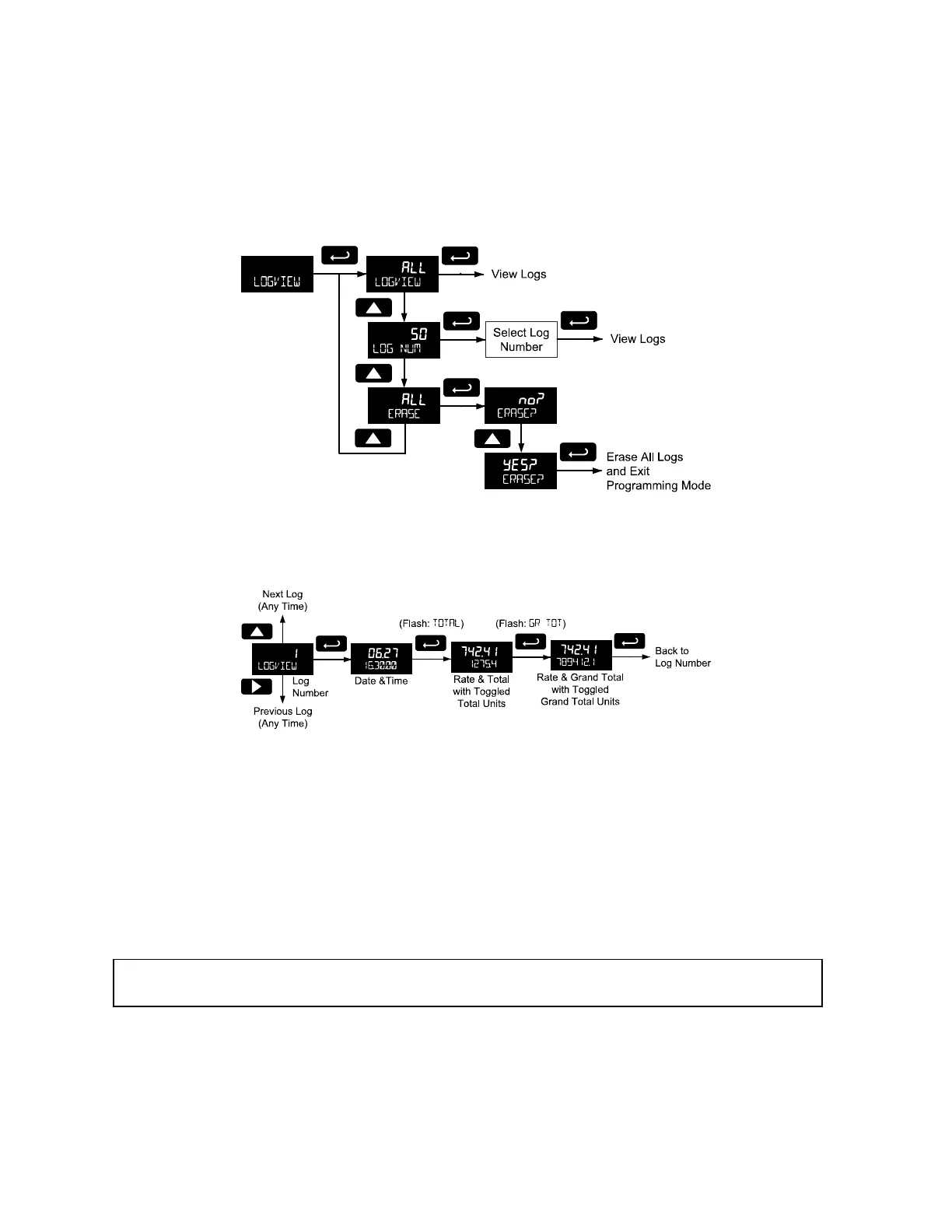
The Log View menu allows on-screen browsing of the data log points stored in the meter. Data points
may be navigated by viewing the log number, date and time, total, or grand total amounts. A known log
may be jumped to immediately, avoiding a lengthy search for data. All logs may be deleted with the
ERASE command, requiring confirmation.
Once the log records are displayed, use the Up and Right arrows to change the log entry being viewed.
The Enter key changes the displayed information for the same log.
Backlight (BAKLITE)
The Backlight menu is used to enable or disable the backlight. This feature is particularly important for the
battery-powered models with momentary backlight. This feature is not available for models with a loop
output powered backlight.
Analog Output Calibration (AO CAL)
This feature is only used at the factory for diagnostic purposes. It is not recommended to access this
menu without instruction from technical support.
Backup & Restore (BACKUP)
The features are used to save and restore programmed settings. Programming can be restored to a
known saved good configuration, or to factory defaults. This is useful to restore meters whose
programming has been altered in unknown ways, or to quickly restore known good settings if mistakes
are made during reprogramming.
The meter saves all parameter settings and no reprogramming is necessary when power is lost and restored to the meter.
The total and grand totals are saved during a power loss. Only the maximum and minimum displays are reset when power is
lost.



 To Next Page