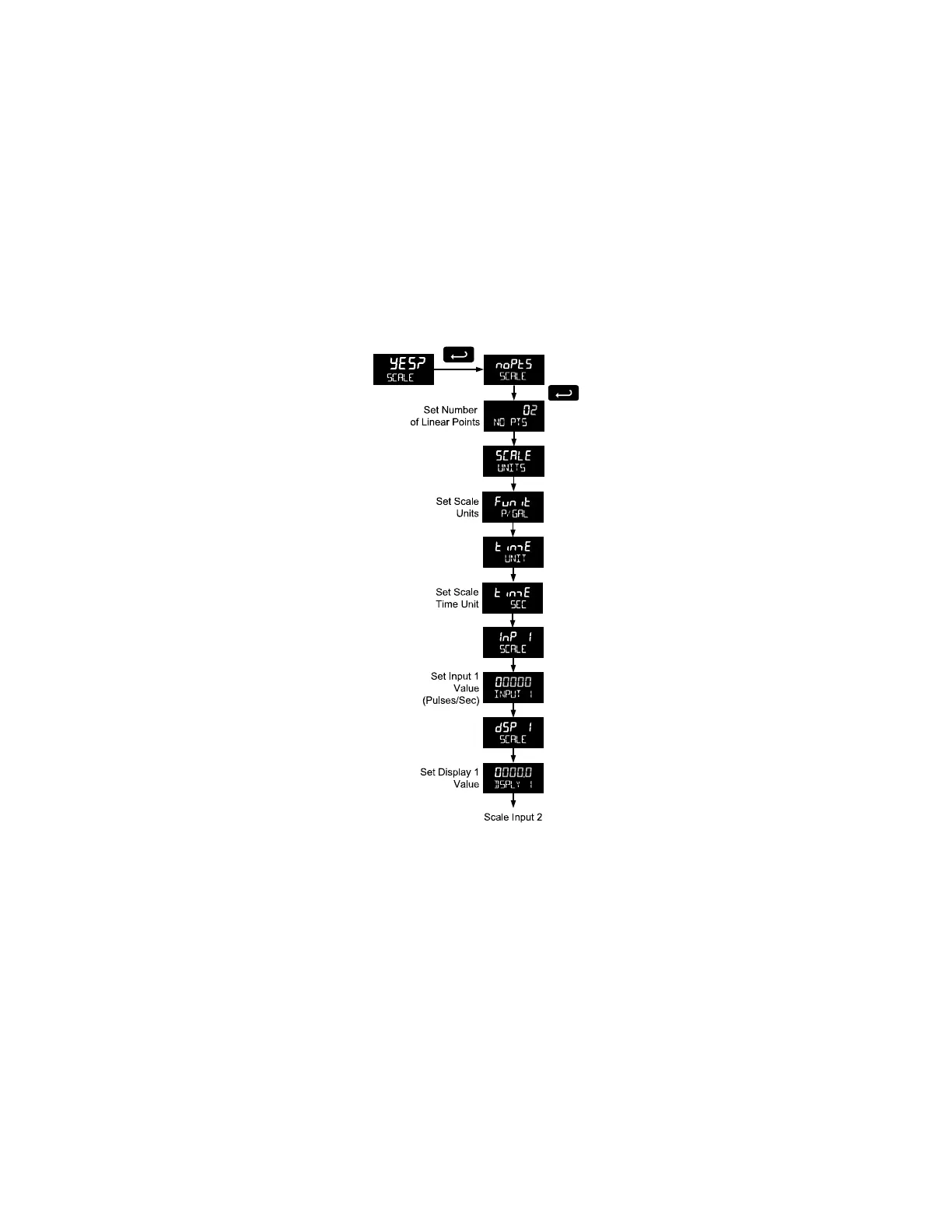
Scaling the Meter (SCale)
The pulse input can be scaled to display the process variable in engineering units.
A signal source is not needed to scale the meter; simply program the inputs and corresponding display
values.
A programmed scaled input will work with Automatic Unit Conversions as described on page 34. The
units for the display values that must be entered are a combination of the programmed Rate Unit and the
time unit (Time UNIT) entered in the Scale menu.
For example, if the Rate Unit is gallons, and the time unit (Time UNIT) is seconds, the units for the
display values entered in the Scale menu are gallons/second.
For instructions on how to program numeric values see page 19.
Multi-Point Linearization (nopts)
Up to 32 linearization points can be selected under the nopts function. The multi-point linearization can be
used to linearize the display for non-linear inputs.
Number of Points (nopts)
Enter number of linearization points. The default value is 2 points. For linear inputs requiring only 2 scale
points, the number of points can be left at 2.
Scale Units (SCALE UNITS)
Enter the units associated with the desired scale values. Selecting the scale display units allows the
meter to perform automatic unit conversions.



 To Next Page