Introduction
1 - 6
1
6
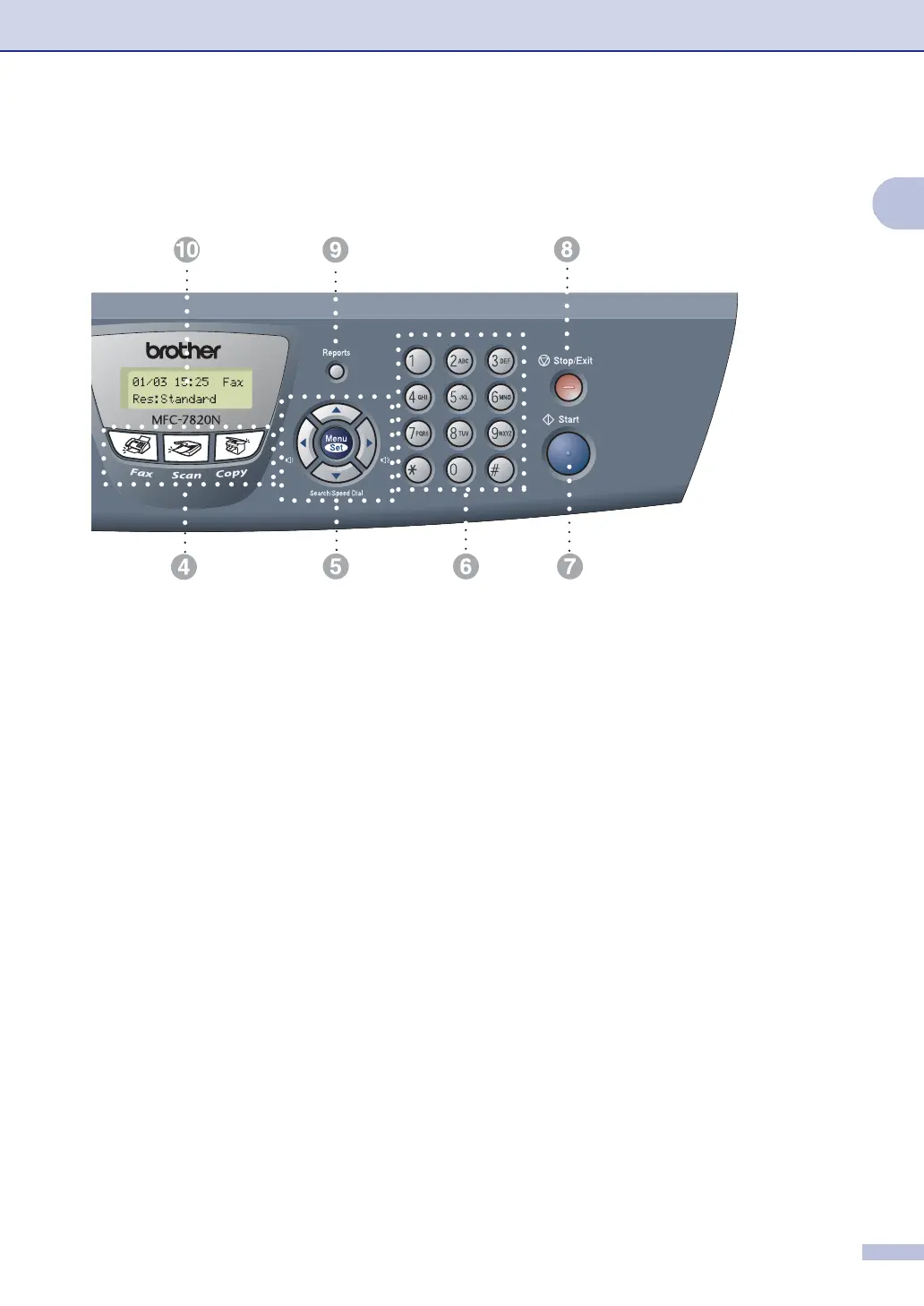
Dial Pad
Use these keys to dial telephone or fax
numbers and as a keyboard for entering
information into the machine.
The # key lets you temporarily switch the
dialling mode during a telephone call from
Pulse to Tone (not available in New
Zealand).
7
Start
Lets you start sending faxes or make copies.
8
Stop/Exit
Stops an operation or exits from the menu.
9
Reports
Print the Transmission Verification Report,
Help List, Quick-Dial List, Fax Journal, User
Settings, Order Form and Network
Configuration*. (*MFC-7820N only).
@
Liquid Crystal Display (LCD)
Displays messages on the screen to help you
set up and use your machine.
A
Copy keys (Temporary settings):
Enlarge/Reduce
Lets you reduce or enlarge copies depending
upon the ratio you select.
Options
You can quickly and easily select temporary
settings for copying.
B
Printer key:
Job Cancel
You can cancel a print job and clear the
printer memory.



 To Next Page
 Loading...