Home > Troubleshooting > Error and Maintenance Indications
Error and Maintenance Indications
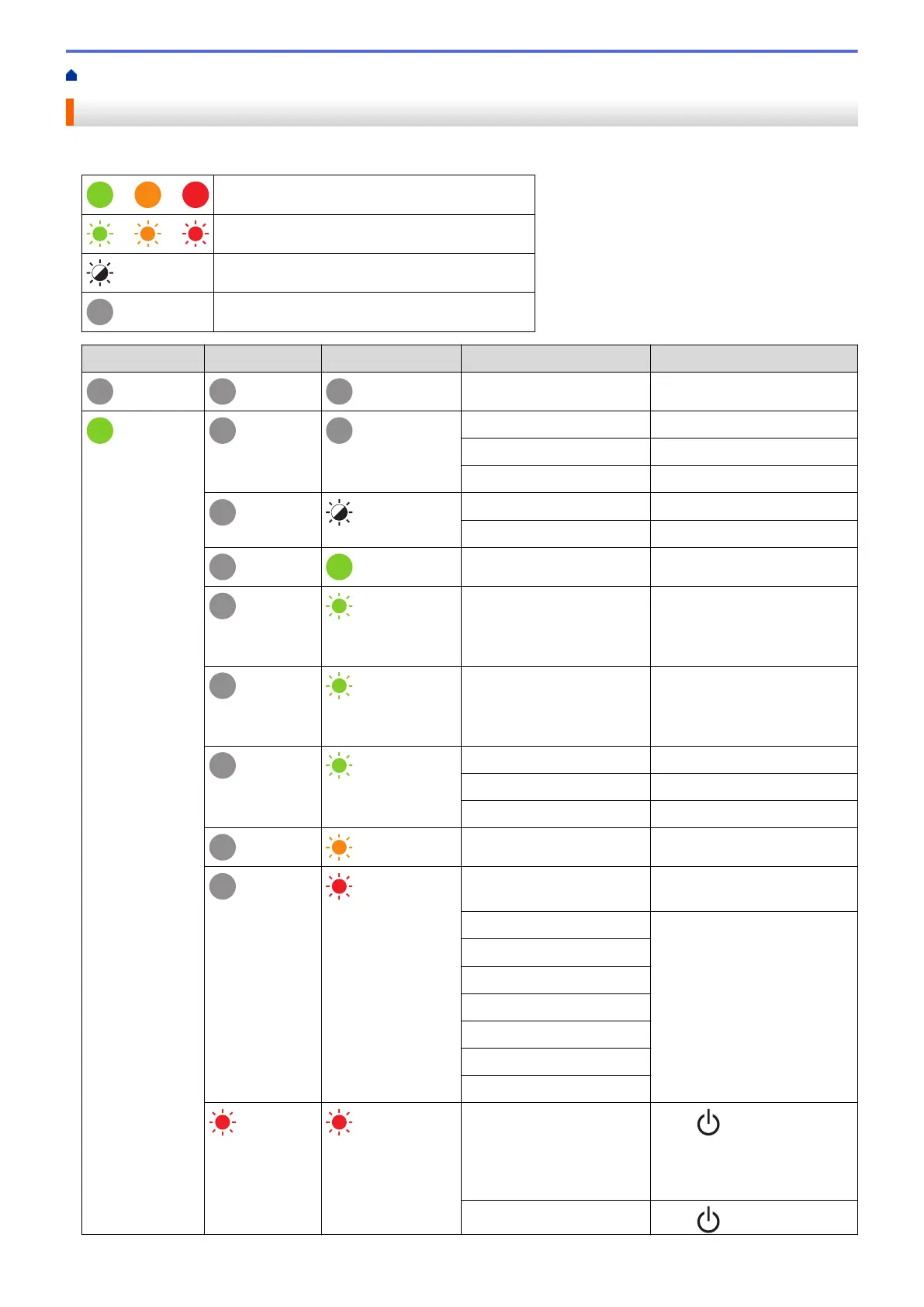
The indicators light and flash to indicate the printer's status.
or or
Indicator is lit in the colour shown.
or or
Indicator is flashing in the colour shown.
Indicator can be off, lit, or flashing in any colour.
Indicator is off.
Power LED Roll LED Status LED Condition Action
Power is off -
Feeding mode -
Printing mode -
Cutting mode -
Idle mode -
Mass storage mode -
Detecting the paper size -
(Once for 3
seconds)
Printing is paused -
(Once for 2
seconds)
Receiving data -
(Once for 1 second)
Cancelling the print job -
Print preparation mode -
Downloading mode -
Cooling mode -
Cover open error Close the Roll Compartment
Cover until it locks into place.
BLF file error Press any button to clear the
error.
Communication error
Database search error
No template error
Memory full error
ESC/P Memory full error
JPEG file error
Roll end error
Press to clear the error.
Insert a roll that matches the
paper setting and has
sufficient paper remaining.
Feed error
Press to clear the error.
103



 To Next Page
 Loading...





