Presser
Foot
A
/
1
You will find various kinds of presser feet
for special use in the extension table.
Accord~ng to your sewing needs, it may be
necessary to change presser foot.
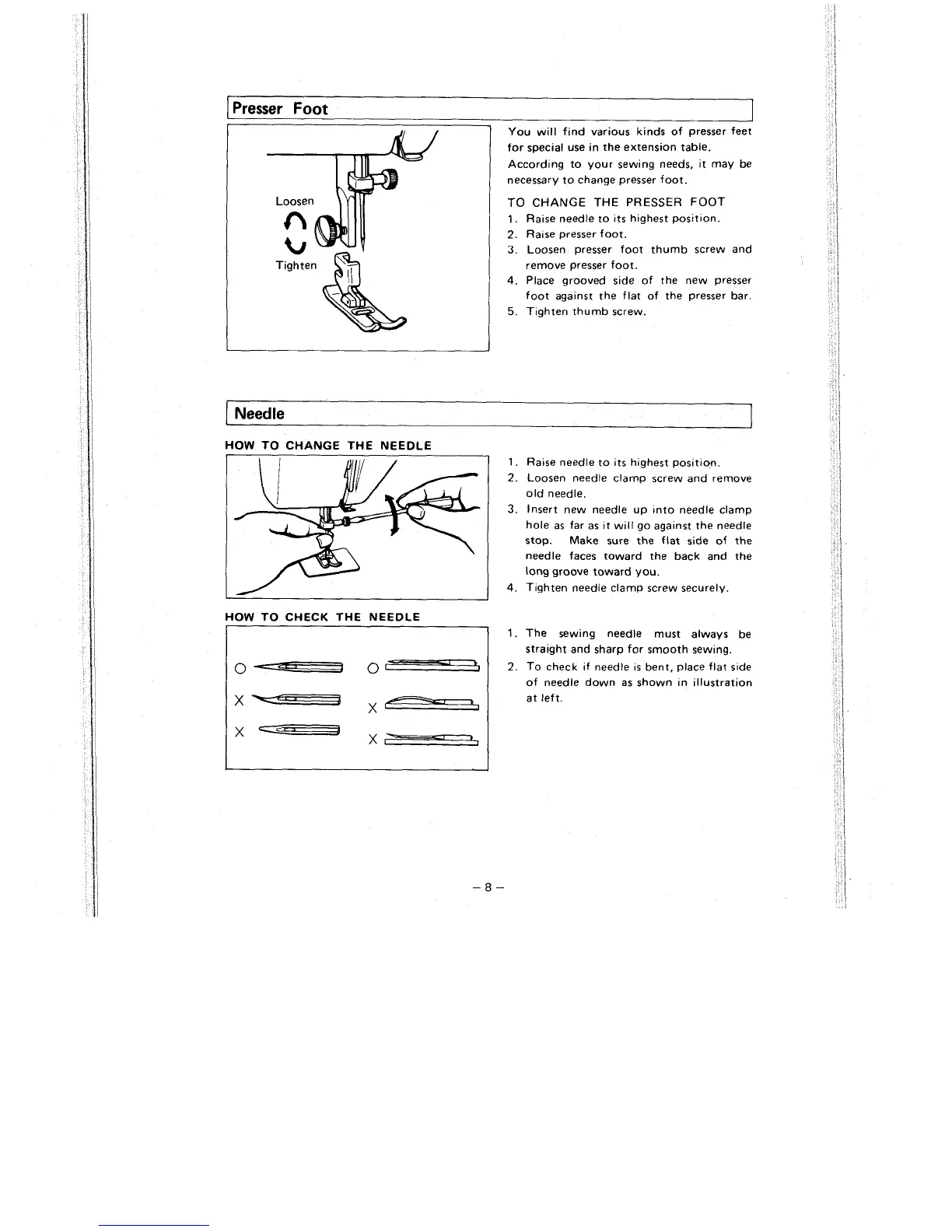
TO CHANGE THE PRESSER FOOT
1.
Raise needle to its highest position.
2.
Ra~se presser foot.
3.
Loosen presser foot thumb screw and
remove presser foot.
4.
Place grooved s~de of the new presser
foot
agalnst the flat of the presser bar.
5.
T~ghten thumb screw.
I
Needle
HOW TO CHANGE THE NEEDLE
1.
Raise needle to its highest posit~on.
2.
Loosen needle clamp screw and remove
old needle.
3.
Insert new needle up into needle clamp
hole as far as
~t
will go against the needle
stop. Make sure the flat side of the
needle faces toward the back and the
long groove toward you.
4.
Tighten needle clamp screw securely.
HOW TO CHECK THE NEEDLE
1.
The sewing needle must always be
straight and sharp for smooth sewing.
I
0
--
0
-
1
2.
To check if needle is bent, place flat side
of needle down as shown
In illustration
Ix-
at left.



 To Next Page