4
1
Decorative Stitches
/
I
Decorative Stitches
J
STITCH LENGTH
STITCH WIDTH
NEEDLE POSITION
PRESSER FOOT
NEEDLE
PRESSURE ADJUSTER
:
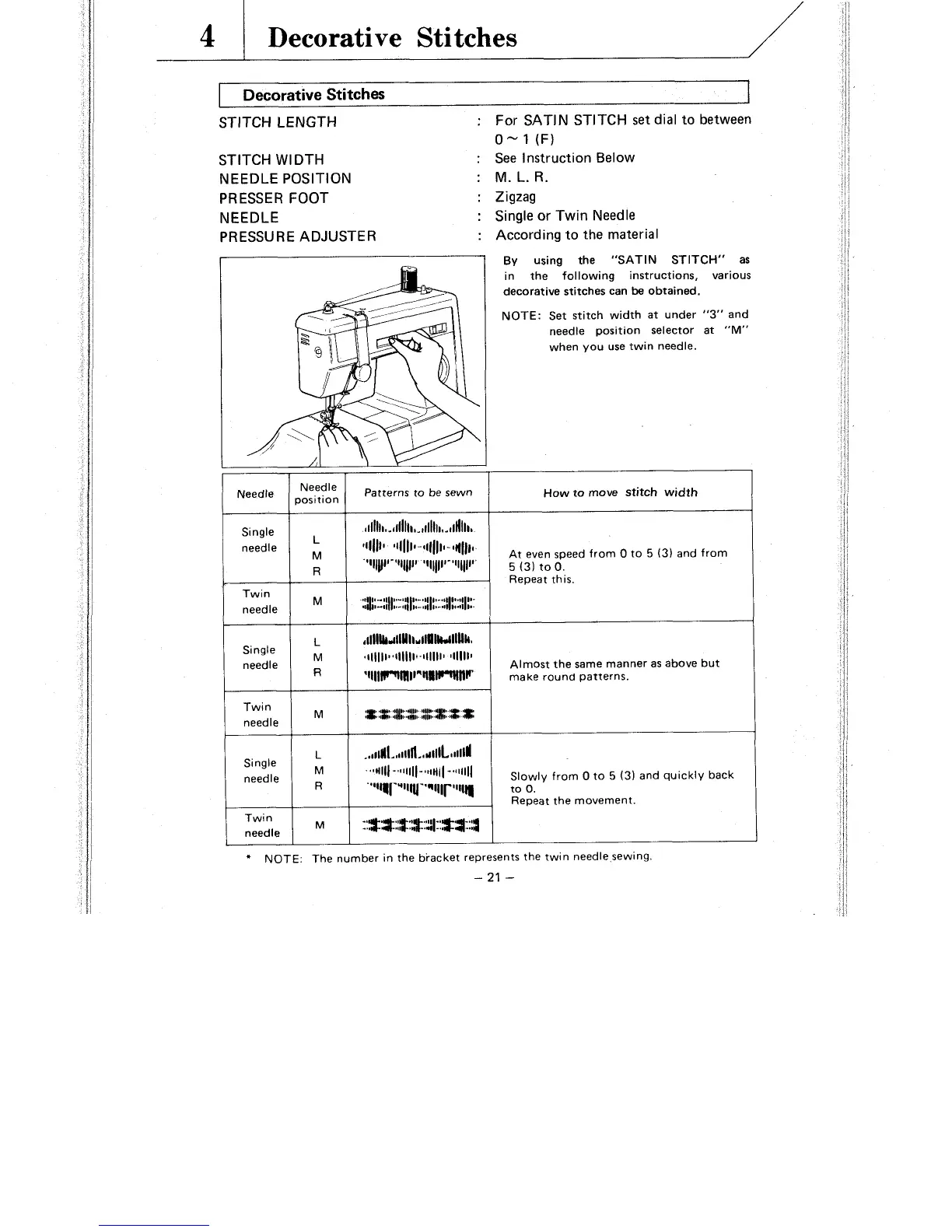
For SATIN STITCH set dial to between
0-
1
(F)
:
See Instruction Below
:
M.
L. R.
:
Zigzag
:
Single or Twin Needle
:
According to the material
By
using the "SATIN STITCH" as
in the following instructions, various
decorative stitches can
be
obtained.
NOTE: Set stitch width at under
"3" and
needle position selector at
"M"
when you use twin needle.
How to move
stitch width
At even speed from
0
to
5
(3) and from
5
(3) to
0.
Repeat this.
Almost the same manner as above but
make round patterns.
Repeat the movement.
Twin
::*~::g?$:l::*~:::~
NOTE: The number in the biacket represents the twin needle sewing.
-
21
-
Patterns to be sewn
~I~~~~I~.III~~II,.~II~III~~II~~~II~
~111111
'11111~-~11~~11-4l(~~~~.
I-I
'II-'III"
811
11-11
,.-1,
1-111
11-.,I
1m.11
1,.
~,$I~-,I~~,.-~~~~~,-~,I~I~-.~I~~~.~I~I..
,dIlL~dUl~.~lPUk(llUk,
~11~~11~~111~11*~11IIII~
111~111
'~IIIIVl(l(Il"Ulm(llF
:r
:rr:
:o:::g::
:#:::+:
3:
x
Single
needle
Twin
needle
Single
needle
Twin
needle
position
L
M
R
lU
L
M
R
M



 To Next Page