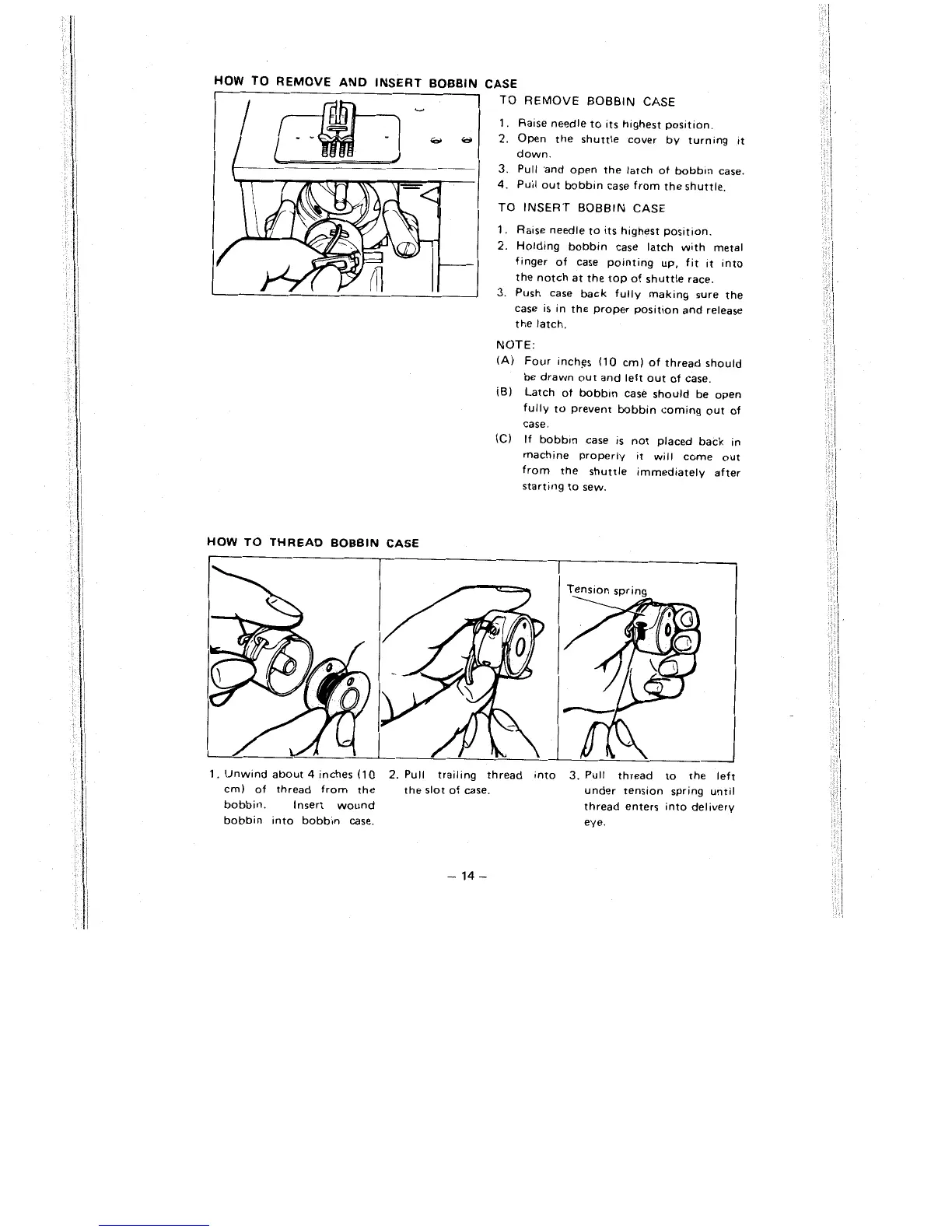
HOW TO REMOVE AND INSERT BOBBIN
I
CASE
TO REMOVE BOBBIN CASE
1.
Rase needle to ~ts h~ghest posltlon.
2.
Open the shuttle cover by turning tt
down.
3.
Pull .and open the latch of bobb~n case.
4.
Pull out bobb~n case from the shuttle.
TO INSERT BOBBIN CASE
1.
Ra~se needle to its h~ghest posltlon.
2.
Holdtng bobbin case latch with metal
finger of case pointing up, fit ~t into
the notch at the top of shuttle race.
3.
Push case back fully making sure the
case is in the proper
posit~on and release
the latch.
NOTE:
(A) Four Inches (10 cm) of thread should
be drawn out and left out of case.
(B)
Latch of bobb~n case should be open
fully to prevent bobbin coming out of
case.
(C)
If bobb~n case is not placed back in
machine properly
~t
will come out
from the shuttle immediately after
starttng to sew.
HOW TO THREAD BOBBIN CASE



 To Next Page