Operation
SMART CLEARER -3.29 -
CLOCK - Reading/Setting the Printer Clock-Calendar (rtc)
SETUP
CONFIG
CLOCK
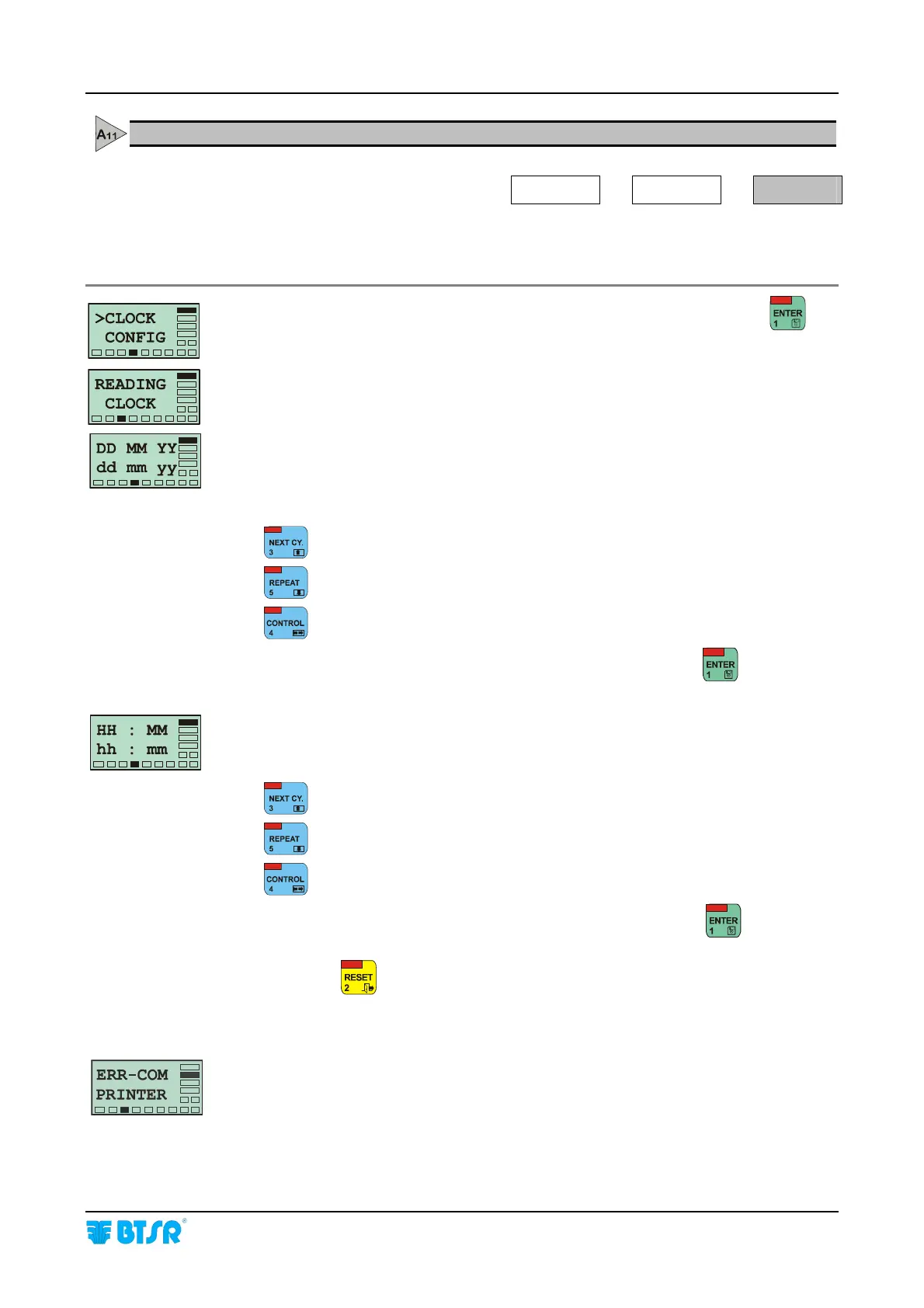
This function allows you to read, and setup, if necessary, the date and time that will
be printed on production reports with the PRINT REPORT function.
Once you have selected the CLOCK function from CONFIG menu, press
to
have access to the function.
This message indicates that the date and time parameters reading is in progress.
DD MM YY = Read values
(DD= day; MM= month; YY=year)
dd mm yy = New values (if needed)
Increases the value.
Decreases the value.
Alternatively selects dd, mm, yy fields.
Once you have checked (and setup, if necessary) the date, press
to confirm.
HH : MM = Read values; (HH = hours, MM = minutes)
hh : mm = New values (if needed)
Increases the value.
Decreases the value.
Alternatively selects hh and mm fields.
Once you have checked (and setup, if necessary) the hour, press
to confirm.
Press once
to return to the CONFIG menu, or twice to return to the Main
Menu.
If the printer is not connected correctly, the ERR-COM PRINTER message will
appear. For further details, please refer to chapter al Cap. 4 “Troubleshooting”.









 To Next Page