Operation
- 3.44 - SMART CLEARER
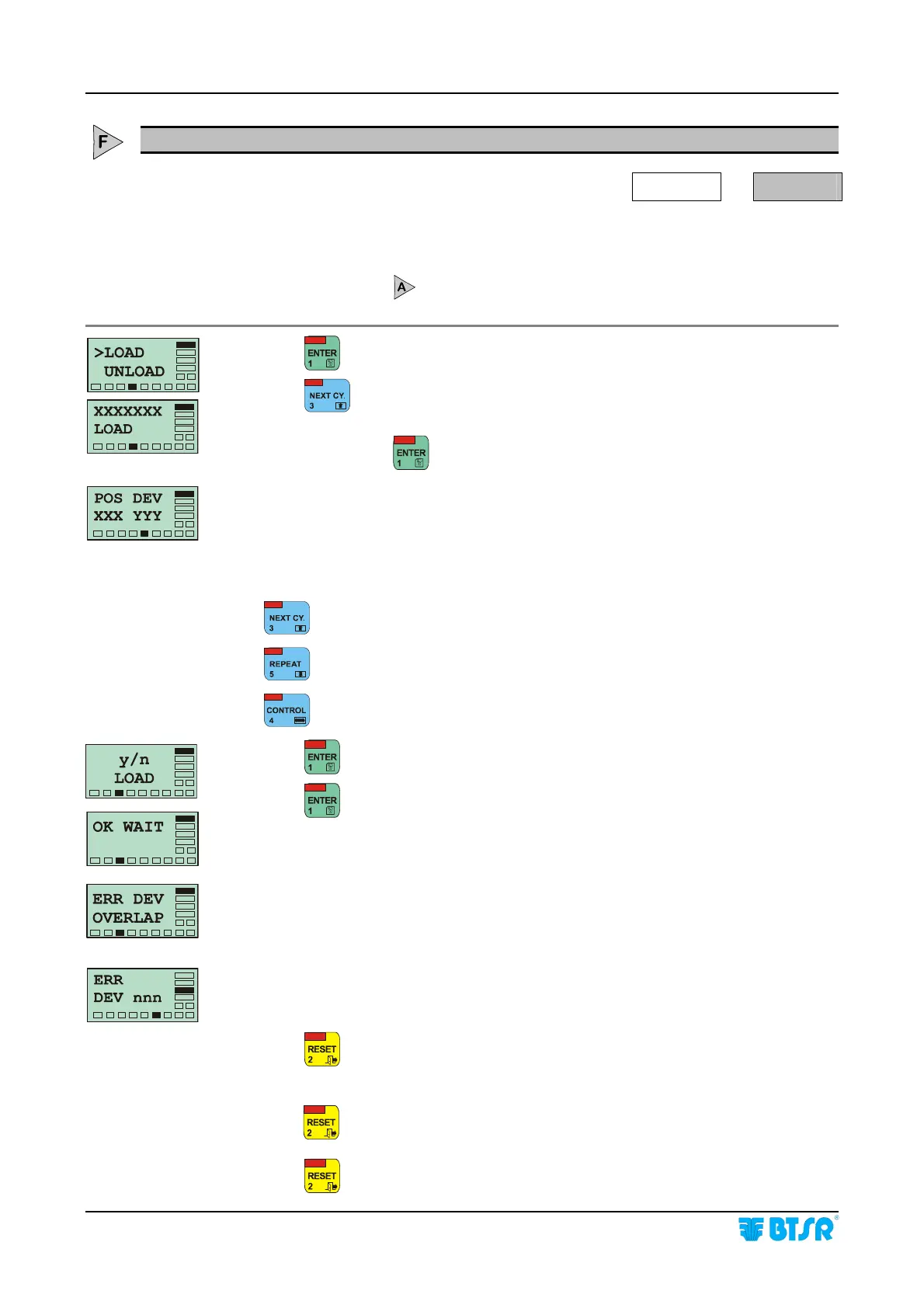
LOAD - Loading an article in sensor memory
WORK
LOAD
This function allows loading of an article (more specifically the settings of the
article) on a specified range of sensors connected to the SMART CLEARER system.
The sensors must have been previously declared and numbered using the CONFIG
DEVICE function
.
Press
to have access to the function.
Press
once or several times until the name of the required article you wish
to load into the sensor appears.
At this point press
to start the function.
This screen indicates the first and last device (sensor) on which you wish to load
the article.
XXX and YYY represent the range of sensors on which you want to load the
selected article, in particular:
XXX shows the first sensor
YYY shows the last sensor
Increases the number where the cursor is positioned.
Decreases the number where the cursor is positioned.
Moves the cursor between XXX and YYY fields.
Press
to confirm the setting and go to the next screen.
Press to load the parameters of the article in the selected range of sensors.
During the loading phase the message OK WAIT is shown for a few seconds.
If you try to load an article into a range of sensors in which another article was
previously loaded, the system signals the incompatibility by displaying the ERR
DEV OVERLAP message. In this case it is necessary to unload the previous
article, by using the UNLOAD function and repeat the LOAD function, to load the
new article.
In the case of a programming error, the system signals the fault with the message
ERR DEV nnn, where nnn is the number of sensor which has not been
programmed correctly.
Press
once to return to the POS DEV screen and continue with programming
a new set of sensors.
Press
twice to return to the XXX LOAD screen and select a new article to load.
Press
three times to return to the Main Menu.









 To Next Page