Operation
- 3.40 - SMART CLEARER
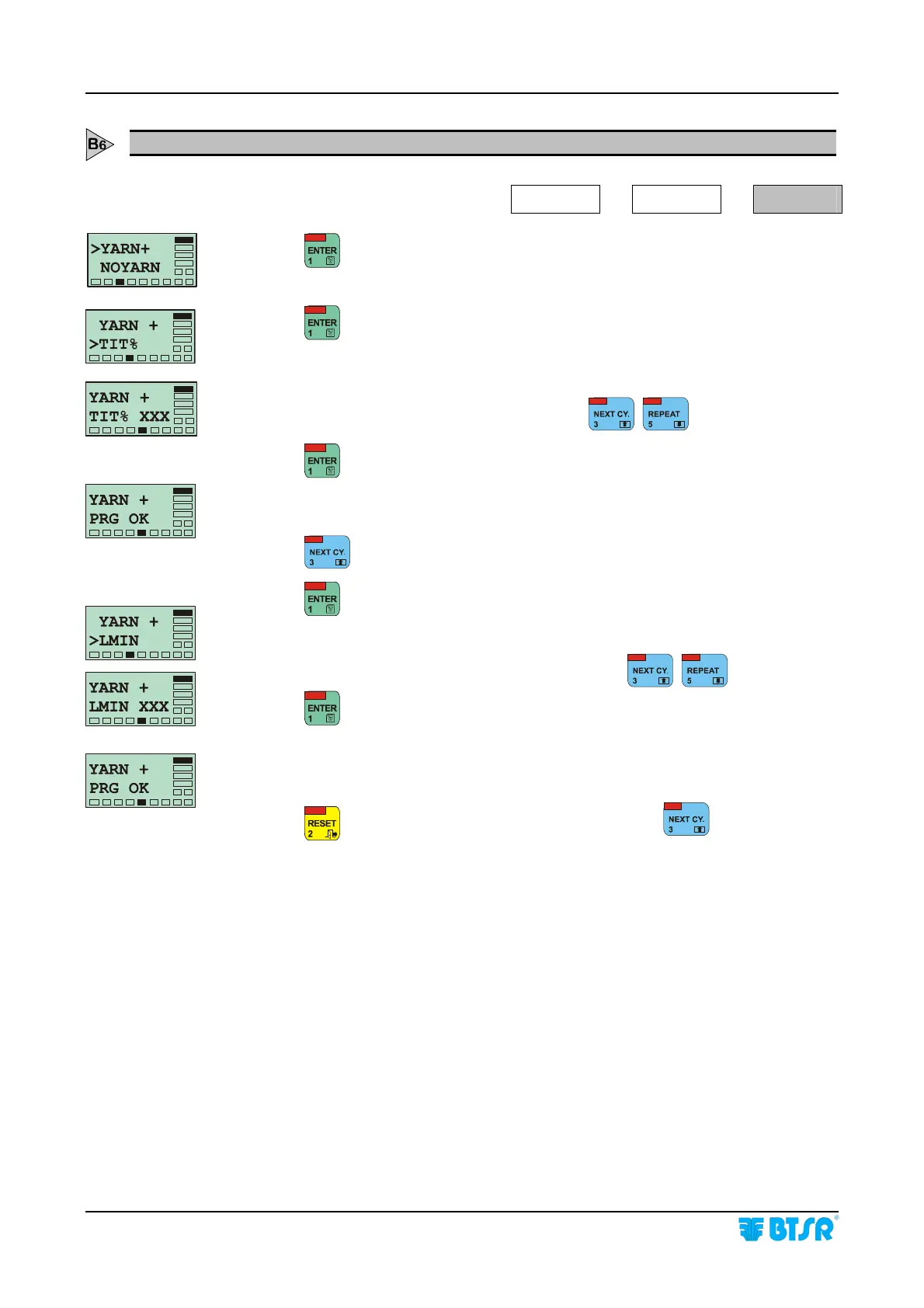
YARN(+) Creating a New Article Characteristics of the Added Ply defect
SETUP
NEW
YARN+
Press
to have access to the function.
Press
to continue.
Set the reduction percentage (TIT%) with respect to the constant value 100 which
will have to be interpreted as Added Ply, using
.
Press
to confirm the entered value.
This screen displayed for a few seconds, indicates that the previously set parameter
has been programmed correctly.
Press
to select the Minimum Length of the Added Ply defect (LMIN).
Press
to continue.
Set the Minimum Length of Added Ply defect, using
.
Press
to continue.
This screen, displayed for a few seconds, indicates that the Minimum Length
parameter has been programmed correctly.
Length parameter has been programmed correctly.
Press
to return to the Article Parameters Menu, then
to select the next
parameter (NOYARN).









 To Next Page