Operation
- 3.32 - SMART CLEARER
VERS – UPG – Test of software version and Sensor’s version Updating
SETUP
CONFIG
TEST
VERS-UPG
This function allows you to check the software version on each individual sensor,
with the possibility to update the version, if needed..
The updating procedure is effective only if all the sensors have a software version
≥ 3.0 and only if strictly necessary, for instance upon indication of your BTSR
distributor.
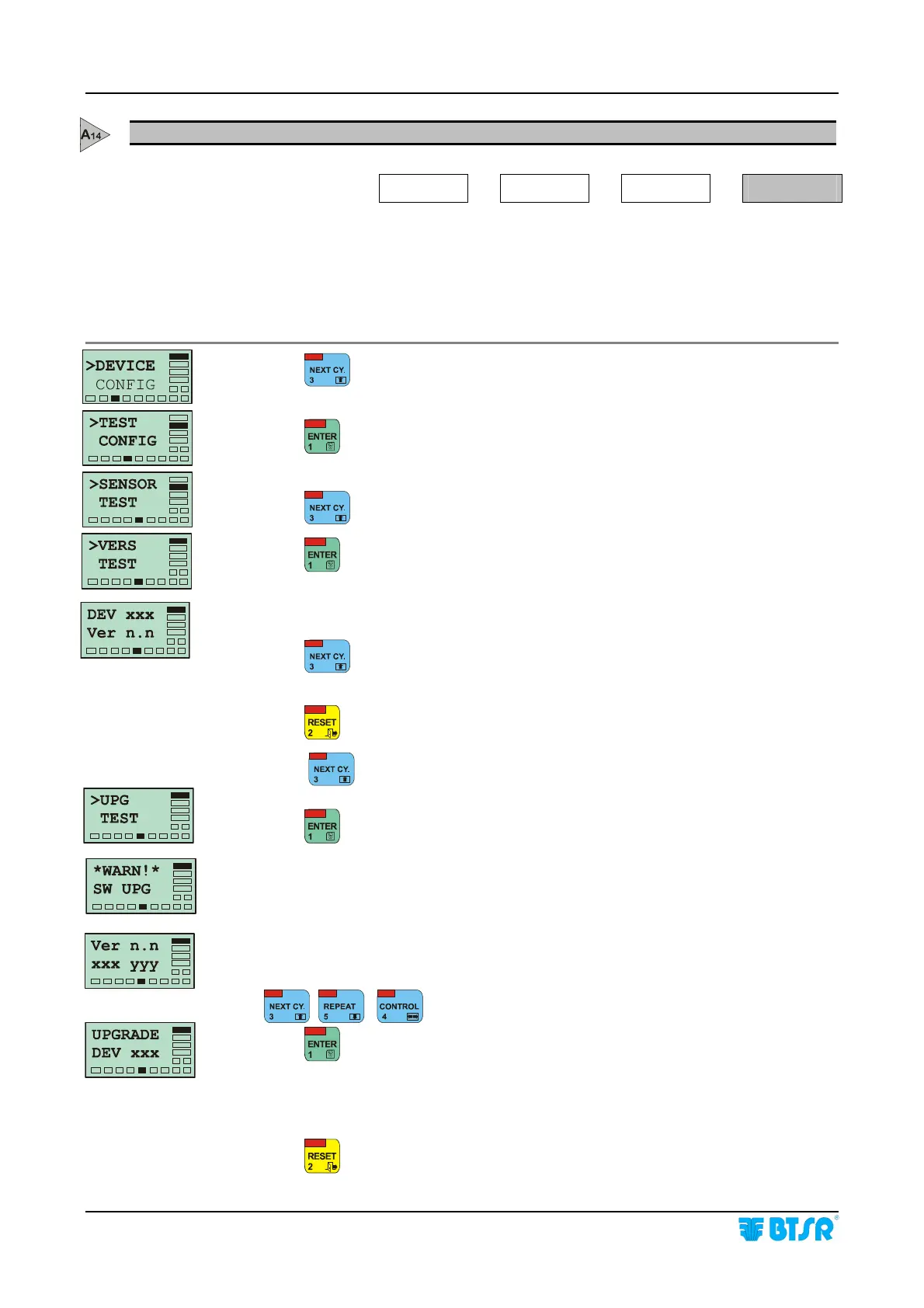
Press until the TEST CONFIG menu option is displayed.
Press
to have access to the Test function.
Press
until the VERS TEST menu item appears.
Press
to continue.
XXX = Number of ISSC.. device
n.n= Software version loaded on XXX device
Press
to select, in sequence, all the connected devices and check the
software version loaded
Press
to return to the VERS TEST
.screen
Press
to select the UPG menu item.
Press
to access the updating procedure
This screen means that the software updating procedure on ISSC.. devices is in
progress.
n.n = Software version that will be loaded on xxx to yyy device range
Select the range of sensors to be updated using
, ,
Press
to execute the updating
The selected sensors, will be automatically updated, one after the other, and the
field xxx will automatically increase until it reaches the value set as yyy in the
previous step.
Press
once to leave this function, or press it twice to return to the Main Menu.









 To Next Page