BÜCHI Labortechnik AG Installation | 5
Operation Manual Vacuum Pump V-600 29/65
5.9 Fitting an Interface I-300
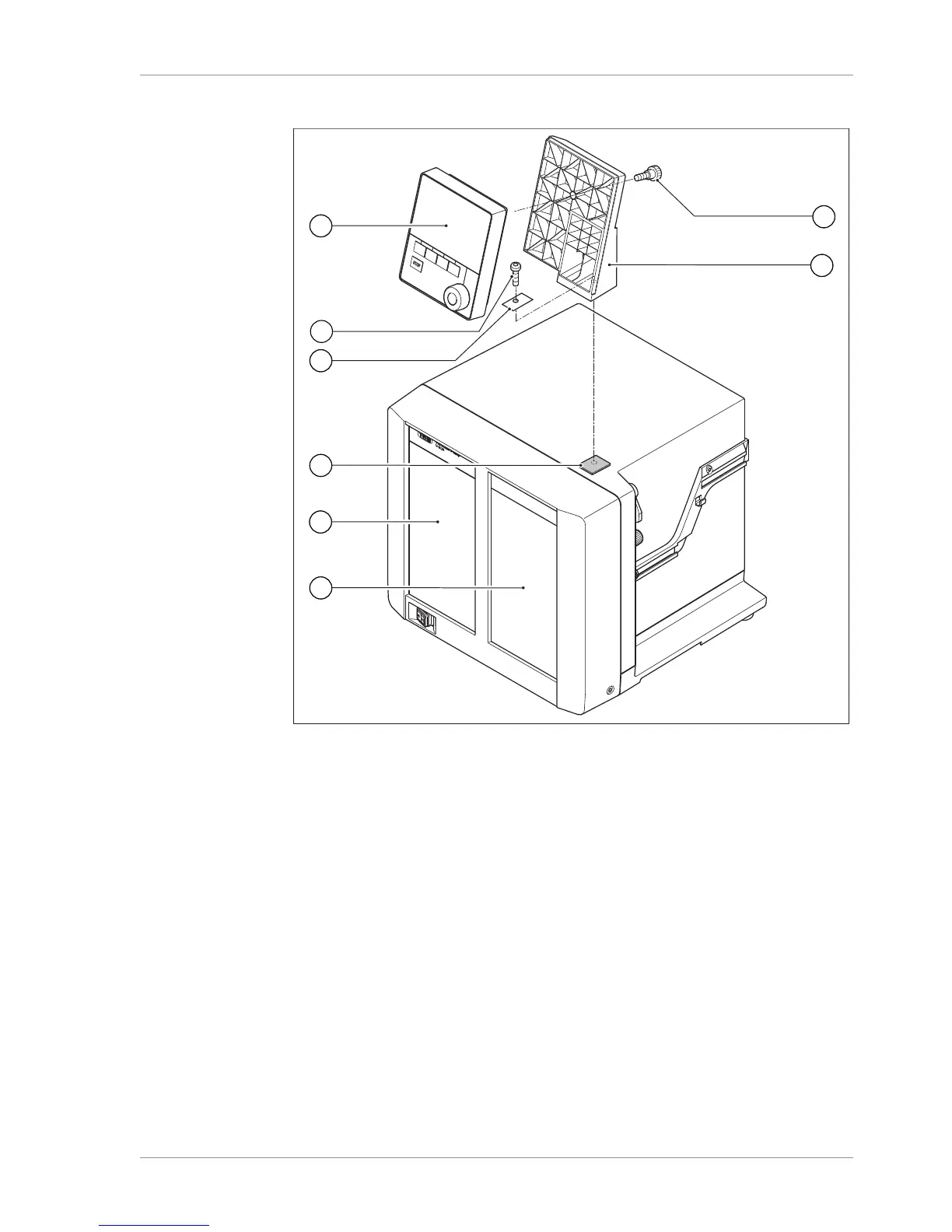
Fig.15: Holder for fitting the Interface I-300
1 Interface I-300 5 Casing front of V-600
2 Fixing screw for holder 6 Knurled-head screw
3 Metal plate 7 Holder
4 Rubber plug and threaded hole
Tools required:
Torx key Tx25
The Interface I-300 can be mounted on the top of the Vacuum Pump V-600 using a
holder.
u Remove the rubber plug (4) from the top panel of the vacuum pump. Use a screw-
driver if necessary.
Underneath the rubber plug is a threaded hole for a screw.
u Position the holder (7) over the threaded hole (4) and fix it in place using the screw
(2) supplied. When doing so, pass the screw through the hole in the metal plate
(3).
u Feed the communication cable through the holder from the rear and connect it to
the COM port on the back of the interface unit.


 To Next Page