Using your LinkStation
LinkStation User Manual 34
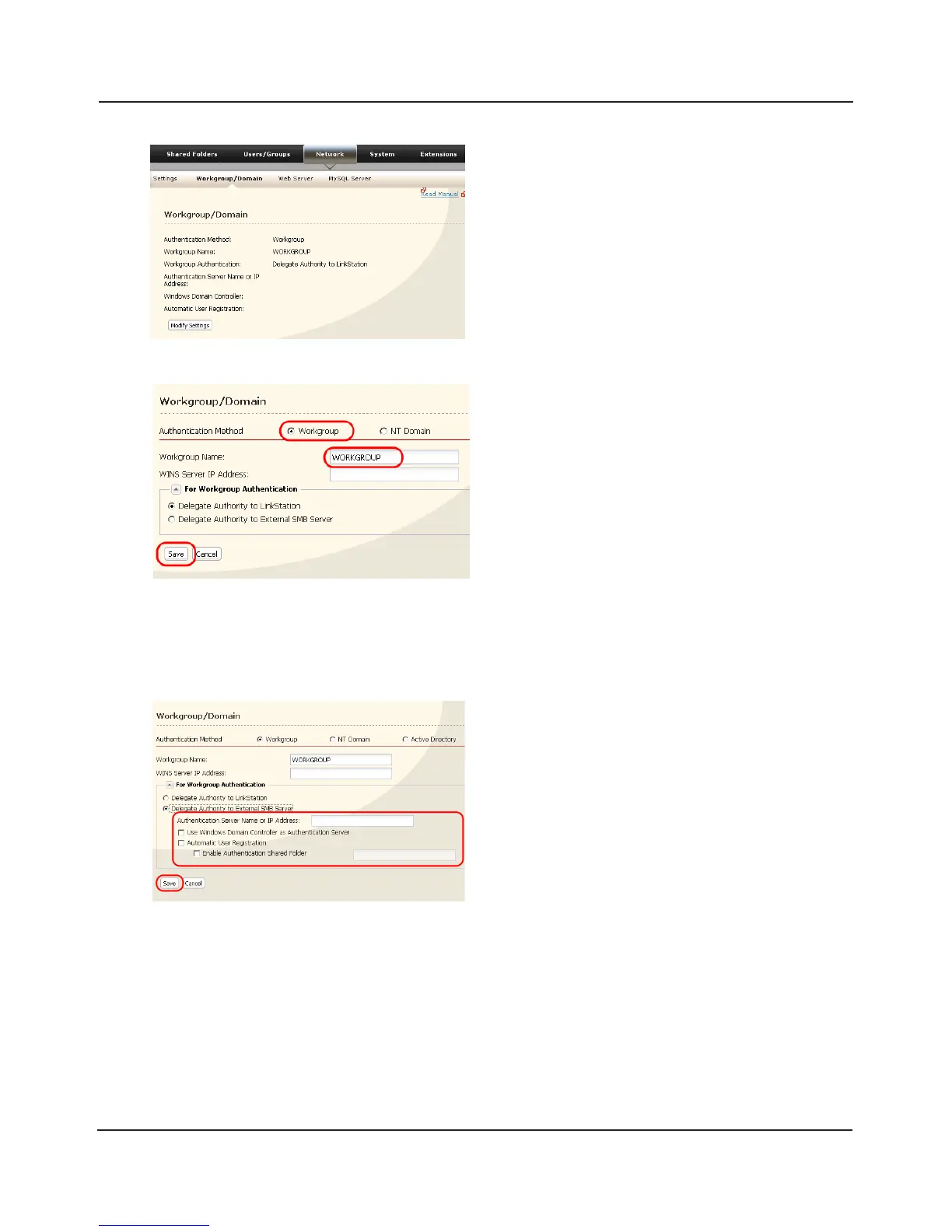
1 Click [Workgroup] (even if you are in a domain
environment).
2 Enter the [Workgroup Name]. To use a
Windows Domain Controller as an external
SMB authentication server, enter its name for
the [Workgroup Name].
3 Select [Delegate Authority to External SMB
Server].
1 Enter the [Authentication Server Name or IP
Address] .
Note: When connecting with AFP or FTP, an IP
address is recommended.
2 Check [Use Windows Domain Controller as
Authentication Server], [Automatic User
Registration] and [Enable Authentication
Shared Folder].
3 Enter the shared folder name for
authentication.
4 Click [Save].
1 In the Web Admin interface, navigate to
[Network] - [Workgroup/Domain].
2 Click [Modify Settings].
1
2
3















 To Next Page