Using your LinkStation
LinkStation User Manual 85
E-mail Notication
Your LinkStation can send you daily email reports. It can also send you an email when settings are
changed or an error occurs.
System - Maintenance
The following things will be sent via E-mail:
• The condition of the hard drive
• Notication of completed backup jobs
• Notication of fan errors
• Notication of hard drive errors
1
2
3
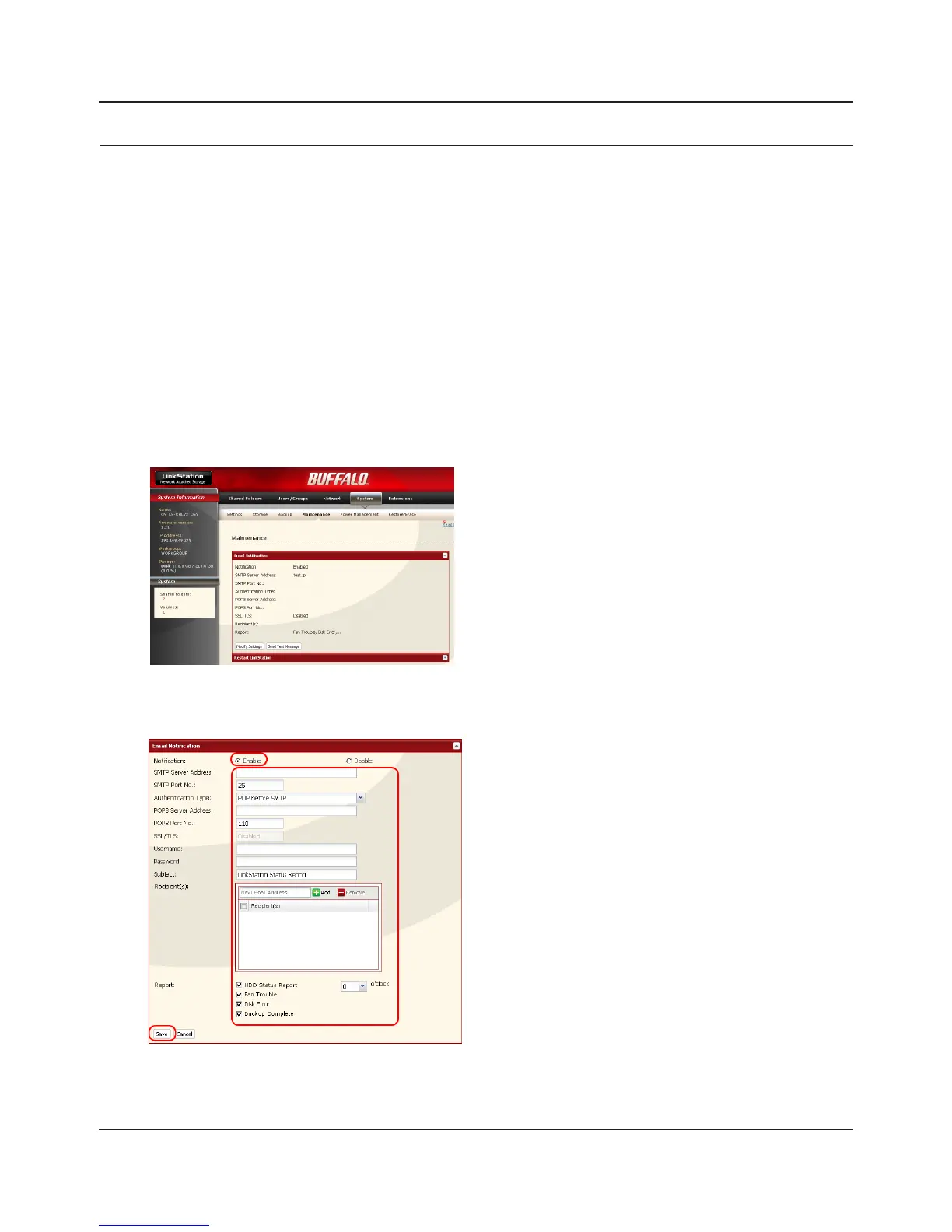
In the Web Admin interface, navigate to [System] -
[Maintenance].
Click [Modify Settings] in [E-mail Notication].
1 Click [Enable] in Notication.
2 Type the [SMTP Server Address] and [SMTP
port No.].
Note: If using [POP before SMTP], enter [POP3
Server address] and [POP3 port No.].
3 Select [Authertication Type] from [Disabled]/
[POP before SMTP]/[LOGIN(SMTP-AUTH)]/
[CRAM-MD5 (SMTP-AUTH)/CRAM-MD5)].
4 Enter a username.















 To Next Page