19
BUNNLINK ACTIVATION
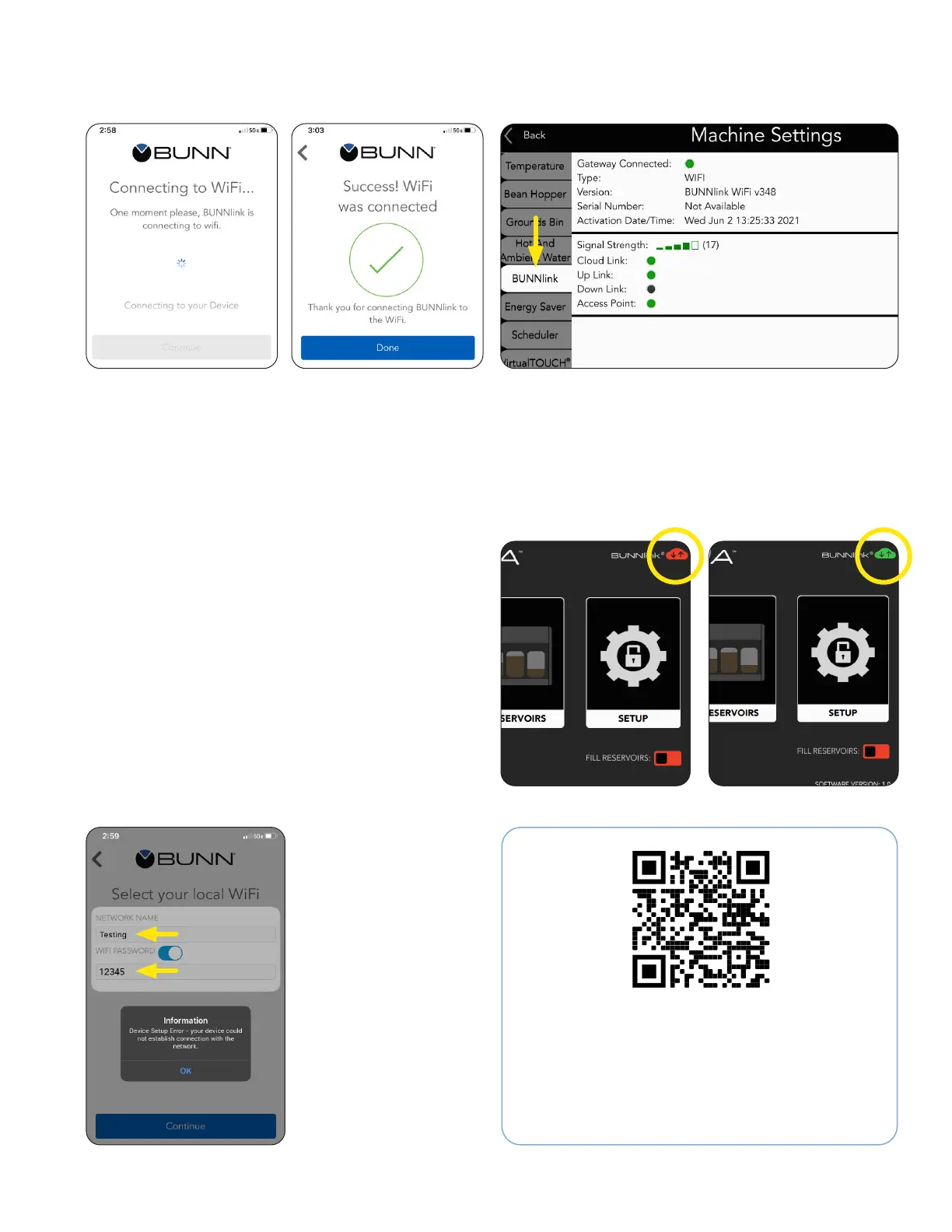
9. This screen will
display while
the machine is
attempting
to connect to the
network.
10. Upon successful
connection this
screen will display.
Press DONE.
If the machine does not
connect to the network;
ensure the name and
password were typed
correctly.
Scan to register your machine on BUNNlink
®
for
Customer Care Alerts, reports and further support.
Please provide this QR code the customer or
manager of the site.
11. Select the BUNNLink tab from Machine Settings
to verify:
- The gateway has been connected
- Machine serial number
- Signal strength
- If a cloud link has been made
12. BUNNlink connection is also shown with the
color change of the cloud icon in the upper
right corner of the Service Access screen
from Red to Green.
BUNNlink Product Registration
Setup Error
WI-FI Activation



 To Next Page