24
CARE AND CLEANING
continued >
Reservoir Removal
– As Needed
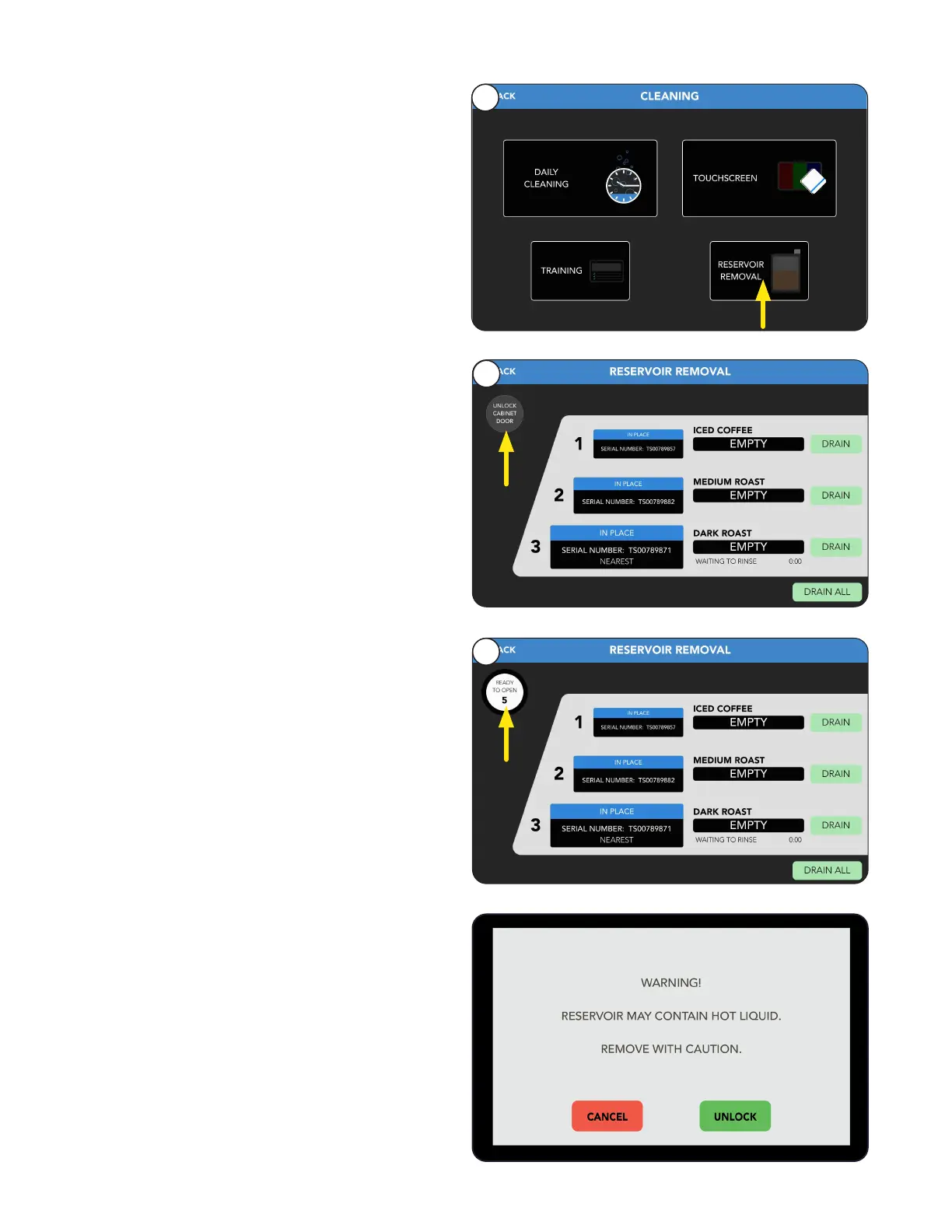
1. Select the Reservoir Removal tab.
Reservoir cleaning is included in scheduled Weekly
cleaning, but if access to reservoirs at other times is
needed, follow these steps.
2. Select Unlock Cabinet Door button to access
reservoirs.
1
2
3. A countdown of 5 seconds will start.
If not opened, the Unlock Cabinet Door button
will need to be pressed again.
3
CAUTION: If there is liquid in a reservoir; the
option to drain each or all reservoirs can done
by pressing the Drain buttons.
A countdown timer will show progress of draining.
NOTE: If reservoirs are removed without draining
then a warning screen will show to remove with
caution because they may contain hot liquid.



 To Next Page