45
SETUP MENU
Your Brand
The Your Brand screen contains pages that can be
accessed by selecting a tab on the left of the screen
and contains customization options for the machine.
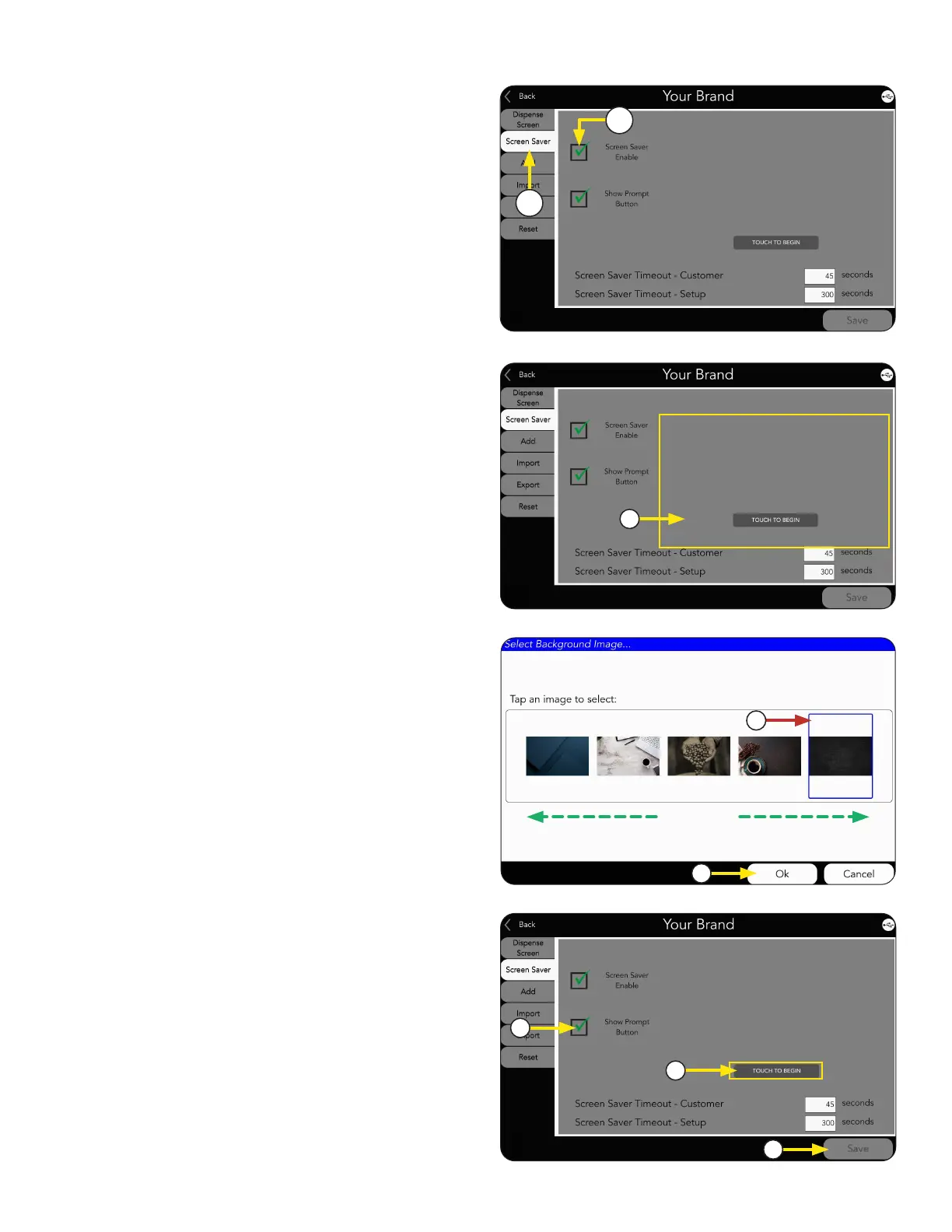
2. Check Screen Saver Enable box.
Screen Saver
1. Select SCREENSAVER tab.
When enabled, the screensaver can be adjusted:
Options Available:
a. Select Screen Saver image.
1. CHANGING SCREENSAVER IMAGE
c. Press OK.
b. A selection screen will open. If there
are more images available than shown,
scroll side-to-side to view library.
Then click selected image.
NOTE: Screen Saver size should be
1024 x 1280 pixels.
a
c
b
1
2
c. Select Save.
a. Select Show Prompt Button box.
b. Select Prompt Button to edit text.
2. SHOW PROMPT BUTTON
a
c
b



 To Next Page