22
CARE AND CLEANING
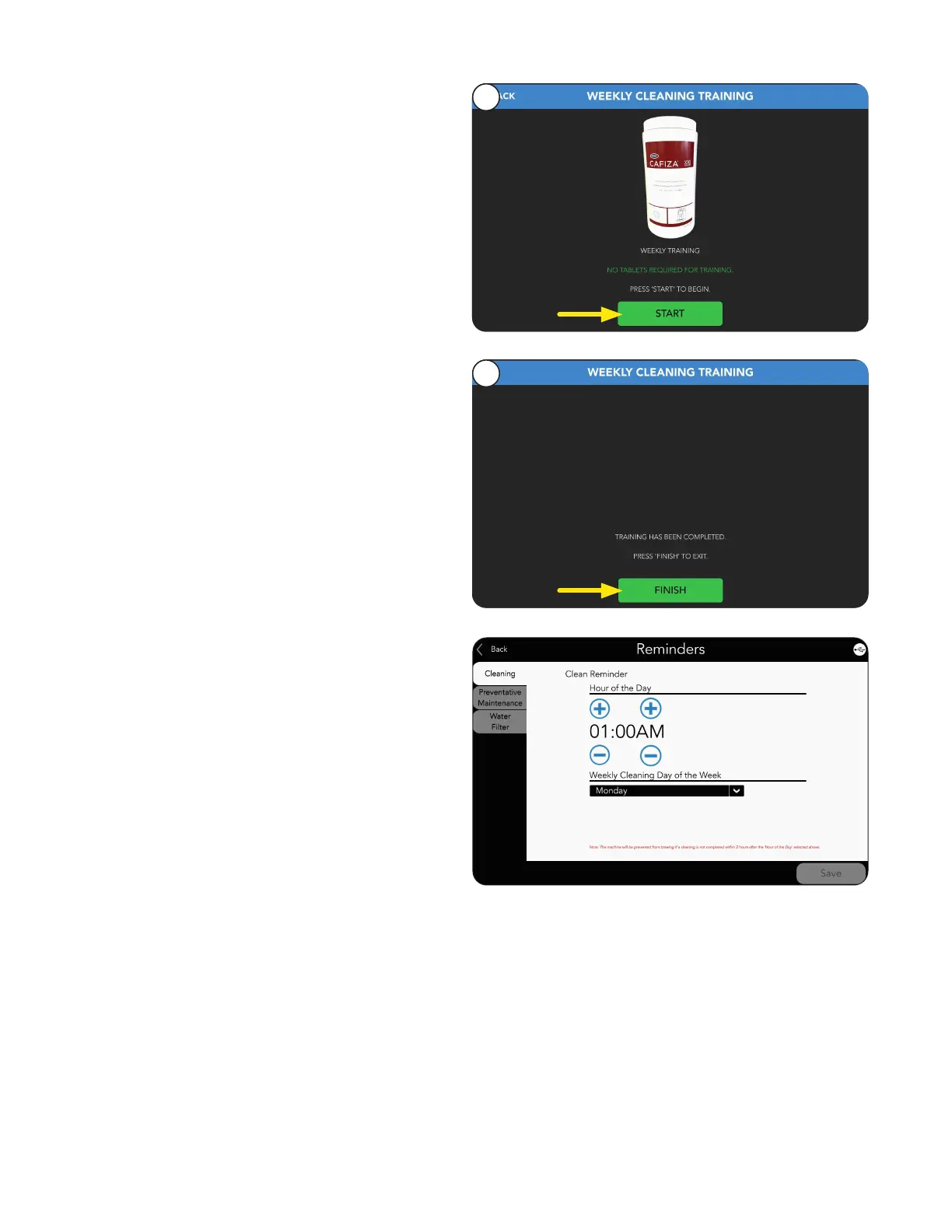
2. Select Start button.
Follow the onscreen instructions to prepare
for cleaning.
3. Select Finish button when training is complete.
2
3
NOTE: The default Weekly DAY and TIME for
cleaning from the factory is Monday at 1:00 am.
A Weekly cleaning can be initiated +2/-2 hours
from the time set in Reminders.
If not completed within this 2 hour window, the
machine will go into lockout mode until cleaning
is completed.
This settings can be changed in CLEANING
REMINDERS.
• Do not use any abrasive materials.
• Use a soft, dry cloth to wipe down the exterior surfaces of the dispenser to maintain the luster of the
stainless steel finish.
• Wash the stainless steel interior surfaces of the dispenser with warm, soapy water. Rinse with warm, clear
water. If the water is hard, wipe the dispenser dry with a soft cloth to prevent spotting.
• Use cleaning cloth provided, to clean the acrylic door panel.
• Use only mild, non-abrasive and citrus-free soaps and detergents for cleaning surfaces.
Interior and Exterior Surfaces
Before Starting



 To Next Page