Operating Instructions | 1473-1-8164
Pos: 41 / #Ne ustr ukt ur# /Onl in e-Do kume ntati on (+ KNX) /Üb ersc hr ift en ( --> Für all e D oku ment e <--)/2 . Eb ene/G - L/G erät eei nst ellu nge n @ 18\mod_1302768847744_15.docx @ 103548 @ 333333333333 @ 1
5.6 Adjusting the device
Pos: 42 / #Ne ustr ukt ur# /Onl in e-Dokumentation (+KNX)/Bedienung/Timer/Geräteeinstellungen Hinweis 6455_6456_1098 @ 26\mod_1343377008365_15.docx @ 225691 @ 322 @ 1
All settings of the device are carried out supported by text-controlled operator prompting. The language, time and
date have to be set first during initial commissioning..
Note
Values which need to be changed flash and are displayed in grey in the following illustrated
Pos: 43 /#Neust ru ktur# /O nlin e-Do kume ntati on (+K NX) /Üb ersc hr ift en (--> Für all e D oku ment e <--)/3. Ebene/S - T/S prac he ausw ähle n @ 28\mod_1346941238305_15.docx @ 231187 @ 222222 @ 1
5.6.1 Selecting languages
Pos: 44 / #Ne ustr ukt ur# /Onl in e-Do kume ntati on (+ KNX) /B edie nung /Ti mer/ Ein st ellu ngen Spr ac he - 645 5_645 6 @ 26\mod_1343377850120_15.docx @ 225705 @ 32223222 @ 1
The language is set via the country selection and the astro time is automatically assigned. The current location
(country) of the timer must be selected because of the different time zones.
Note
The astro function daily adjusts the switching times automatically to the yearly process of sunrise
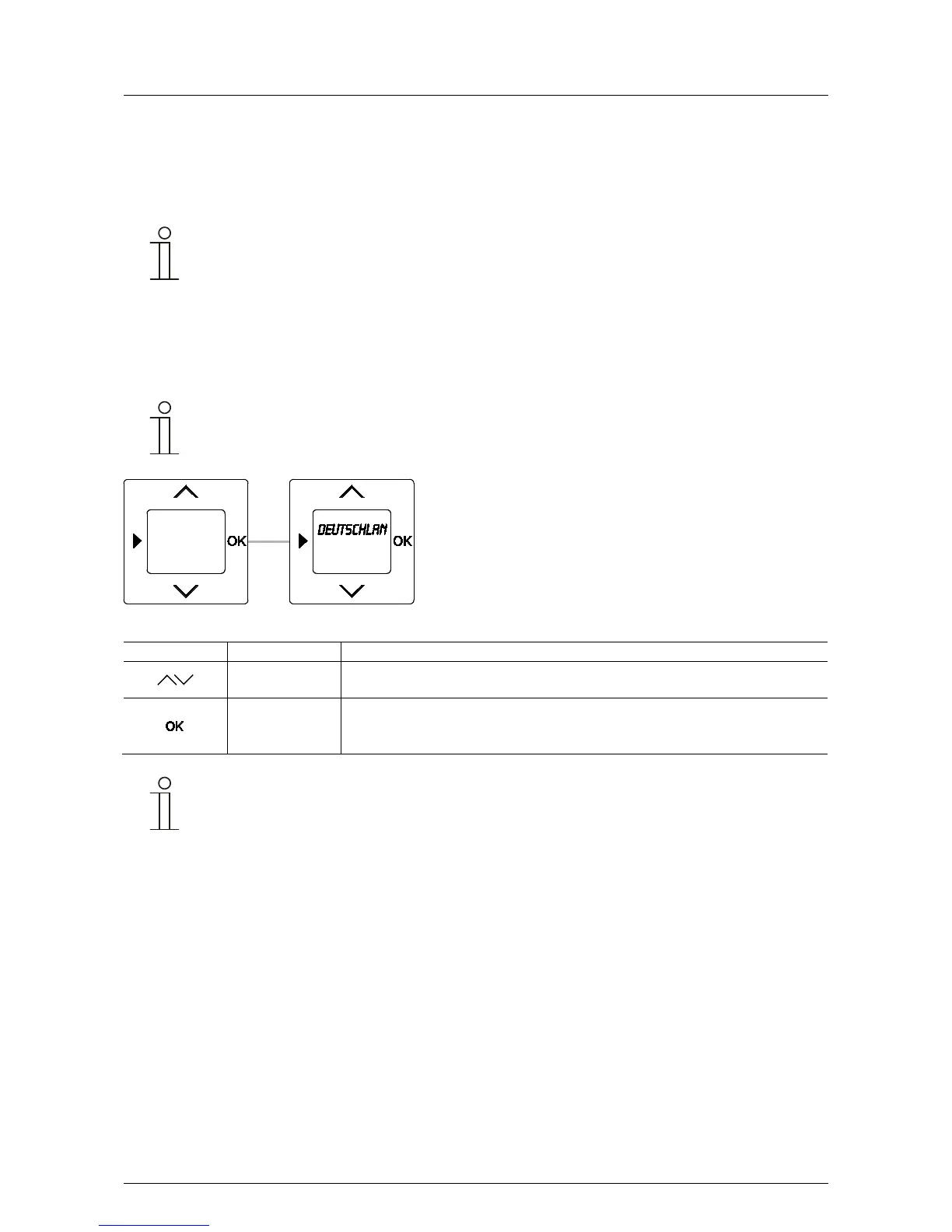
Fig. 5: Country / language selection
Germany
Selecting languages
- Select the country via the arrow buttons.
- Confirm your selection with the OK button.
You simultaneously switch to the next menu item. This is followed by setting the year,
month, day, hour and minute. See section 5.6.2.
Note
To change the language at a later point in time the device settings must be reset via the reset
function. See section 5.6.3.
Pos: 45 / #Ne ustr ukt ur# /Onl in e-Do kume ntati on (+ KNX) /S teuer mod ul e - Online-Dokumentation (--> Für alle Dokumente <--)/++++++++++++ Seitenumbruch ++++++++++++ @ 9\mod_1268898668093_0.docx @ 52149 @ 3232 @ 1



 To Next Page