Operating Instructions | 1473-1-8164
Pos: 89 / #Ne ustr ukt ur# /Onl in e-Do kume ntati on (+ KNX) /Üb ersc hr ift en ( --> Für all e D oku ment e <--)/3. Ebene/S - T/ Sensor @ 28\mod_1347004161033_15.docx @ 232177 @ 222221142222222224 @ 1
5.9.5 Sensor
Pos: 90 / #Ne ustr ukt ur# /Onl in e-Do kume ntati on (+ KNX) /B edie nung /Ti mer/ Ein st ellu ngen - Sonderfunktionen - Sensor - 645 5 Jalous ie @ 26 \mod_1343816164567_15.docx @ 226483 @ 22222222124 @ 1
The "Sensor" setting is required when the brightness sensor is connected for controlling the blind in dependence
of the intensity of sunlight (brightness). The setting of the brightness sensor is described here. For a description
of functions see section 4.3.
5.9.5.1 Sun protection function
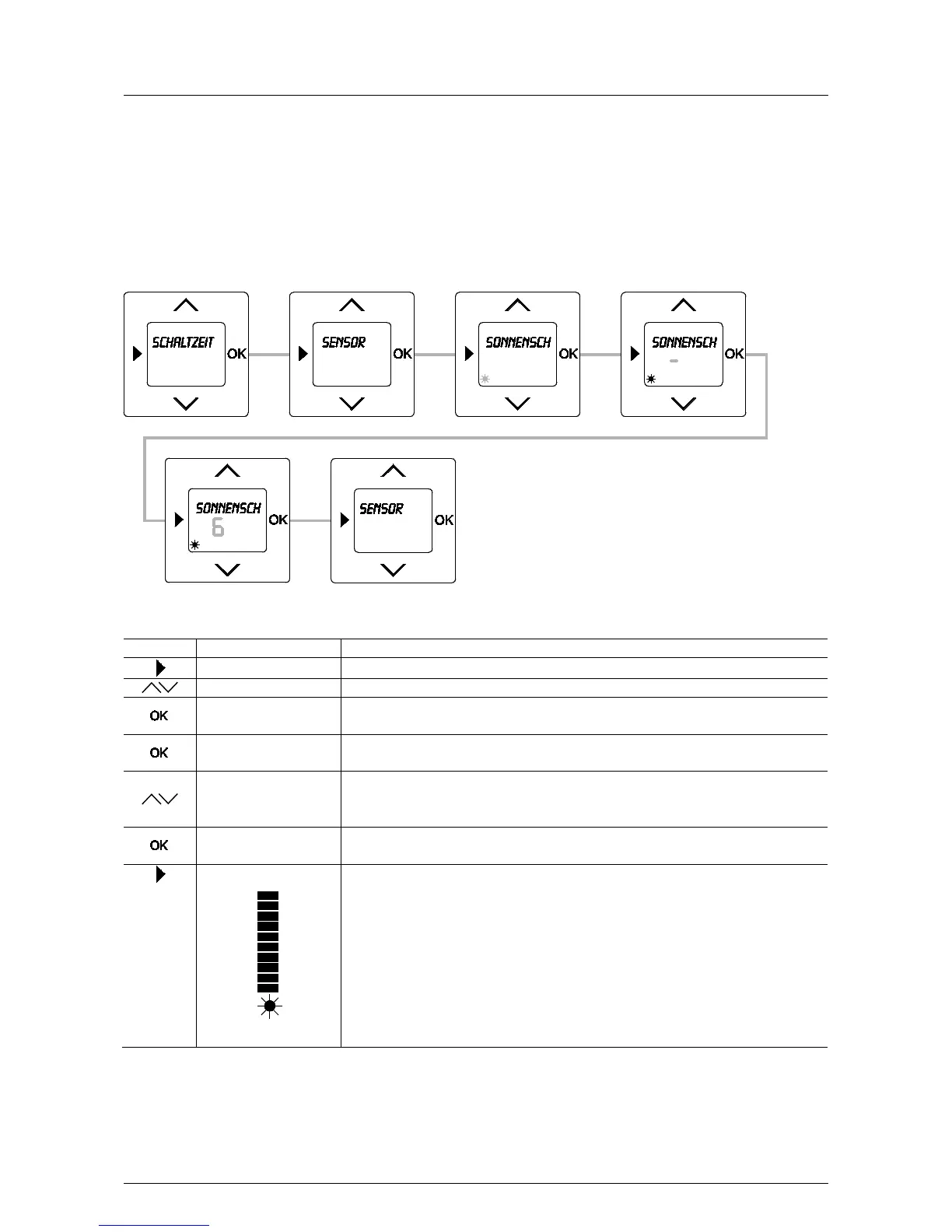
Fig. 19: Menu item – Sensor / Sun protection
Sequence of operating steps
Switching times
- Press the menu button to switch to the setting mode.
- Select menu "Sensor" via the arrow buttons.
Sun protection
- Press the OK button.
Menu item "Sun protection" is displayed.
–
- Press the OK button again.
6
- Set a brightness value (0 to 9) via the arrow buttons at which the blind moves DOWN. For
setting (-) the function is OFF.
In this example the value 6 has been set.
Sensor
- Confirm your entry with the "OK" button.
You simultaneously switch to menu "Sensor".
- Press the menu button to switch to the operating mode.
The bar in the display indicates the current brightness value.
The sun protection function automatically moves the blind down after exceeding the set
brightness value. The sensor is overridden (darkened), the blind stops and moves up again
until the sensor again has an "unrestricted view".
To trigger the function the brightness must be exceeded for at least 90 seconds. Then the
"Sun" symbol in the display flashes. The end position of the blind can be individually
selected by the positioning of the sensor on the pane.
If the shortfall in brightness is longer than 15 minutes, the blind automatically moves back



 To Next Page