Operating Instructions | 1473-1-8164
Pos: 98 / #Ne ustr ukt ur# /Onl in e-Do kume ntati on (+ KNX) /Üb ersc hr ift en ( --> Für all e D oku ment e <--)/1 . Eb ene/M - O/M ont age / I nstal la tio n @ 1 8\m od_1302613966111_15.docx @ 103373 @ 2222222222222222222 @ 1
7 Mounting / Installation
Pos: 99 / #Ne ustr ukt ur# /Onl in e-Dokumentation (+KNX)/Sicherheitshinweise und Hinweise (--> Für alle Dokumente <--)/Warnhi nwei se/S ich erh eit - 230 V @ 18 \mod_1302606816750_15.docx @ 103308 @ 22 @ 1
Electric voltage!
Risk of death and fire due to electrical voltage of 230 V.
– Work on the 230V supply system may only be performed by authorised electricians!
– Disconnect the mains power supply prior to installation and/or disassembly!
Pos: 10 0 /#Neu struk tur#/ Onli ne-Do kume ntati on ( + KNX)/ Sic her heit shi n weise und Hi nwei se ( --> F ür al le D ok ume nte < --)/Hinweise - Allge mei n/H inw eis z u m ele ktr isc hen Ans chl uss ( Be dien ele men t) @ 28\ mod_1347265033624_15.docx @ 232456 @ 2222 @ 1
Notes on electrical connection
Prerequisite for mounting or attaching the control element is that the flush-mounted insert has
been installed and electrically connected beforehand. The electrical connection is described in the
separate instructions of the flush-mounted insert.
Pos: 10 1 /#Neu struk tur#/ Onli ne-Do kument ation (+ KNX)/M ont age/Ti mer /Mont age 645 5_645 6 @ 26\ mod_1343717080218_15.docx @ 226218 @ 2222212 @ 1
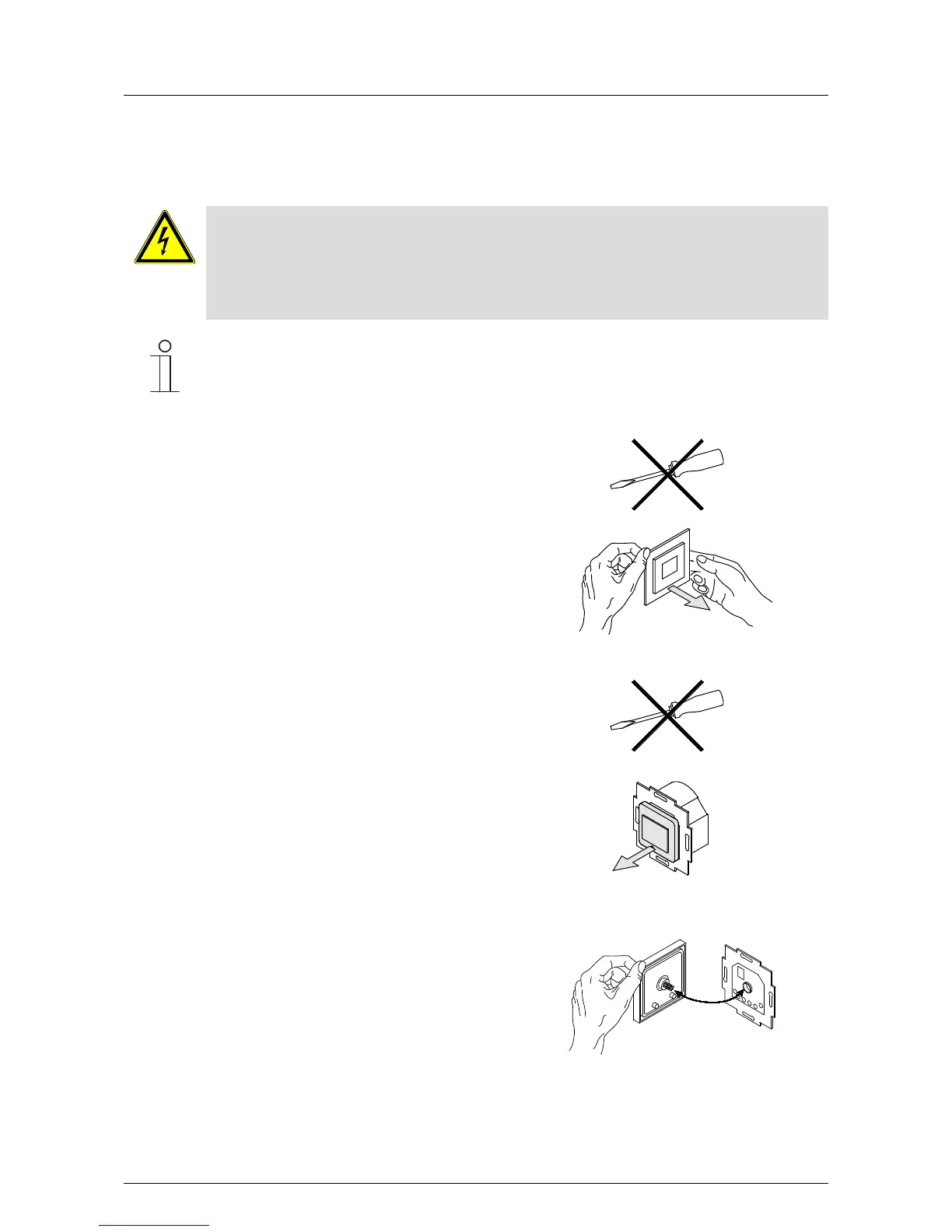
. Pull the attachment off.
If the device is already mounted or assembled, pull off the
attachment from the flush-mounted insert with the aid
of the frame.
Fig. 23: Wall mounting: Pulling the attachment off
– If the state of the device is at the point of delivery, pull
off the attachment from the flush-mounted insert with
your hands.
– Pull the attachment off only with your hands.
Do not lever parts off with screwdrivers or similar hard
objects. This damages the device.
– When pulling off, first the resistance of the plastic
clamps must be overcome.
Fig. 24: State of the device at the point of delivery:
pulling off the attachment
. Plug the attachment together with the frame onto the
flush-mounted insert.
– Make sure that the plug-in connection on the rear side
does not get jammed.
– If mounting is difficult, check whether a burr has
formed at the lock-in opening of the flush-mounted
insert and remove it.
The device is now mounted.
Fig. 25: Plug-on of attachment
=== Ende der Lis te f ür T ext mar ke C ont ent = ==



 To Next Page