Pos: 65 / #Neustruktur#/Online-Doku ment ati on ( +KN X) /Über sc hri ften (--> Für al le D o kume nte < --)/3. Ebene/A - F/As tro-F unktio n @ 28\mod_1346999843259_15.docx @ 231685 @ 13333 @ 1
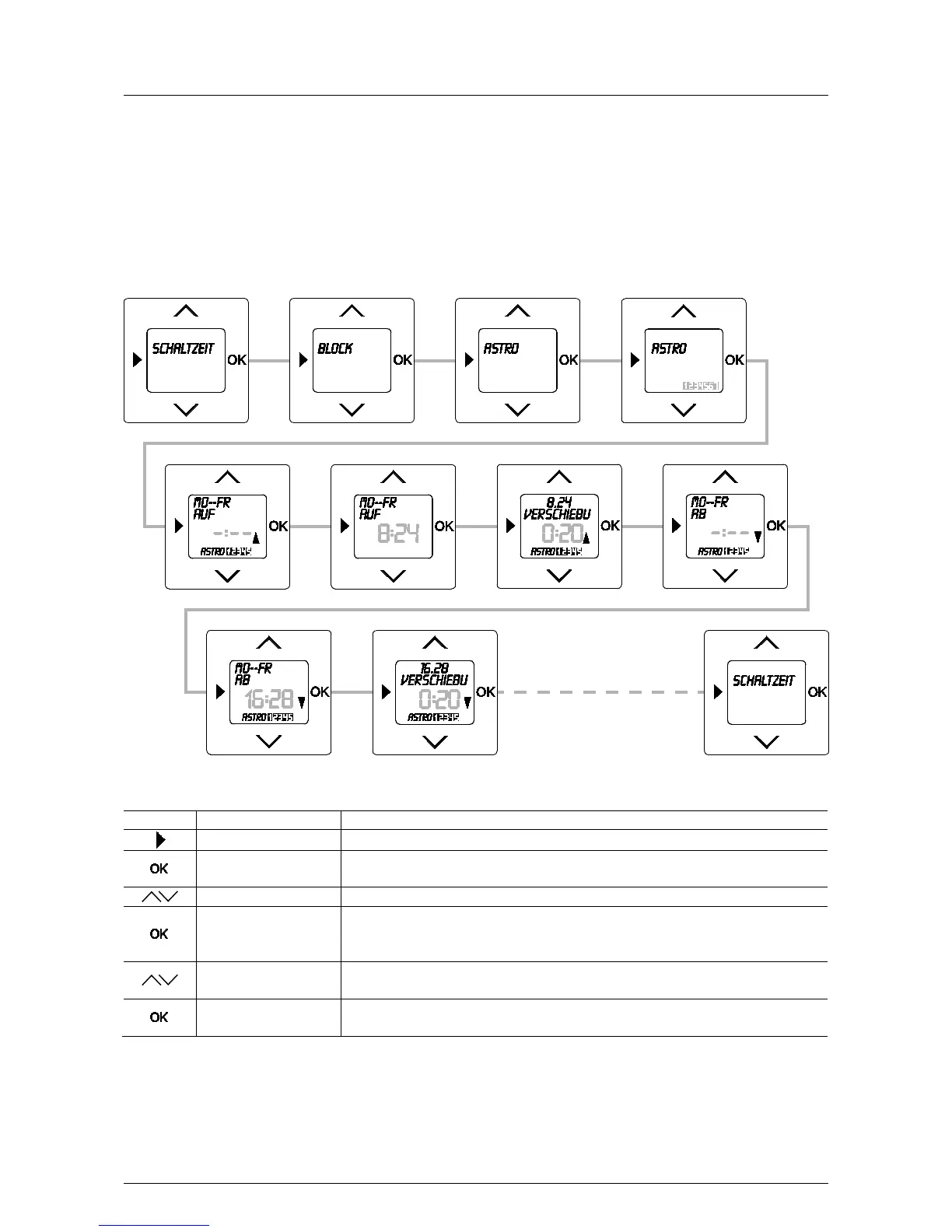
5.8.2 ASTRO function
Pos: 66 / #Ne ustr ukt ur# /Onl in e-Do kume ntati on (+ KNX) /B edie nung /Ti mer/ Astr o-Funktion (Einleitung) - 645 5 @ 28\mod_1346999920136_15.docx @ 231698 @ 2212 @ 1
By activating the astro function the switching times are automatically adjusted each day to the yearly process of
sunrise and sunset.
The astro switching times are designed as blocks for Mon-Fri and Sat-Sun. Also the entry of a time shift (±90
minutes) is possible in addition to the astro time. With the time shift the astro time can be adapted to the regional
conditions.
Pos: 67 / #Ne ustr ukt ur# /Onl in e-Dokumentation (+KNX) /Bedi e nung /Ti mer/ Ein stel lu ngen Astr o-F unkt ion - 645 5 Jalousi e @ 28\mod_1347000021333_15.docx @ 231791 @ 12 @ 1
Fig. 12: Menu item – Astro
Sequence of operating steps



 To Next Page