Pos: 75 /#Neust ru ktur# /O nlin e-Do kume ntati on (+K NX) /Üb ersc hr ift en (--> Für all e D oku ment e <--)/2. Ebene/S - T/Sonderfunktionen aufrufen @ 28\mod_1347000678094_15.docx @ 231952 @ 2211111112222 @ 1
5.9 Calling up special functions
Pos: 76 /#Neust ru ktur# /O nlin e-Do kume ntati on (+K NX) /Bedi e nung /Ti mer/ S ond erfu nkti one n au fruf en ( Ei nleit ung ) - 6455-1098 @ 28\mod_1347000761227_15.docx @ 231965 @ 311 @ 1
The settings of the special functions that are available and how the menu items are called up is described here. A
detailed description of the individual functions is contained in the following sub-sections.
Pos: 77 / #Ne ustr ukt ur# /Onl in e-Do kume ntati on (+ KNX) /Üb ersc hr ift en ( --> Für all e D oku ment e <--)/3 . Eb ene/U - Z/Z usat z-Sc halt zei ten akt ivier en @ 28\mod_1347019049789_15.docx @ 232373 @ 133 @ 1
5.9.1 Activating additional switching times
Pos: 78 / #Ne ustr ukt ur# /Onl in e-Do kume ntati on (+ KNX) /B edie nung /Ti mer/ Ein st ellu ngen - Sonderfunktionen - Zusatz -Schal tzei te n - 6455 @ 26\mod_1343815841166_15.docx @ 226431 @ 13322222222 @ 1
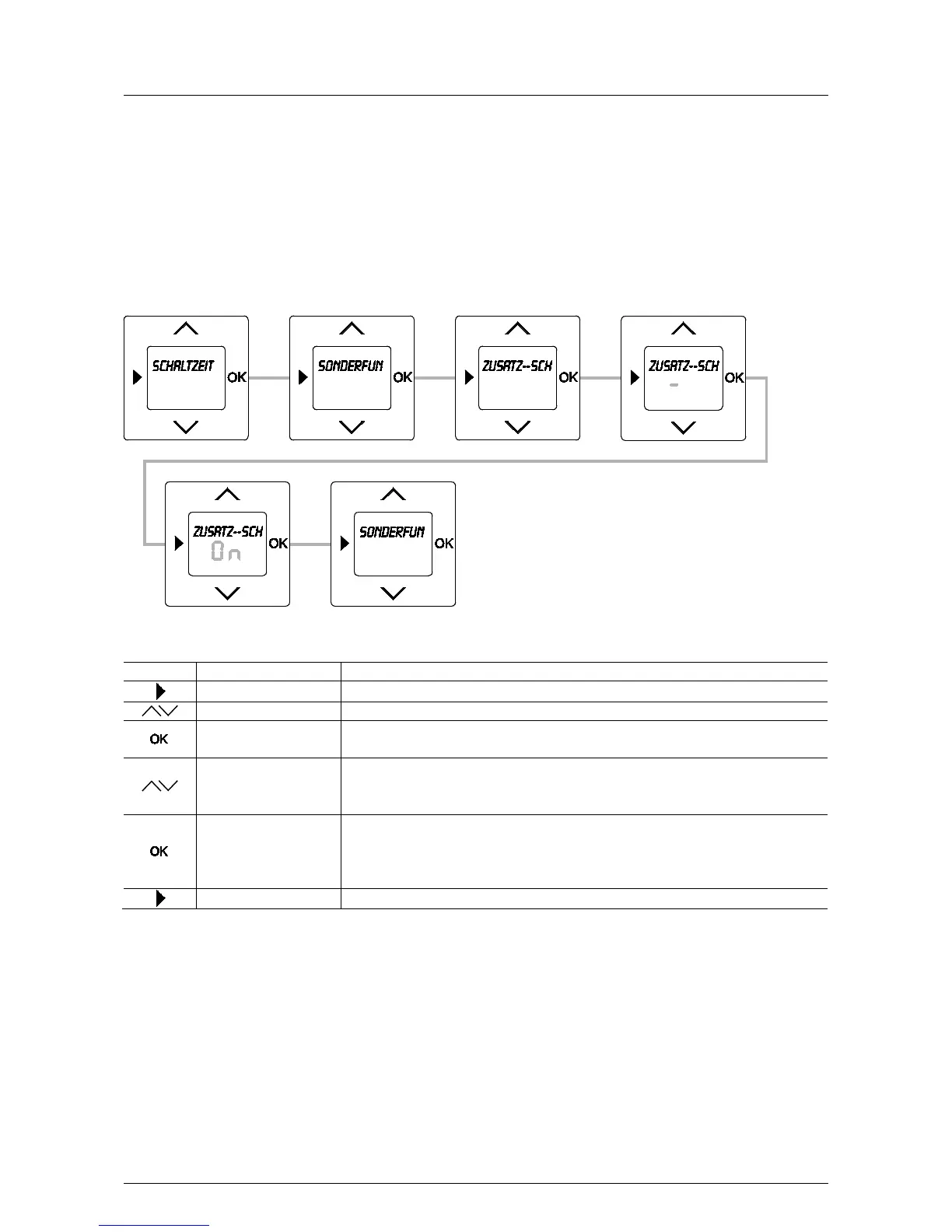
To enable additional switching times to be entered, menu item "Additional switching times" must first be activated.
See the following description:
Fig. 15: Menu item – Special functions / Additional switching times
Sequence of operating steps
Special functions
- Confirm your selection with the OK button.
The selection is stored. You simultaneously switch to menu "Special functions".
When selecting On: The further procedure for setting the "Additional switching times" is
- Press the menu button to switch to the operating mode.
Pos: 79 / #Ne ustr ukt ur# /Onl in e-Do kume ntati on (+ KNX) /S teuer mod ul e - Online-Dokumentation (--> Für al le Dokumente <--)/++++++++++++ Seitenumbruch ++++++++++++ @ 9\mod_1268898668093_0.docx @ 52149 @ 22323 @ 1



 To Next Page