Operating Instructions | 1473-1-8164
Pos: 72 / #Ne ustr ukt ur# /Onl in e-Do kume ntati on (+ KNX) /Üb ersc hr ift en ( --> Für all e D oku ment e <--)/3 . Eb ene/U - Z/Z usat z-Sc halt zei ten @ 28\mod_1347000356375_15.docx @ 231830 @ 211111111 @ 1
5.8.4 Additional switching times
Pos: 73 / #Ne ustr ukt ur# /Onl in e-Do kume ntati on (+ KNX) /B edie nung /Ti mer/ Ein st ellu ngen Z usat z-Sc halt zeit en - 6 455 Jal ousi e @ 28\mod_1347000401334_15.docx @ 231863 @ 21 @ 1
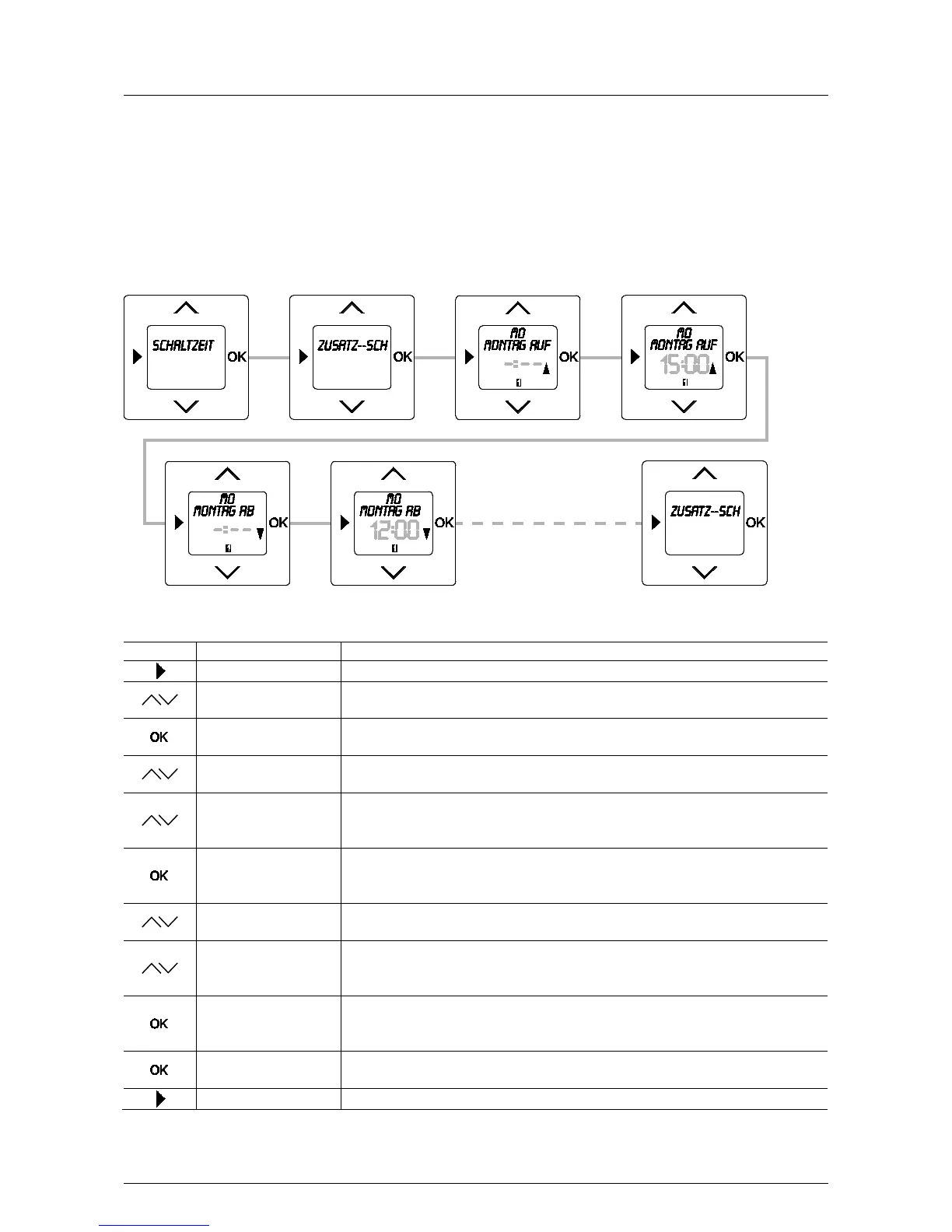
An additional up and down command can be set for each weekday in menu item "Additional switching times". This
makes it possible, for example, to reproduce a lunch break or the blind moves into a ventilation position with the
first down-time and with the second down-time the blind closes completely.
To enable the additional switching times to be entered, the menu item must first be activated in menu "Special
functions". See section 5.9.1. Only then will the additional switching times appear on the "Menus" level.
Fig. 14: Menu item – Individual
Sequence of operating steps
Switching times
- Press the menu button to switch to the setting mode.
Additional switching
- Select menu item "Additional switching times" via the arrow buttons.
MONday UP / -:--
You simultaneously switch to the next menu item "Monday UP".
MOntag AUF / 15:00
- Press one of the arrow buttons.
The suggested up-time flashes.
15:00
- Change the time via the arrow buttons.
In this example the up-time of 15:00 has been taken over.
No switching time will be set if the flashing display
MONday Down / -:--
- Confirm your entry with the "OK" button.
You simultaneously switch to the next menu item "Monday DOWN".
MONday Down / 12:00
- Press one of the arrow buttons.
The suggested down-time flashes.
12:00
- Change the time via the arrow buttons.
In this example the down-time of 12:00 has been taken over.
No switching time will be set if the flashing display
Tuesday UP / 15:00
- Confirm your entry with the "OK" button.
You simultaneously switch to the next weekday. If desired, use the same procedure for
- Confirm your entry with the "OK" button.
The switching times have been set.
- Press the menu button to switch to the operating mode.
Pos: 74 / #Ne ustr ukt ur# /Onl in e-Do kume ntati on (+ KNX) /S teuer mod ul e - Online-Dokumentation (--> Für alle Dokumente <--)/++++++++++++ Seitenumbruch ++++++++++++ @ 9\mod_1268898668093_0.docx @ 52149 @ 222 @ 1



 To Next Page