Operating Instructions | 1473-1-8164
5.9.5.2 Twilight function
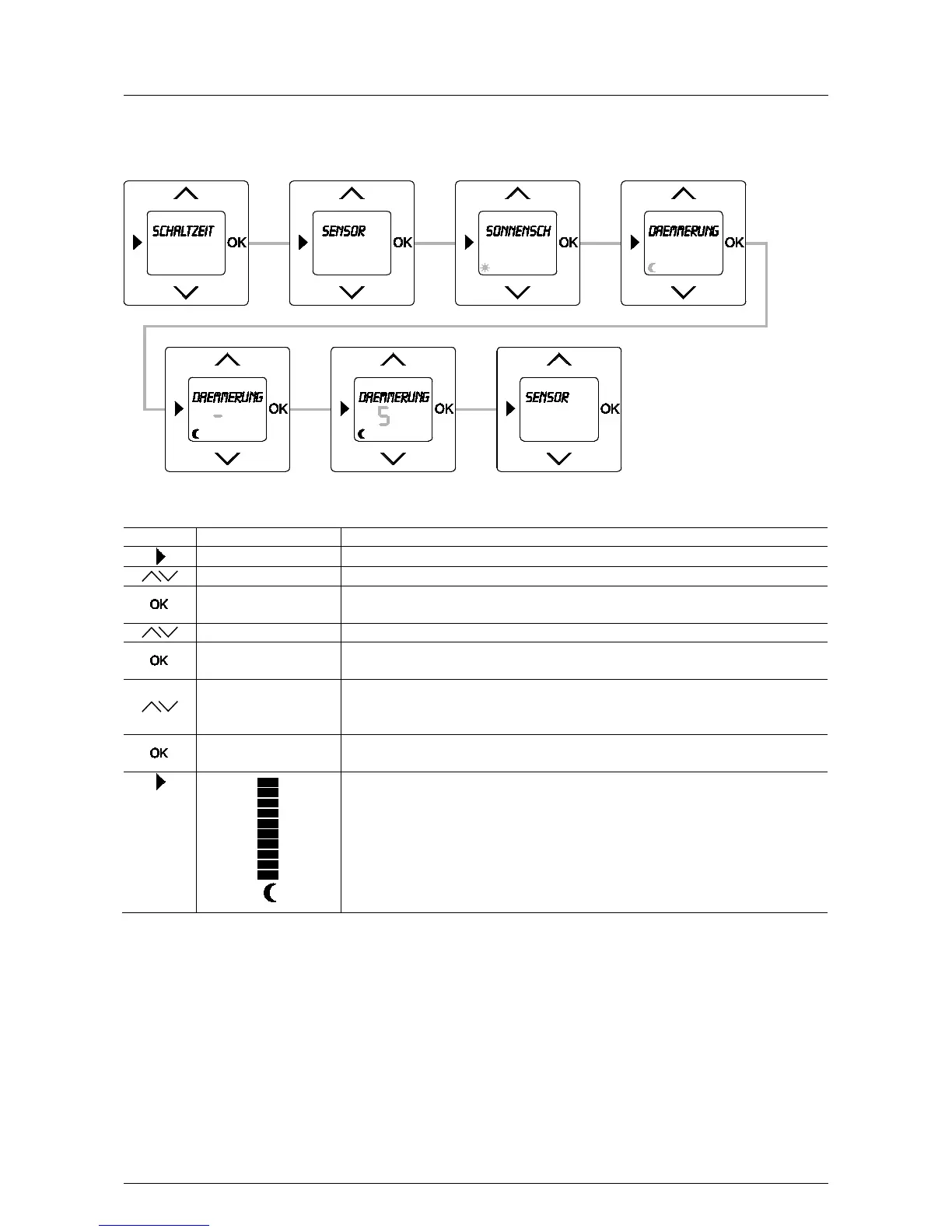
Fig. 20: Menu item – Sensor / Twilight
Sequence of operating steps
Switching times
- Press the menu button to switch to the setting mode.
- Select menu "Sensor" via the arrow buttons.
Sun protection
- Press the OK button.
Menu item "Sun protection" is displayed.
- Select menu item "Twilight" via the arrow buttons.
5
- Set a brightness value (0 to 9) via the arrow buttons at which the blind moves DOWN. For
setting (-) the function is OFF.
In this example the value 5 has been set.
Sensor
- Confirm your entry with the "OK" button.
You simultaneously switch to menu "Sensor".
- Press the menu button to switch to the operating mode.
The bar in the display indicates the currently set brightness value.
The twilight function closes the blind if the set brightness value falls short for more than 90
seconds.
The twilight function is active only starting from 15:00 h.
If the set twilight value falls short, the "Moon" symbol in the display flashes.
After closing, the blind will remain closed until the next UP command.
Pos: 91 / #Ne ustr ukt ur# /Onl in e-Do kume ntati on (+ KNX) /S teuer mod ul e - Online-Dokumentation (--> Für alle Dokumente <--)/++++++++++++ Seitenumbruch ++++++++++++ @ 9\mod_1268898668093_0.docx @ 52149 @ 332114 @ 1



 To Next Page