Operating Instructions | 1473-1-8164
Pos: 86 / #Ne ustr ukt ur# /Onl in e-Do kume ntati on (+ KNX) /Üb ersc hr ift en ( --> Für all e D oku ment e <--)/3. Ebene/A - F/As tro-S per rzei t @ 28\ mod_1347002725649_15.docx @ 232164 @ 144444222224 @ 1
5.9.4 ASTRO blocking time
Pos: 87 / #Ne ustr ukt ur# /Onl in e-Do kume ntati on (+ KNX) /B edie nung /Ti mer/ Ein st ellu ngen - Sonderfunktionen - Astro-Sp err zeit - 6455_6456 Jalousie @ 26\mod_1343816103336_15.docx @ 226470 @ 212 @ 1
The set switching times of the astro function can be limited with the "Astro blockage time" function.
ASTRO blocking
Not earlier UP than ... o'clock
Not earlier DOWN than ... o'clock
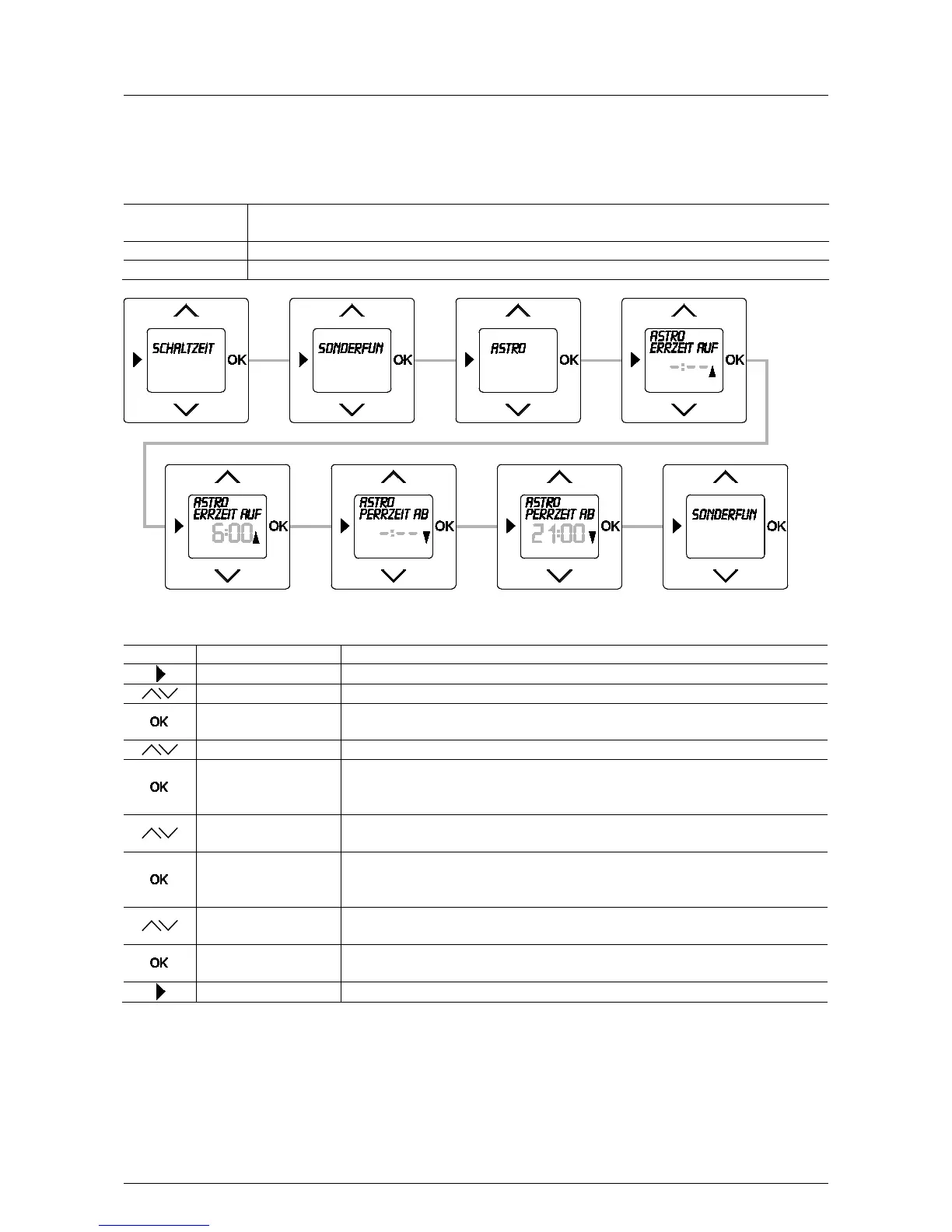
Fig. 18: Menu item – Astro blocking time
Sequence of operating steps
Switching times
- Press the menu button to switch to the setting mode.
- Select menu "Special functions" via the arrow buttons.
Menu item "Additional switching times" is displayed.
- Select menu "Astro" via the arrow buttons.
- Confirm your selection with the OK button.
You simultaneously switch to the next menu item "Astro blocking time UP".
6:00
- Set the earliest time via the arrow buttons from which the blind is to be moved up.
In this example the preset time of 6:00 has been taken over.
- Confirm your selection with the OK button.
You simultaneously switch to the next menu item "Astro blocking time DOWN".
21:00
- Set the earliest time via the arrow buttons from which the blind is to be moved down.
In this example the preset time of 21:00 has been taken over.
Special functions
- Confirm your entry with the "OK" button.
You simultaneously switch to menu "Special functions".
- Press the menu button to switch to the operating mode.
Pos: 88 / #Ne ustr ukt ur# /Onl in e-Do kume ntati on (+ KNX) /S teuer mod ul e - Online-Dokumentation (--> Für alle Dokumente <--)/++++++++++++ Seitenumbruch ++++++++++++ @ 9\mod_1268898668093_0.docx @ 52149 @ 322111 @ 1



 To Next Page