Operating Instructions | 1473-1-8164
Pos: 69 / #Ne ustr ukt ur# /Onl in e-Do kume ntati on (+ KNX) /Üb ersc hr ift en ( --> Für all e D oku ment e <--)/3 . Eb ene/G - L/I ndi viduel le Sch altz eit en @ 28\ mod_1347000174088_15.docx @ 231804 @ 2222122 @ 1
5.8.3 Individual switching times
Pos: 70 / #Ne ustr ukt ur# /Onl in e-Do kume ntati on (+ KNX) /B edie nung /Ti mer/ Ein st ellu ngen I ndivi duel le Sch altz eit en - 6455 J alous ie @ 28\ mod_1347000228517_15.docx @ 231817 @ 1122 @ 1
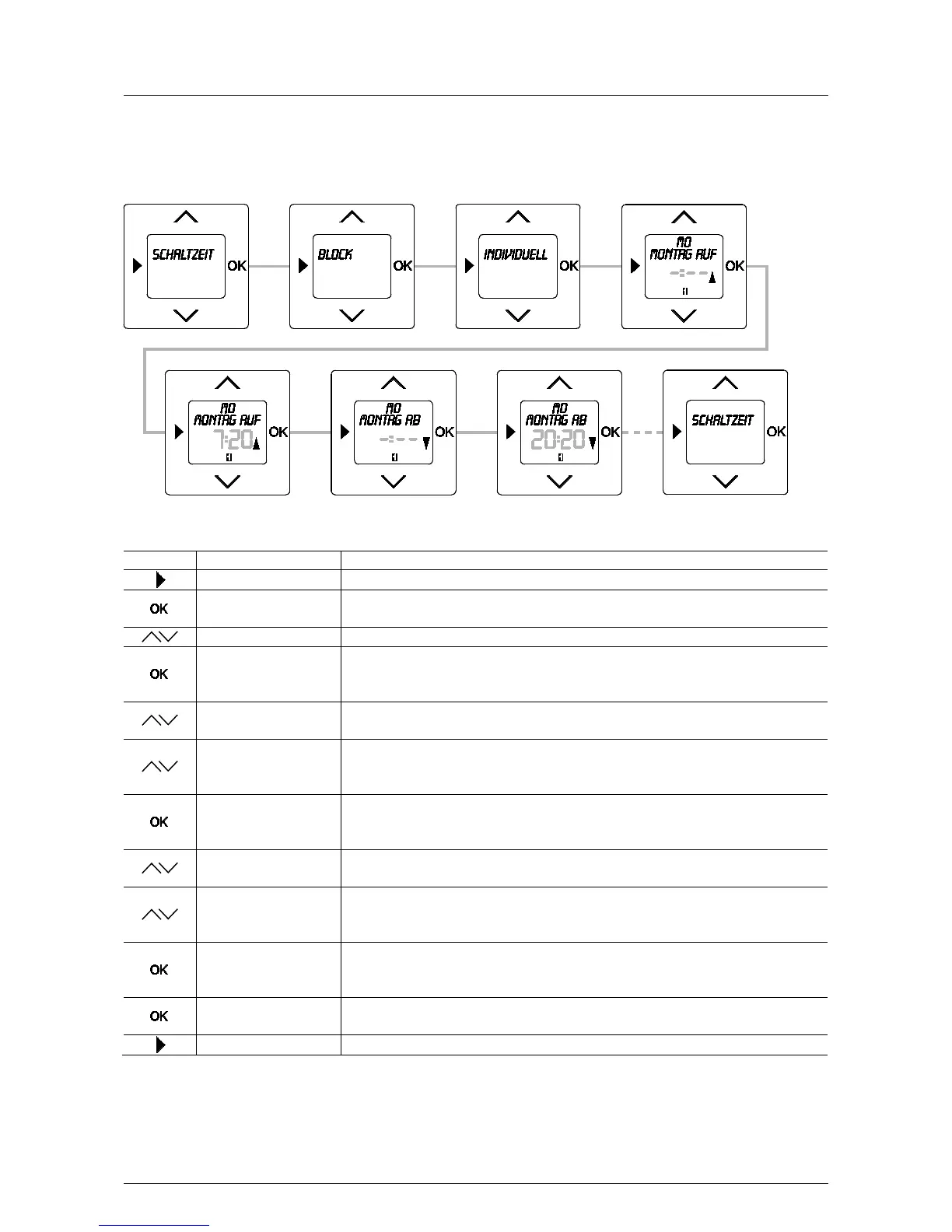
The times for moving up and down for each day can be set independent of each other via menu item "Individual".
Fig. 13: Menu item – Individual
Sequence of operating steps
Switching times
- Press the menu button to switch to the setting mode.
BLOCK
- Press the OK button.
Menu item "Block" is displayed.
- Select menu item "Individual" via the arrow buttons.
MONday UP / -:--
- Press the OK button.
You simultaneously switch to the next menu item "Monday UP".
MONday UP / 7:00
- Press one of the arrow buttons.
The suggested up-time flashes.
7:20
- Change the time via the arrow buttons.
In this example the up-time has been set at 7:20.
No switching time will be set if the flashing display
MONday Down / -:--
- Confirm your entry with the "OK" button.
You simultaneously switch to the next menu item "Monday DOWN".
MONday Down / 20:00
- Press one of the arrow buttons.
The suggested down-time flashes.
20:20
- Change the time via the arrow buttons.
In this example the down-time has been set at 20:20.
No switching time will be set if the flashing display
Tuesday UP / 7:00
- Confirm your entry with the "OK" button.
You simultaneously switch to the next weekday. If desired, use the same procedure for
Switching times
- Confirm your entry with the "OK" button.
The switching times have been set.
- Press the menu button to switch to the operating mode.
Pos: 71 / #Ne ustr ukt ur# /Onl in e-Do kume ntati on (+ KNX) /S teuer mod ul e - Online-Dokumentation (--> Für alle Dokumente <--)/++++++++++++ Seitenumbruch ++++++++++++ @ 9\mod_1268898668093_0.docx @ 52149 @ 33432 @ 1



 To Next Page