Operating Instructions | 1473-1-8164
Pos: 35 /#Neust ru ktur# /O nlin e-Do kume ntati on (+K NX) /Üb ersc hr ift en (--> Für all e D oku ment e <--)/2. Ebene/A - F/D ispl ay und S ymbole @ 25\mod_1340698574878_15.docx @ 220111 @ 33333333 @ 1
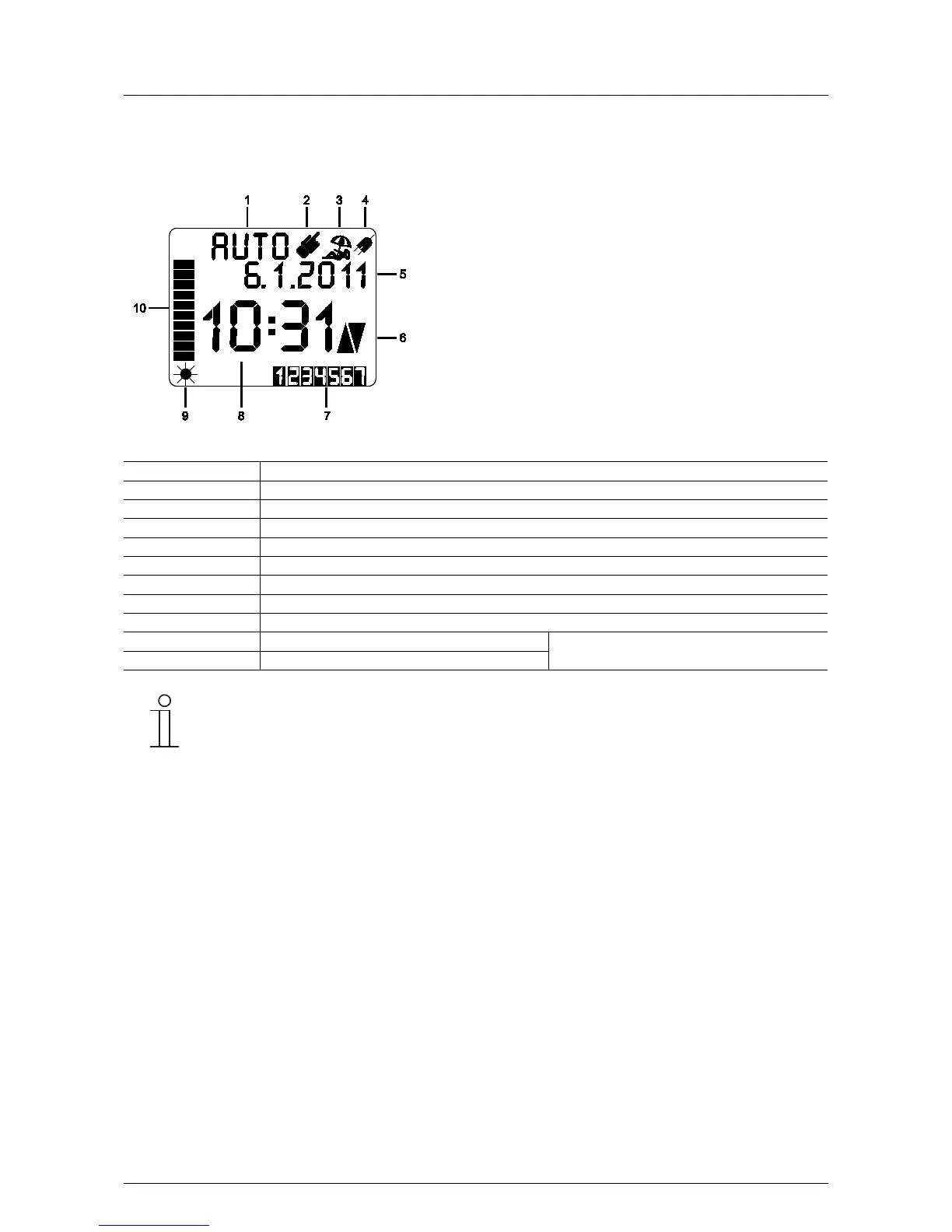
5.4 Display and icons
Pos: 36 /#Neust ru ktur# /O nlin e-Do kume ntati on (+K NX) /Bedi e nung /Ti mer/D is pl ay - 64 55 J al ousi e @ 28\ mod_1346940777328_15.docx @ 231020 @ 233333333 @ 1
Fig. 4: Display with symbols
“Automatic” operating mode
Venetian blind control UP/DOWN
Sun protection / twilight function
Only in connection with 6411 U/S-101 and sensor
Current actual value of the sensor
If the text is too long for the info line, it will run continuously through the info line.
Pos: 37 / #Ne ustr ukt ur# /Onl in e-Do kume ntati on (+ KNX) /S teuer mod ul e - Online-Dokumentation (--> Für alle Dokumente <--)/++++++++++++ Seitenumbruch ++++++++++++ @ 9\mod_1268898668093_0.docx @ 52149 @ 3 @ 1



 To Next Page