Operating Instructions | 1473-1-8164
Pos: 46 / #Ne ustr ukt ur# /Onl in e-Do kume ntati on (+ KNX) /Üb ersc hr ift en ( --> Für all e D oku ment e <--)/3. Ebene/A - F/ Dat um u nd U hrz eit ei nstel le n @ 2 8\mod_1347000521439_15.docx @ 231876 @ 23233333222 @ 1
5.6.2 Setting date and time
Pos: 47 / #Neustruktur#/Online-Do kume ntat ion (+ KN X)/B edi enu ng/Ti mer /Ei nst ell ung en Da tum /Uhr zei t - 6 455 @ 26 \mod_1343378823018_15.docx @ 225719 @ 33323 @ 1
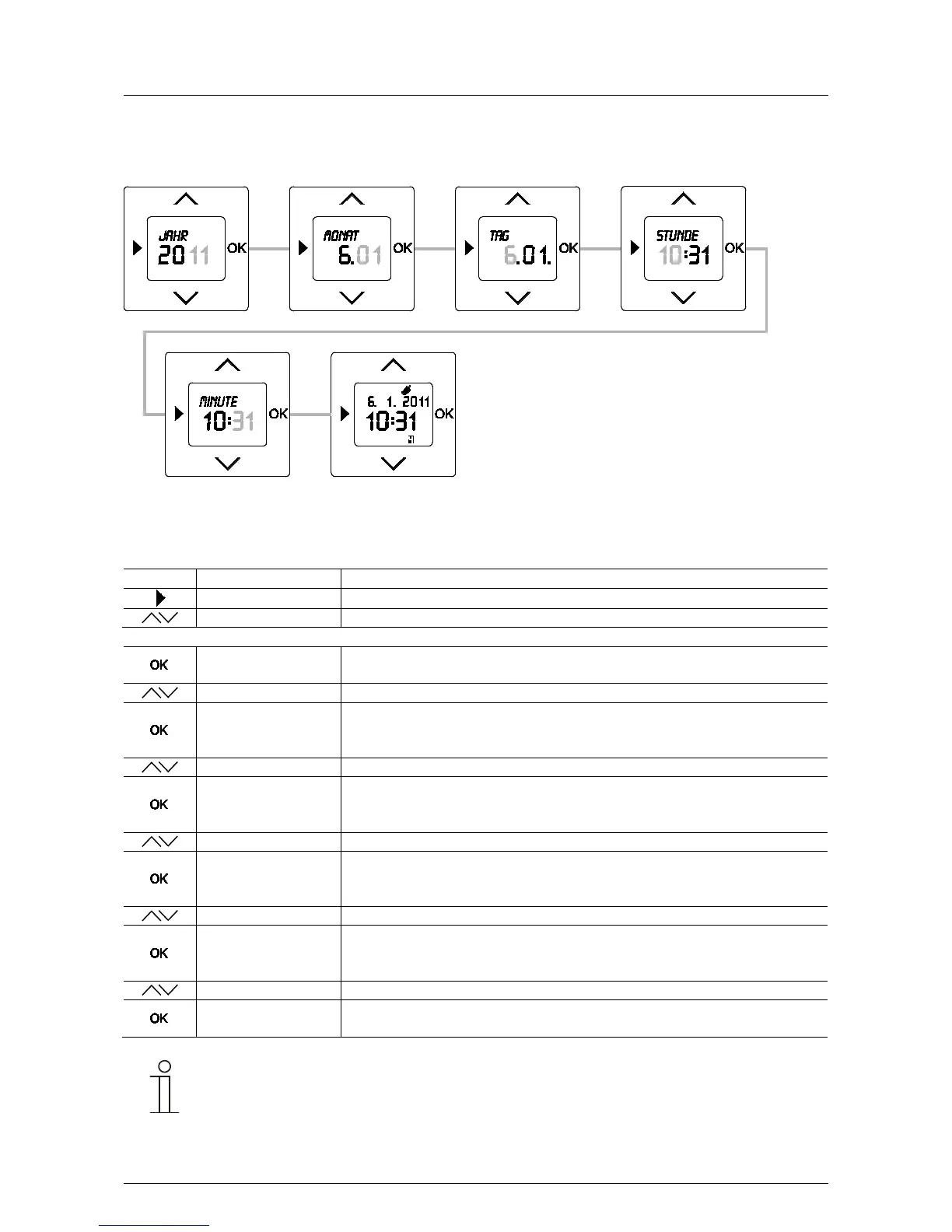
Fig. 6: Setting the date and time
Sequence of operating steps
The first two steps need only be carried out if the date and time are to be changed later. During initial
commissioning you will be asked to enter the year directly after selecting the language.
Switching times
- Press the menu button to switch to the setting mode.
- Select menu "Date - Time" via the arrow buttons.
Year / --:--
- Confirm your selection with the OK button.
– Set the year via the arrow buttons.
Month / --:--
- Confirm your entry with the "OK" button.
You simultaneously switch to the next menu item "Month".
The preset month flashes.
- Set the month via the arrow buttons.
Day / --:--
- Confirm your entry with the "OK" button.
You simultaneously switch to the next menu item "Day".
- Set the day via the arrow buttons.
Hour / --:--
- Confirm your entry with the "OK" button.
You simultaneously switch to the next menu item "Hour".
- Set the hour via the arrow buttons.
Minute / --:--
- Confirm your entry with the "OK" button.
You simultaneously switch to the next menu item "Minute".
The preset minute flashes.
- Set the minutes via the arrow buttons.
- Confirm your entry with the "OK" button.
The timer changes into the operating mode.
Note
Pressing the menu button switches from setting mode to operating mode. All entries that were
confirmed previously with the OK button are taken over.
Pos: 48 / #Ne ustr ukt ur# /Onl in e-Do kume ntati on (+ KNX) /S teuer mod ul e - Online-Dokumentation (--> Für alle Dokumente <--)/++++++++++++ Seitenumbruch ++++++++++++ @ 9\mod_1268898668093_0.docx @ 52149 @ 32 @ 1



 To Next Page