Encoder Selects the stereo generator mode, from either: Stereo, Mono L+R, Mono L, Mono R
and Swap L + R.
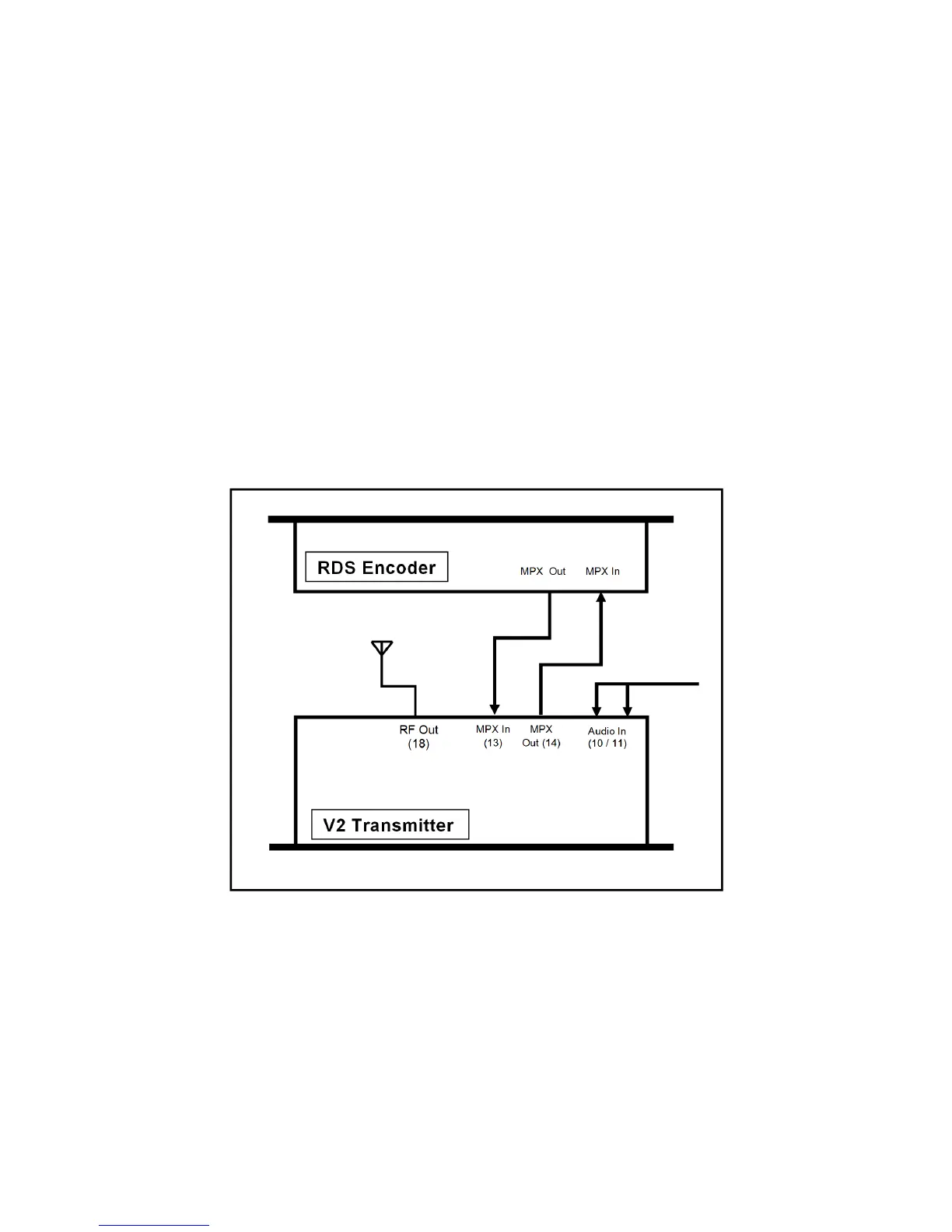
MPX Source Selects if the MPX source for the exciter is internal or external. If using the V2 trans-
mitter with no external equipment (RDS, audio processor etc) then set to internal. If using any
external equipment set to external. When set to internal, the MPX In and MPX Out connectors
are internally connected. which routes the internal stereo generator directly to the exciter.
When set to external, the internal the internal stereo generator and audio processor are still
functioning, but the MPX in and MPX out connections are not internally connected, allowing
MPX signals to be routed to and/or from external equipment.
6.2 Examples of Use
6.2.1 Transmitter with an external RDS encoder and internal audio processing
1. Place the transmitter in a well ventilated space.
2. Connect the antenna to the RF output connector on the back of the transmitter.
3. Connect the left and right program audio signals to the XLR input connectors on the
back of the transmitter. If using AES/EBU digital, connect this to the left audio input XLR
connector.
26



 To Next Page