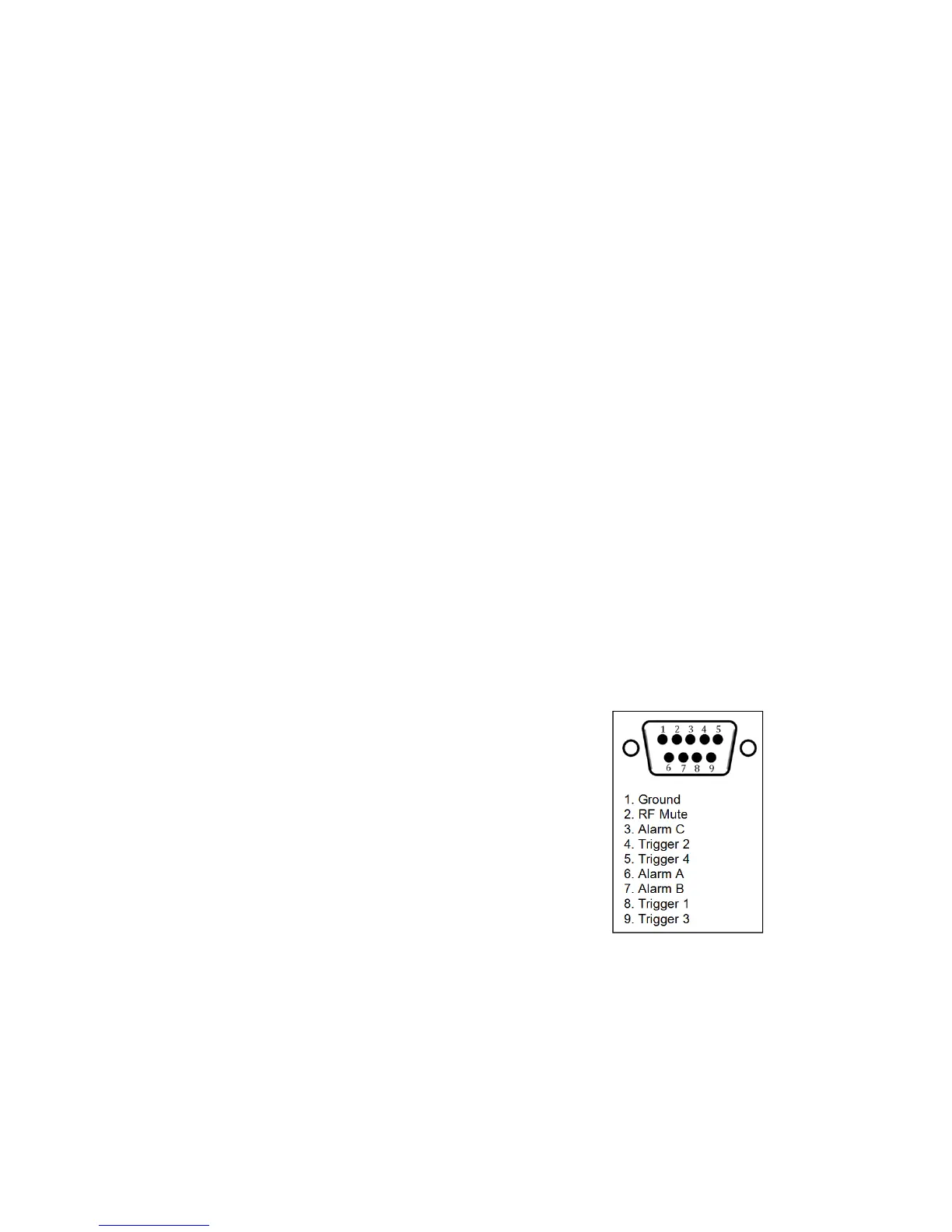
Triggers are used to control certain parameters on
the V2 Transmitter using the relevant pins on the rear
alarms and triggers connector. To fire a trigger, the
pin must be pulled low.
To set up a trigger:
1. Connect the required trigger pin to the required source. Make sure that the voltage
and current levels are compatible.
2. Navigate to the Triggers folder and enter the required trigger folder (Trigger 1, ..., Trigger
4).
3. Set Enable to Enabled.
4. Select the Action that the trigger will perform. Options are: Frequency Up, Frequency
Down, Power Up, Power Down, RF Mute and Reboot. Frequency Up, Frequency Down,
Power Up, Power Down and reboot will perform the action on falling edges of the signal
on the trigger pin. RF Mute acts based on voltage levels. RF Mute will be engaged for
as long as the trigger signal is pulled low and unmute when the signal is high.
5. If you require email alerts, set Send e-mail to Yes. Make sure e-mails are setup correctly.
(Refer to the e-mails section in this manual)
6. If Send e-mail is set to Yes, enter the (ON) Message that the trigger will send when fired.
7.4 Alarms
Figure 7.2: Alarms and Triggers Port
Alarms on the V2 Transmitter indicate that a failure
condition is met. They can be set to go off on Mod-
ulation level, Forward power, Reverse power and PLL
lock fail. Upon triggering they will toggle the relevant
pin on the rear alarms and trigger connector. They
will also write a notification to the RS232, write to the
system log and send an e-mail if required. Alarm pins
can be configured as open-collector Outputs (when
working as alarms) or as Analog outputs (for reporting
system parameters as analog voltages). When used
as alarms, 10 kOhm external pull-up resistors to 12 V
should be placed on each pin to be able observe
voltage changes in the alarm pins.
To set up an Alarm pin as Alarm:
1. If required, connect the required alarm pin to the external measuring equipment. Ob-
serve correct current and voltage ratings. Note that an external pull-up resistor may be
required.
34



 To Next Page