1.1 01/2012 © CAME cancelli automatici s.p.a. - The data and information in this manual may be changed at any time and without obligation on the part of Came Cancelli Automatici S.p.a. to notify said changes.
ENGLISH
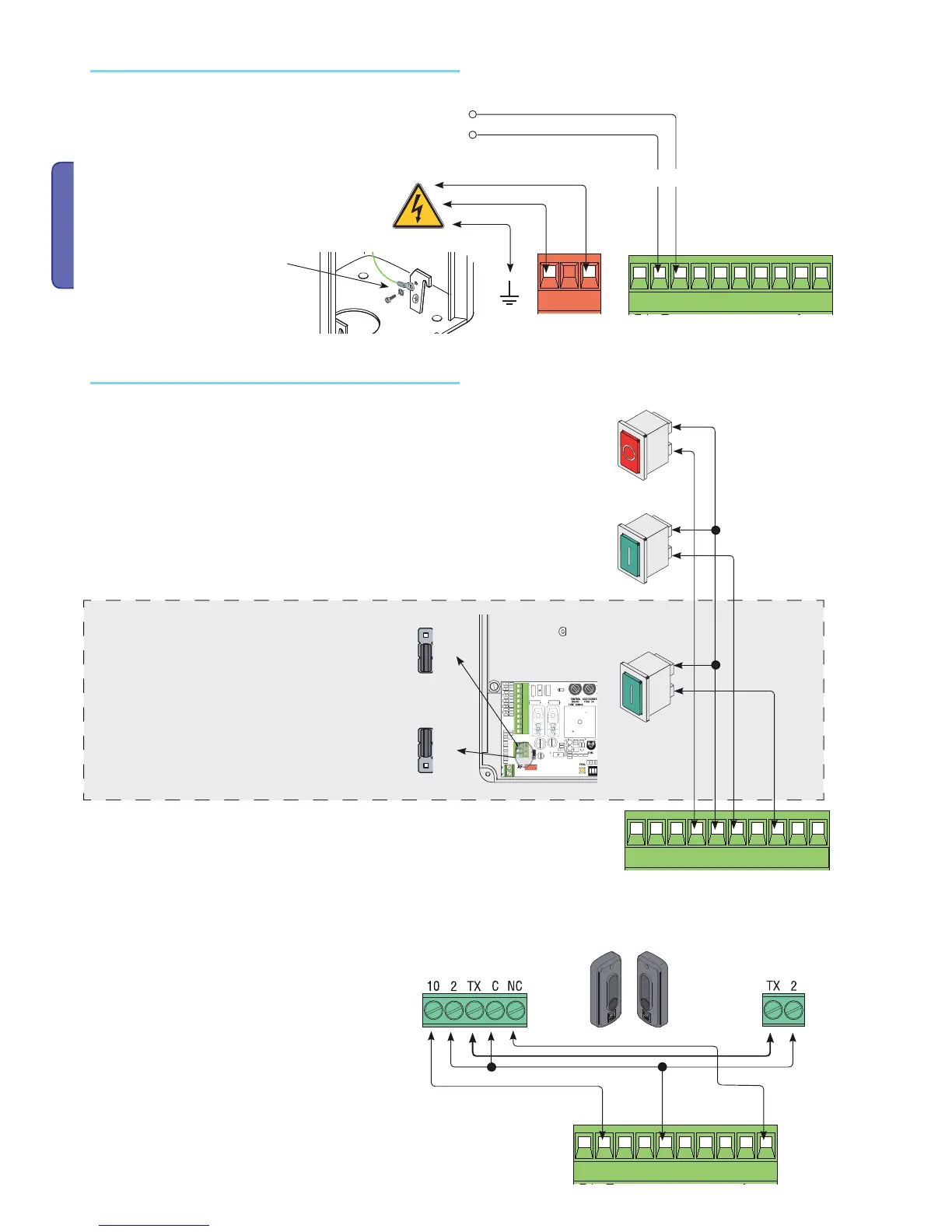
Terminals for powering accessories:
- normally at 24V A.C;
- when emergency batteries are operating;
Overall allowed power: 40 W
Power supply
Power supply 230V (a..C.)Frequency 50/60 Hz
Eyelet terminal with screw and
washer for ground connection
Command button (N.O. contact ) - Barrier-arm opening
and closing command. The barrier opens or inverts its
movement depending on what is selected on Dip switch
2.)
Check position of jumper (n 14, page 15) as shown in
fi gure.
Command devices
Closing button (N.O. contact) - Barrier-arm closing
command. This command is obligatory with the
"maintained action" function.
Position jumper as shown.
Immediate closing (N.C.) contact
Automatic closing of barrier arm after obstacle passes
within operating range of safety devices
if unused, set Dip switch 8 to ON.
DIR photocells
Stop button (N.C. contact) - Button to stop barrier arm Excludes automatic closing. To resu-
me movement press the command button or trasmitter key.
if unused, set Dip switch 9 to ON.
Opening button (N.O. contact) - Barrier-arm opening command.



 To Next Page
 Loading...








