COPYRIGHT
©
2002 CANON INC. CANON CLC1100/1130/1150/1160/1180 REV.1 FEB. 2002 PRINTED IN JAPAN (IMPRIME AU JAPON)
7-101
CHAPTER 7 PICK-UP / FEEDING SYSTEM
F. Transfer Drum Cleaner
Locking Motor Assembly
(PM6)
1. Removing the Transfer Drum
Cleaner Locking Motor Assembly
1) Slide out the transfer drum frame.
2) Remove the rear cover.
3) Open the CPU PCB.
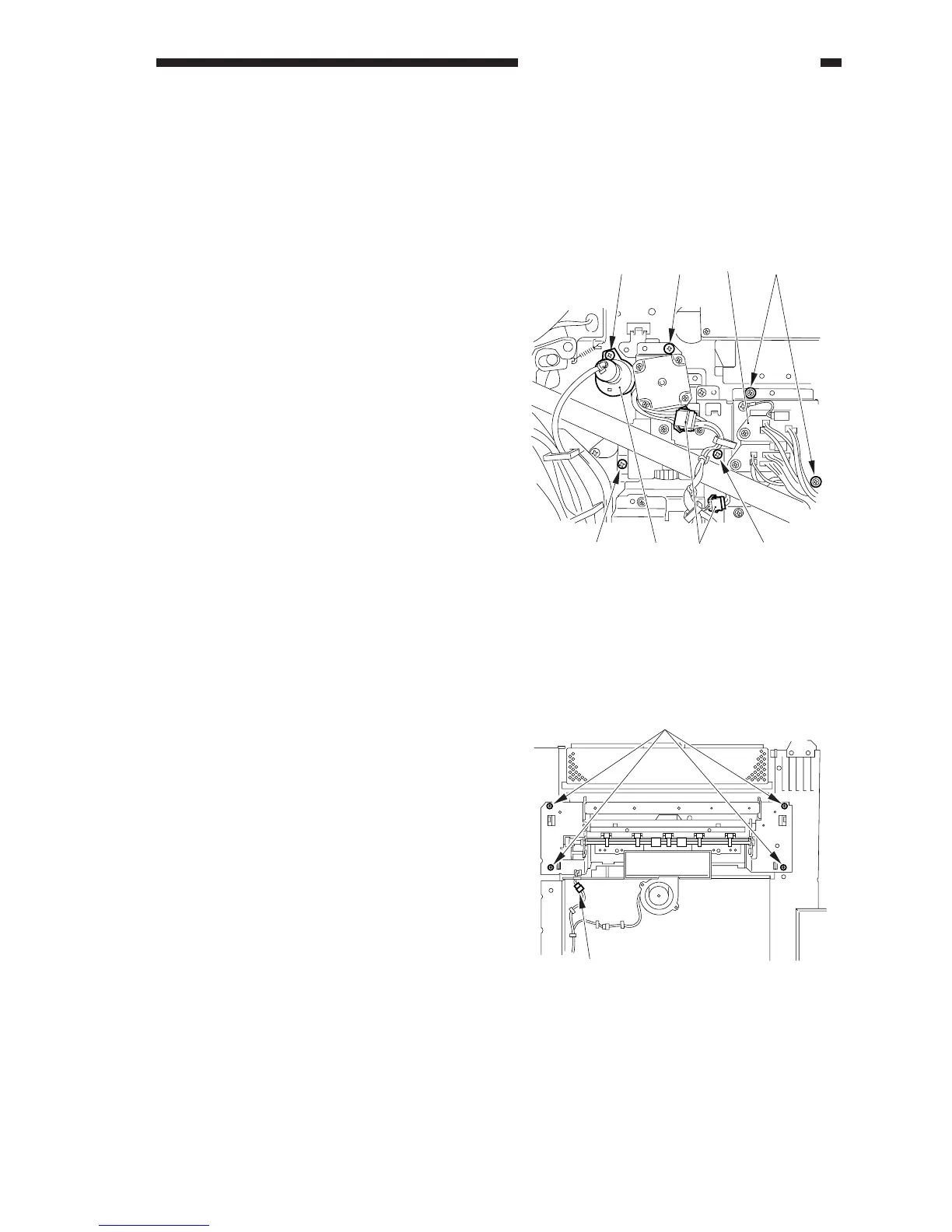
4) Remove the screw [1], and disconnect the
external static eliminator connector [2].
5) Remove the two screws [3], and remove
the fixing assembly connector base [4].
6) Remove the three screws [5], and
disconnect the two connectors [6]; then,
detach the transfer drum cleaner locking
motor assembly.
Figure 7-874
[5] [4] [3]
[5] [5][6][2]
[1]
G. Delivery Assembly
(CLC1100/1120/1130/1140/
1160 only)
1. Removing the Delivery Assembly
1) Remove the left upper cover.
2) Remove the delivery cover.
3) Remove the four screws [1], and
disconnect the connector [2].
4) Slide out the delivery assembly to detach.
Figure 7-875
[2]
[1]



 To Next Page