CHAPTER 10 PAPER DECK
10-28
COPYRIGHT
©
2002 CANON INC. CANON CLC1100/1130/1150/1160/1180 REV.1 FEB. 2002 PRINTED IN JAPAN (IMPRIME AU JAPON)
C. Drive System
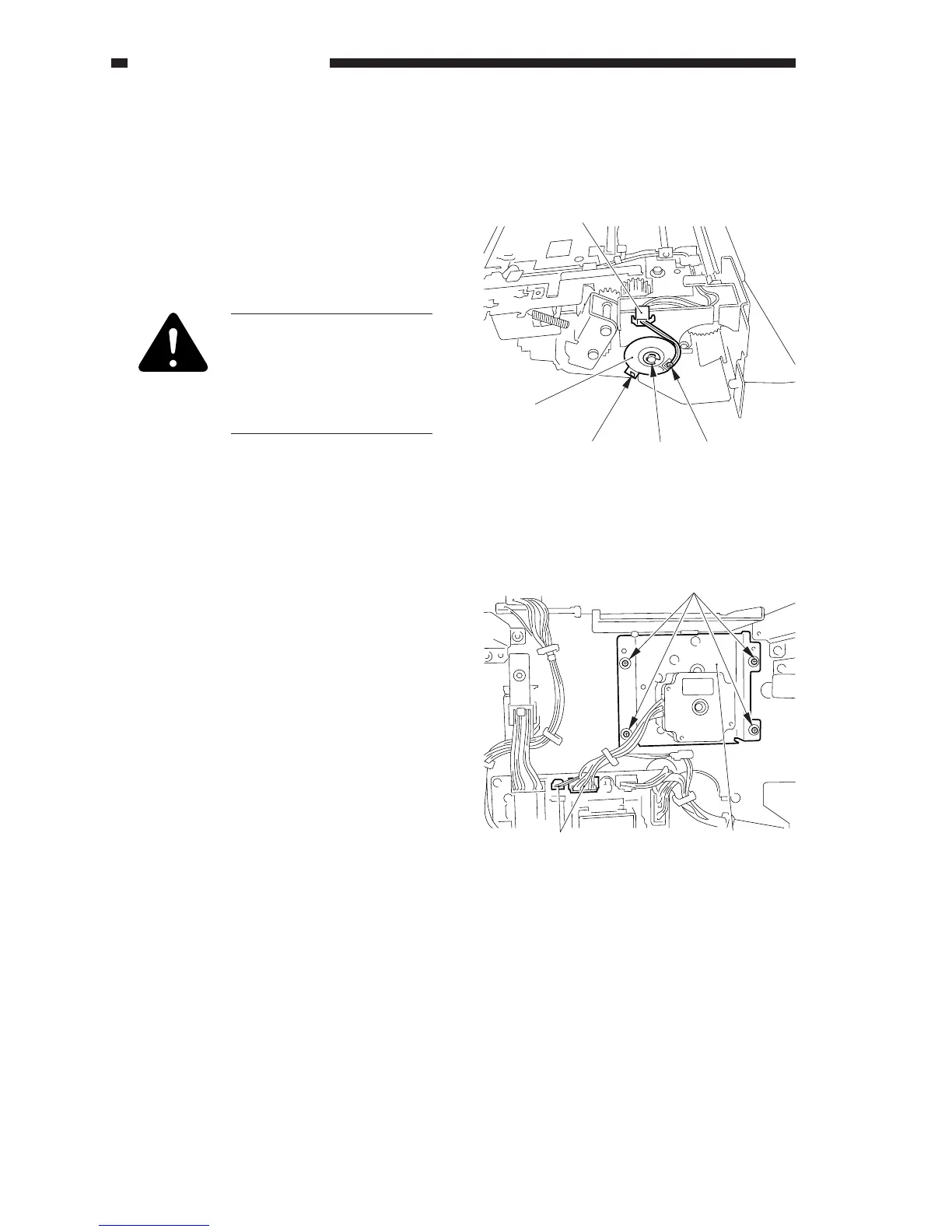
1. Removing the Deck Pickup Clutch
(CL102)
1) Remove the deck pickup unit. (p. 10-34)
2) Disconnect the connector [1], and remove
the E-ring [2]; then, detach the deck
pickup clutch [3].
When mounting the pickup
clutch, be sure to put the
clutch in the slip stop [4].
Be sure also to hook the
harness on the U groove [5]
of the guide.
Figure 10-324
2. Removing the Deck Pickup Motor
Assembly
1) Disconnect the deck from the copier; then,
remove the six screws, and detach the ear
cover.
2) Disconnect the two connectors [1] and
remove the four screws [2] of the deck
driver PCB; then, detach the deck pickup
motor assembly [3].
Figure 10-325
[2][4] [5]
[1]
[3]
[1]
[2]
[3]



 To Next Page