COPYRIGHT
©
2002 CANON INC. CANON CLC1100/1130/1150/1160/1180 REV.1 FEB. 2002 PRINTED IN JAPAN (IMPRIME AU JAPON)
2-9
CHAPTER 2 BASIC OPERATION
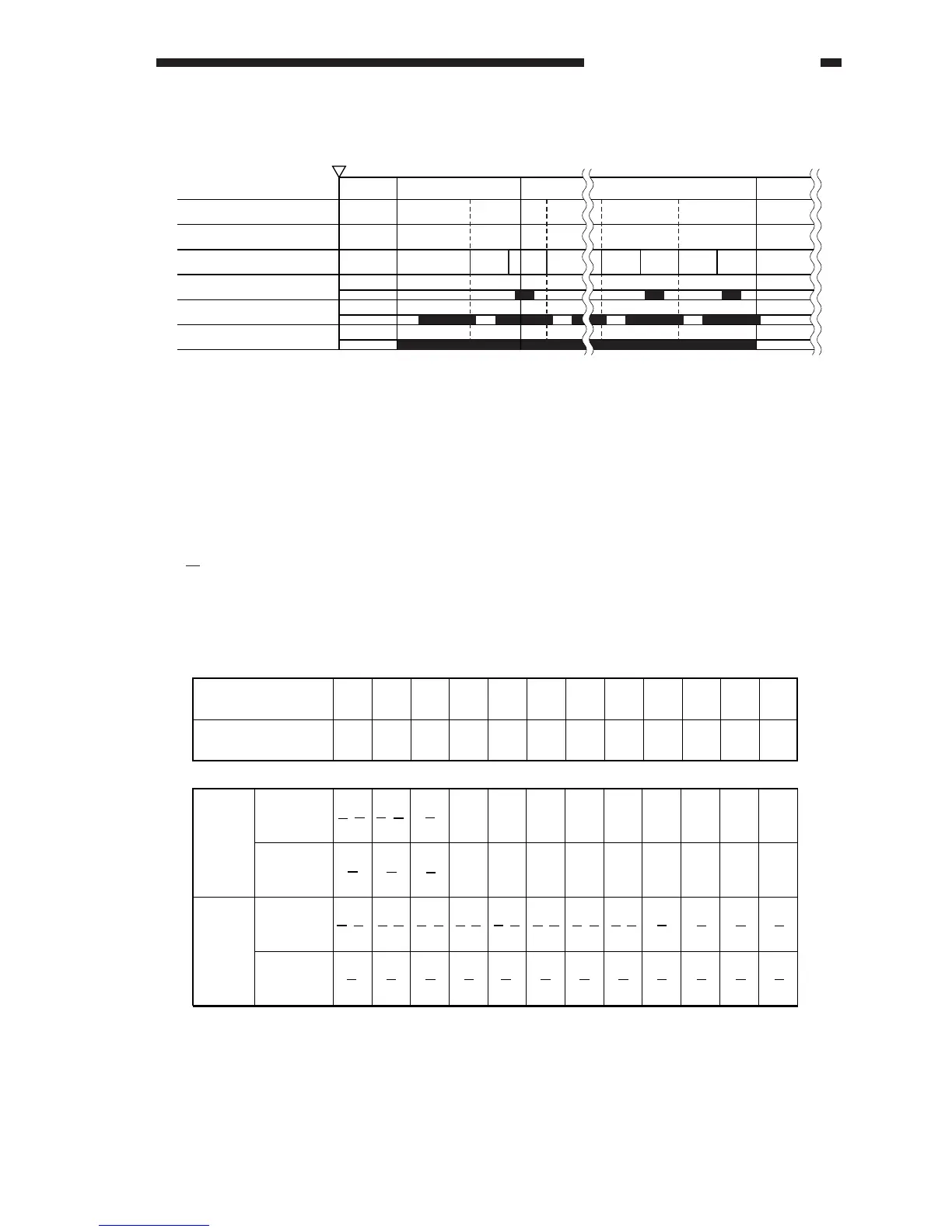
Figure 2-206
b. Transfer Drum When Copying on Side B
The tables that follow show how sheets of paper are placed on the transfer drum in each
copying mode; in mono-color copying, C, Y, and Bk use the same arrangement as M.
Small size: 216 mm or less (A4/LTR or smaller) in feeding direction.
Large size: 217 mm or more in feeding direction.
2: Indicates the number of sheets of paper (2nd sheet).
M: Indicates the color to develop (e.g., M development).
· In the case of small-size paper, copying starts on side B.
Table 2-203
Photosensitive drum revolution
Transfer drum revolution
Transfer drum side A/side B
Side A sensor (PS2)
Side B sensor (PS3)
Drum motor (M2)
INTR COPY LSTR STBYDSRDY
Start key
ON
19
19
8
8
BB B
AABA
2
M
234
5
6 7 8 9 10 11 121
B A B A B A B A B A B A B A B A B A B A B A B A
1
M
3
M
4
M
5
M
1
BK
2
BK
1
M
2
M
3
M
1
M
2
M
1
C
2
C
1
Y
2
Y
3
BK
4
BK
3
M
4
M
3
C
4
C
3
Y
4
Y
5
BK
5
M
5
C
5
Y
1
BK
1
M
1
C
1
Y
2
BK
2
M
2
C
2
Y
3
BK
3
M
3
C
3
Y
Transfer drum
revolution
Leading edge of
paper
Mono-
color
(M)
Full-
color
(MCYBk)
5 small-
size sheets
3 large-
size sheets
5 small-
size sheets
3 large-
size sheets



 To Next Page