EasyManua.ls Logo

Canon Canovision8 E50E - Page 145

Canon Canovision8 E50E
179 pages
Print Icon
To Next Page IconTo Next Page
To Previous Page IconTo Previous Page
Loading...
3-8
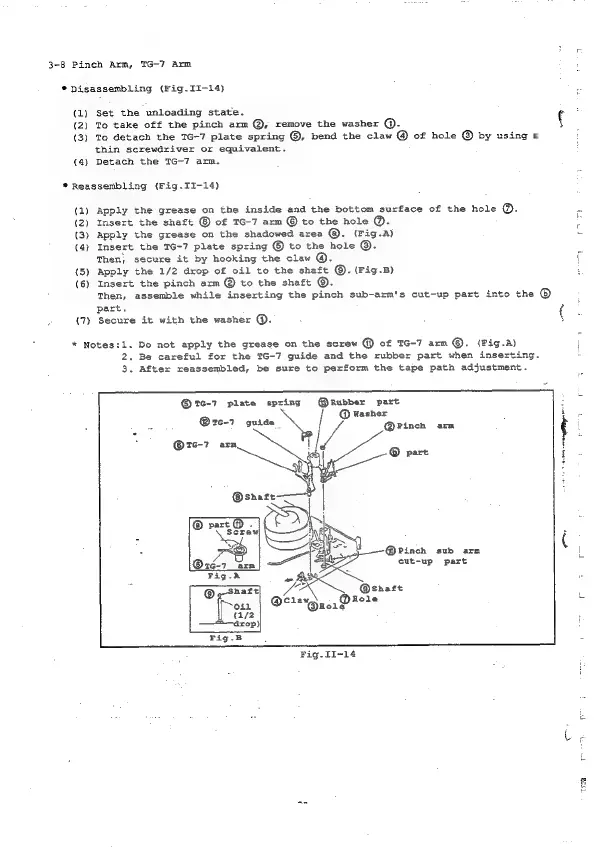
Pinch
Arm,
TG-7
Arm
*
Disassembling
(Fig.II-14)}
(1)
Set
the
unloading
state.
(2)
To
take
off
the
pinch
arm
@,
remove
the
washer
@.
(3)
To
detach
the
TG-7
plate
spring
®,
bend
the
claw
@
of
hole
©
by
using
a
thin
screwdriver
or
equivalent.
(4)
Detach
the
TG-7
arm.
my
*
Reassembling
(Fig.II-14)
(1)
Apply
the
grease
on
the
inside
and
the
bottom
surface
of
the
hole
®.
a
(2)
Insert
the
shaft
of
TG-7
arm
©
to
the
hole
@.
i
(3)
Apply
the
grease
on
the
shadowed
area
@.
(Fig.A)
2
(4)
Insert
the
TG-7
plate
spring
®
to
the
hole
©.
Then;
secure
it
by
hooking
the
claw
@.
f
(5)
Apply
the
1/2
drop
of
oil
to
the
shaft
©.
(Fig.B)
(6)
Insert
the
pinch
arm
@
to
the
shaft
©.
Then,
assemble
while
inserting
the
pinch
sub-arm's
cut-up
part
into
the
®
part.
e
(7)
Secure
it
with
the
washer
@.
{
*
Notes:1.
Do
not
apply
the
grease
on
the
screw
@
of
IG-7
arm
@.
(Fig.A)
\
2.
Be
careful
for
the
TG-7
guide
and
the
rubber
part
when
inserting.
3.
After
reassembled,
be
sure
to
perform
the
tape
path
adjustment.
®
6-7
plate
spring
@Rubber
part
@
Washer
@1c-7
guide
@Pinch
arm
TG-7
arm.
®
©
part
@Pinch
sub
arm
eut-up
part
Fig.
II-14

Table of Contents

Related product manuals