EasyManua.ls Logo

Canon Canovision8 E50E - Page 149

Canon Canovision8 E50E
179 pages
Print Icon
To Next Page IconTo Next Page
To Previous Page IconTo Previous Page
Loading...
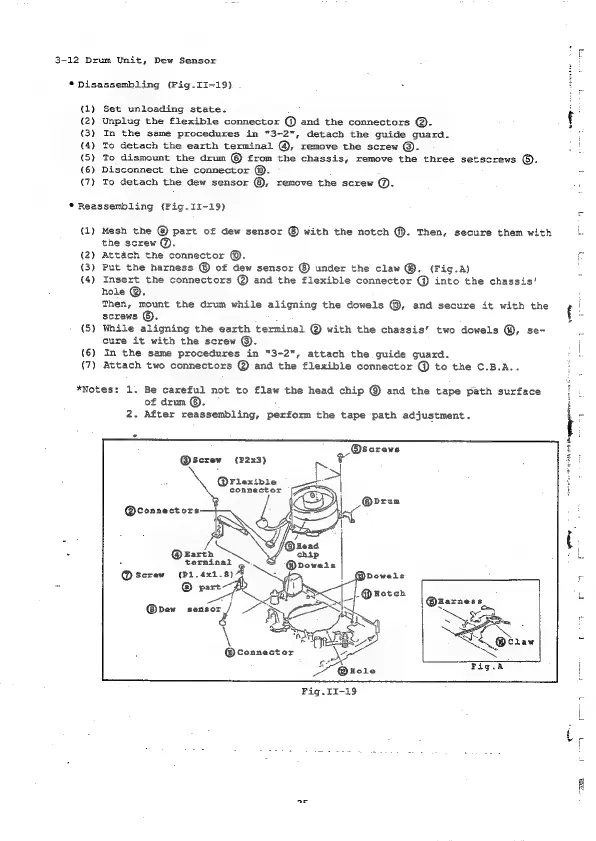
3-12
Drum
Unit,
Dew
Sensor
*
Disassembling
(Fig.II-19).
ql)
(2)
(3)
(4)
(S)
(6)
(7)
Set
unloading
state.
Unplug
the
flexible
connector
@
and
the
connectors
@.
In
the
same
procedures
in
"3-2",
detach
the
guide
guard.
To
detach
the
earth
terminal
@,
remove
the
screw
@.
To
dismount
the
drum
©
from
the
chassis,
remove
the
three
setscrews
©).
Disconnect
the
connector
@.
To
detach
the
dew
sensor
©,
remove
the
screw
@.
*
Reassembling
(Fig.II-19)
(1)
(2)
(3)
(4)
(5)
(6)
(7)
Mesh
the
part
of
dew
sensor
with
the
notch
@).
Then,
secure
them
with
the
screw
&.
Attach
the
connector
©.
Put
the
harness
@
of
dew
sensor
under
the
claw
@.
(Fig.A)
Insert
the
connectors
@
and
the
flexible
connector
@
into
the
chassis‘
hole
@.
Then,
mount
the
drum
while
aligning
the
dowels
®,
and
secure
it
with
the
screws
©.
While
aligning
the
earth
terminal
@
with
the
chassis’
two
dowels
@,
se-
cure
it
with
the
screw
©.
In
the
same
procedures
in
"3-2",
attach
the
guide
guard.
Attach
two
connectors
@
and the
flexible
connector
@
to
the
C.B.A..
*Notes:
1.
Be
careful
not
to
flaw
the
head
chip
and
the
tape
path
surface
of
drum
©.
2.
After
reassembling,
perform
the
tape
path
adjustment.
@screw
(P2x3)
@Flexible
connector
@connectors
Barth
®
terminal
@
screw
(P1.4x1.8)
@
part
a,
@dew
suite
\
3
|
®Harness
sy
eentty
-

Table of Contents

Related product manuals