EasyManua.ls Logo

Canon Canovision8 E50E - Page 150

Canon Canovision8 E50E
179 pages
Print Icon
To Next Page IconTo Next Page
To Previous Page IconTo Previous Page
Loading...
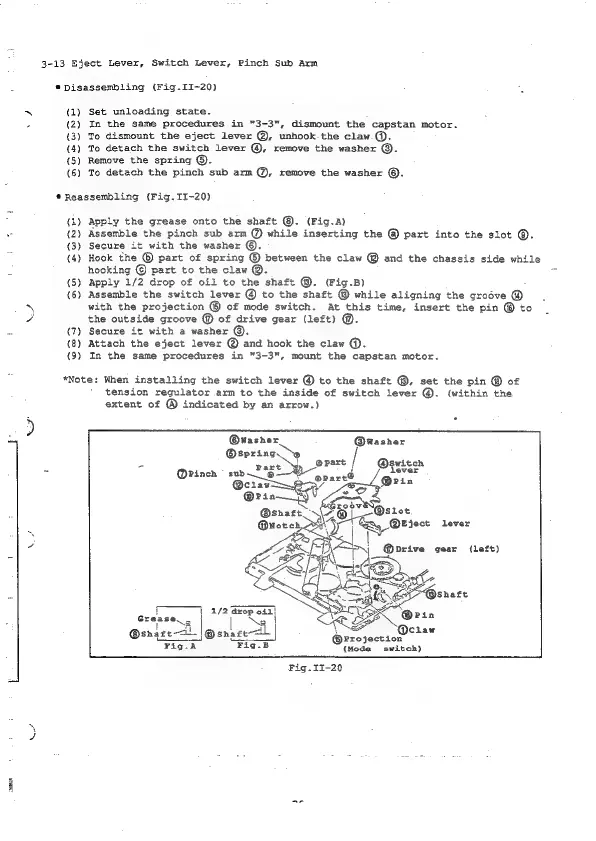
3-13
Eject
Lever,
Switch
Lever,
Pinch
Sub
Arm
®
Disassembling
(Pig.II-20)
(1)
Set
unloading
state.
(2)
In
the
same
procedures
in
"3-3",
dismount
the
capstan
motor.
(3)
To
dismount
the
eject
lever
@,
unhook-the
claw
@.
(4)
To
detach
the
switch
lever
@,
remove
the
washer
©.
{5)
Remove
the
spring
©.
(6)
To
detach
the
pinch
sub
arm
@,
remove
the
washer
©.
*Reassembling
(Fig.II-20)
(1)
Apply
the
grease
onto
the
shaft
©.
(Fig.A)
(2)
Assemble
the
pinch
sub
arm
@
while
inserting
the
@
part
into
the
slot
©.
(3)
Secure
it
with
the
washer
©.
(4)
Hook
the
©
part
of
spring
@
between
the
claw
@
and
the
chassis
side
while
hooking
©
part
to
the
claw
@.
(5)
Apply
1/2
drop
of
oil
to
the
shaft
@.
(Fig.B)
(6)
Assemble
the
switch
lever
@
to
the
shaft
@
while
aligning
the
grodve
@
with
the
projection
®
of
mode
switch.
At
this
time,
insert
the
pin
@
to
the
outside
groove
@
of
drive
gear
(left)
®.
(7)
Secure
it
with
a
washer
@.
(8)
Attach
the
eject
lever
@
and
hook
the
claw
@.
(9)
In
the
same
procedures
in
"3-3",
mount
the
capstan
motor.
*Note:
When
installing
the
switch
lever
@
to
the
shaft
@,
set
the
pin
@
of
tension
regulator
arm
to
the
inside
of
switch
lever
@.
(within
the
extent
of
@
indicated
by
an
arrow.)
@wWasher
a
@spring.
9
®
*
ery
|
Switch
=
@Pinch
|
sub
Eee
lever
Aa
Eject
lever
@brive
gear
(left)
|
4
A/2
os
oil}
Grease
ae
@saler—ol.
mee
Qciaw
—_
@rrojection
Fig.A
Fig.B
{Mode
switch)
Fig.I1-20
pte
ed

Table of Contents

Related product manuals