EasyManua.ls Logo

Canon Canovision8 E50E - EVF and System Information

Canon Canovision8 E50E
179 pages
Print Icon
To Next Page IconTo Next Page
To Previous Page IconTo Previous Page
Loading...
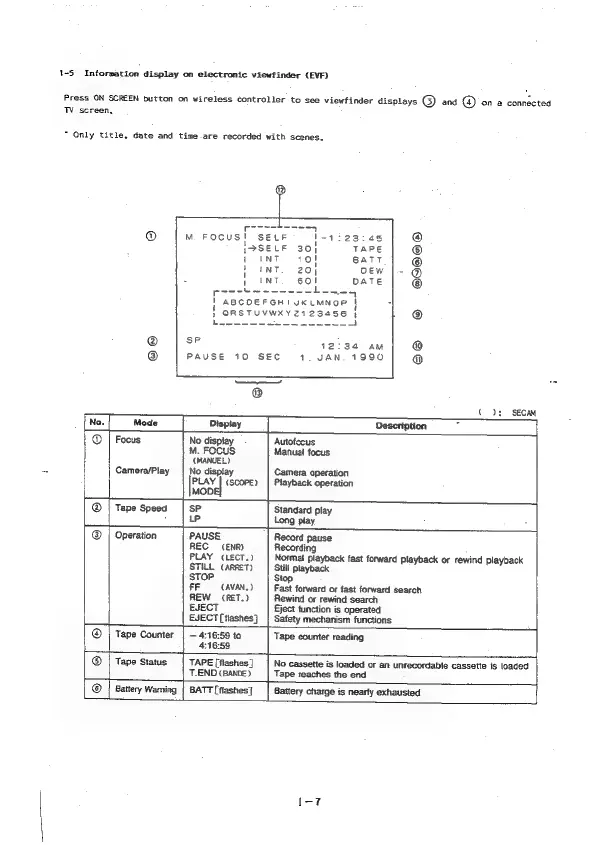
1-5
Information
display
on
electronic
viewfinder
(EVF)
Press
ON
SCREEN
button
on
wireless
controller
to
see
viewfinder
displays
G)
and
(@)
on
a
connected
TW
screen,
Only
title,
date
and
time
are
recorded
with
scenes.
poaa-t----5
M.
FOCUS!
SELF
'-1i23:4s
@
{PSELF
30]
TAPE
©
1
INT
BATT
®
i
iNT
oEw
|-
@
_
1
ENT
DATE
Secucs-
=
|
ABCOEFGHIUKLMNOP
i
}
ORSTUVWXYZ2123456
|
t
been
Sree
eee!
=
SF
12:34
AM
PAUSE
10
SEC
1.
JAN.
1990
ee
eo
©
Co):
SECAM
Description
@
|
Focus
No
display
Autofocus
M.
FOCUS
Manual
focus
(MANUEL)
Camera/Play
No
dispiay
Camera
operation
pe
(SCOPE)
|
Playback
operation
MOD!
Tape
Speed
SP
Standard
play
LP
Long
play
eee
®
|
Operation
PAUSE
Record
pause
REC
(ENR)
Recording
PLAY
(LECT.)
Normal
playback
fast
forward
playback
or
rewind
Playback
STILL
(ARRET)
Still
playback
STOP
Stop
FF
(AVAN,
>
Fast
forward
or
fast
forward
search
REW
(RET.)
Rewind
or
rewind
search
EJECT
Eject
function
is
operated
EJECT[flashes}]
|
Safety
mechanism
functions
+
@
|
Tape
Counter
|
4:16:59
to
Tape
counter
reading
4:16:53
®
|
Tape
Status
TAPE
[flashes
]
No
cassette
is
loaded
or
an
unrecordable
cassette
is
loaded
T.END
(BANDE)
Tape
reaches
the
end
®
|
Battery
Waming
|
BATT
[flashes]
Battery
charge
is
nearly
exhausted

Table of Contents

Related product manuals