DC10 E, DC20 E
DISASSEMBLING
53
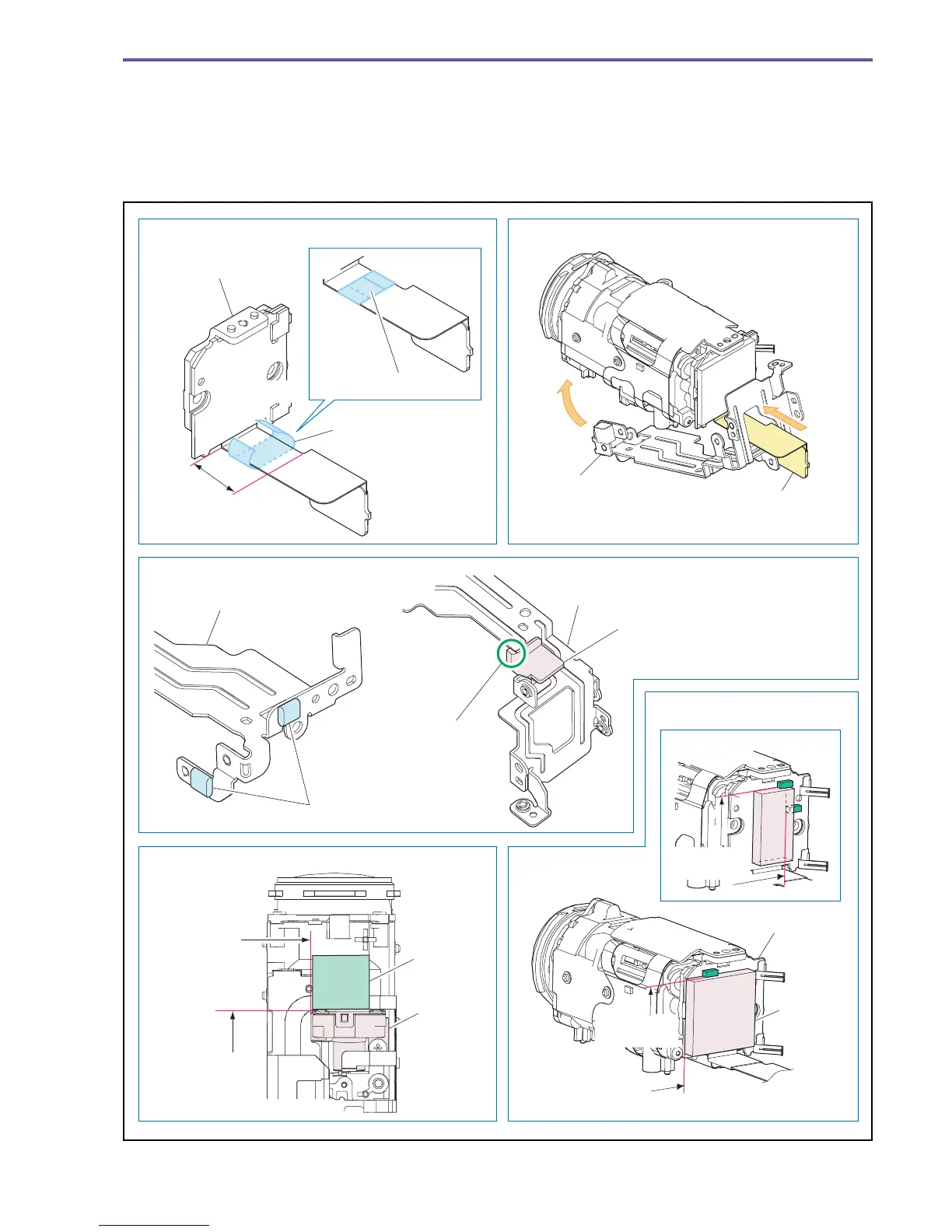
<Note on Reassembling>
(1) Attach the CCD Shield Sheet as shown in the figure below.
(2) Attach the Right Side Gasket and the ST Wire Protector (DC20 E only) to the position indicated in the figure below.
(3) Attach the Lens Holder as shown in the figure below.
(4) Attach the Lens Sponge as shown in the figure below.
(5) Attach the CCD PCB Absorber as shown in the figure below.
Fig. 50
Note on Reassembling (1) Note on Reassembling (3)
Note on Reassembling (2)
Note on Reassembling (4)
Note on Reassembling (5)
Fold and attach
CCD Ass'y
CCD FPC
Lens Holder
CCD Shield Sheet
Pass the CCD FPC through the openings of
Lens Holder and attach it.
Range of
attachment
reference
Bring attachment
to bear on the
edge of the IG Meter Ass'y.
Attachment
reference
Attachment
reference
Make attachment meet the outline of the PCB.
Attachment
reference
Adjust to the flange part
of ST Wire Protector
DC20 E only
DC10 E only
Lens Holder
Right Side Gasket
Lens Holder
ST Wire
Protector
IG Meter
Ass'y
Lens
Sponge
CCD PCB
CCD PCB
Absorber
Attachment
reference
Attachment
reference



 To Next Page