DC10 E, DC20 E
DISASSEMBLING
22
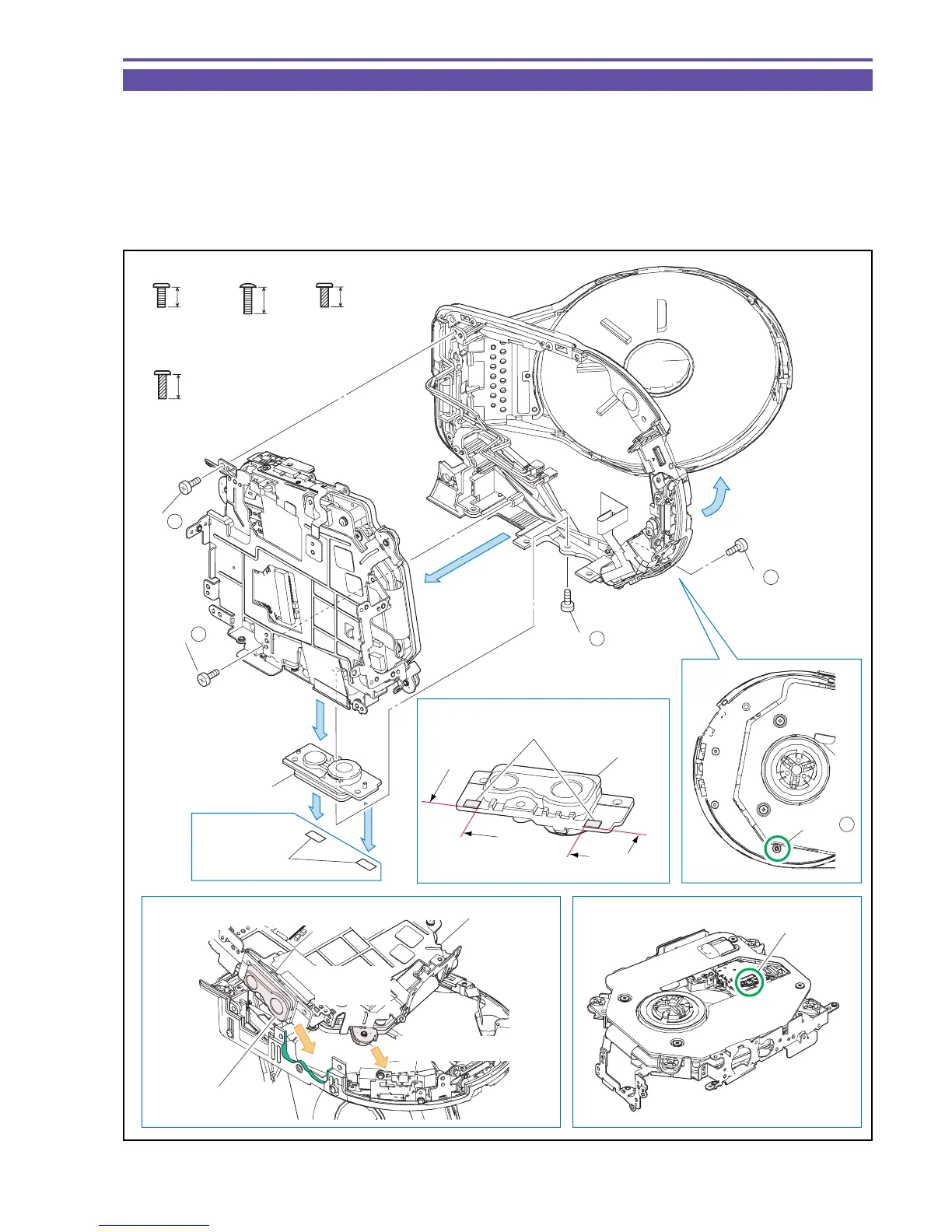
1-13 Separation of TS Mech Section
(1) Open the Disc Cover.
(2) Remove four screws (b × 1, c × 1, f × 1, g × 1), and detach the TS Mech Section, the Tripod Base, and the Gap Sheet.
Note : After detaching the TS Mech Section, place it with its Lens part upward. Never touch the Lens part.
<Note on Reassembling>
(1) Attach the TS Mech Section as shown in the figure below.
(2) Attach the Gap Sheet to the position indicated in the figure below. (DC10 E only)
Fig. 19
b
4.5mm
Metal
M1.7
f
g
4.5mm
5.5mm
Metal
M1.7
(self tap)
Metal
M1.7
(self tap)
c
6mm
Metal
M1.7
Note on Reassembling (1)
Note
Note on Reassembling (2)
DC10 E
only
Attach the
Tripod Base.
Lens part
TS Mech Section
Insert it in advance.
Adjust to
the notch.
(1)
(2) - c
(2) - b
(2) - b
(2)
(2) - g
(2) - f
Tripod Base
Tripod Base
Gap Sheet
(2)
(2)
(2)
Gap Sheet
Attachment
reference
Attachment
reference
Attachment
reference
DC10 E only



 To Next Page