DC10 E, DC20 E
SERVICE HINTS
8
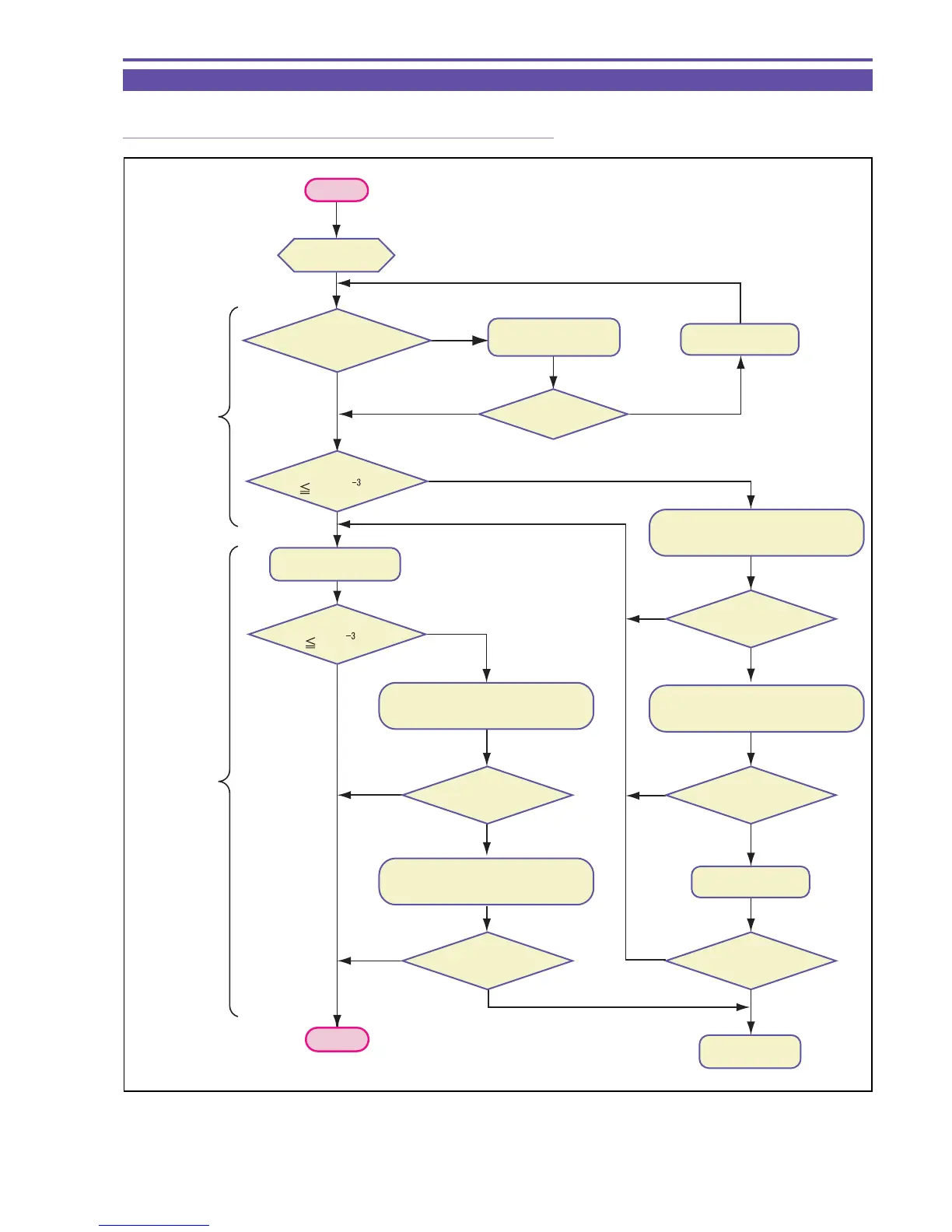
2-3 Malfunction of Playback Picture
2-3-1 Flow Chart for Checking Malfunction of Playback Picture
Fig. 5
START
NO
NO
NO
NO
NO
NO
NO
NOYES
YES
YES
YES
YES
YES
NO
YES
YES
YES
Preparation
for check
Replace the
TS Mech.
Wipe the recording
surface with cloth.
Playback after
self-recording
Replace the disc.
Perform the cleaning of pickup lens (1)
using air blower.
Perform the cleaning of pickup lens (1)
using air blower.
Is reference disc
visual check OK?
Is visual
check OK?
Playback
system check
Recording/
playback
system check
END
Error rate
3.3×10 ?
Error rate
8×10 ?
Perform the cleaning of pickup lens (2)
using alcohol and lens-cleaning paper.
Perform the cleaning of pickup lens (2)
using alcohol and lens-cleaning paper.
Error rate
OK?
Error rate
OK?
Error rate
OK?
Error rate
OK?
Error rate
OK?
Replace the disc.



 To Next Page