DC10 E, DC20 E
DISASSEMBLING
28
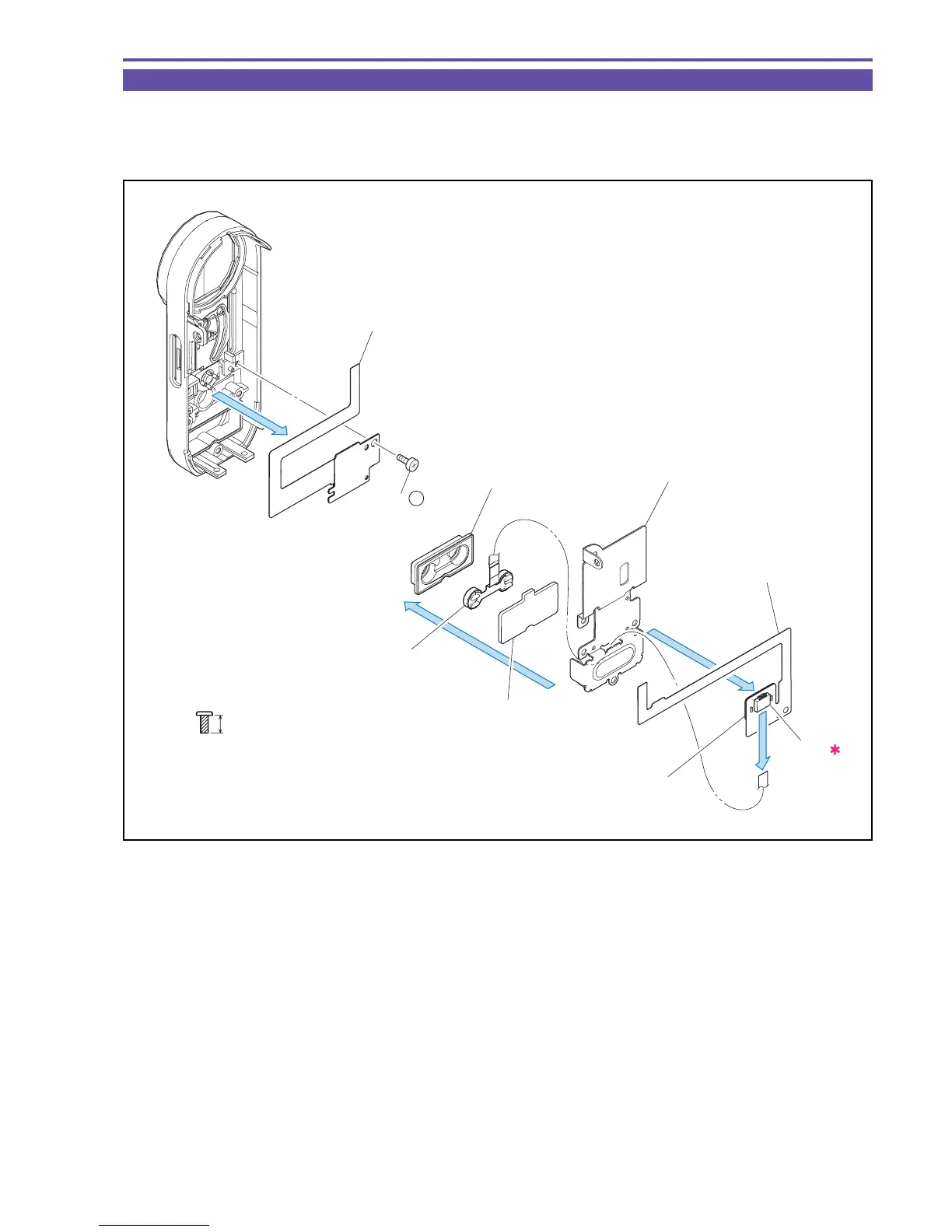
1-16 Disassembly of Front Cover Unit - 2
(1) Remove the CN899, and detach the Microphone Case, the Mic Ass'y, and the Microphone Case Cover from the Back Barrier Plate.
(2) Remove double-sided tape and detach the MICROPHONE RELAY FPC.
(3) Remove one screw (i × 1), and detach the FRONT FPC.
Fig. 25
i
4mm
Metal
M1.7
(self tap)
FRONT FPC
Microphone
Case Cover
Microphone Case
MICROPHONE
RELAY FPC
(1)
(1)
(2)
(3)
Mic Ass'y
Back Barrier Plate
CN899
(3) - i
Double Sided Tape
(Back side)



 To Next Page